
How to Connect Claude to Peppol E-Invoicing
How to connect Claude to Peppol e-invoicing: add GoRoute as a custom connector, sign in, allow, then send, check and track e-invoices in Claude or Claude Code.

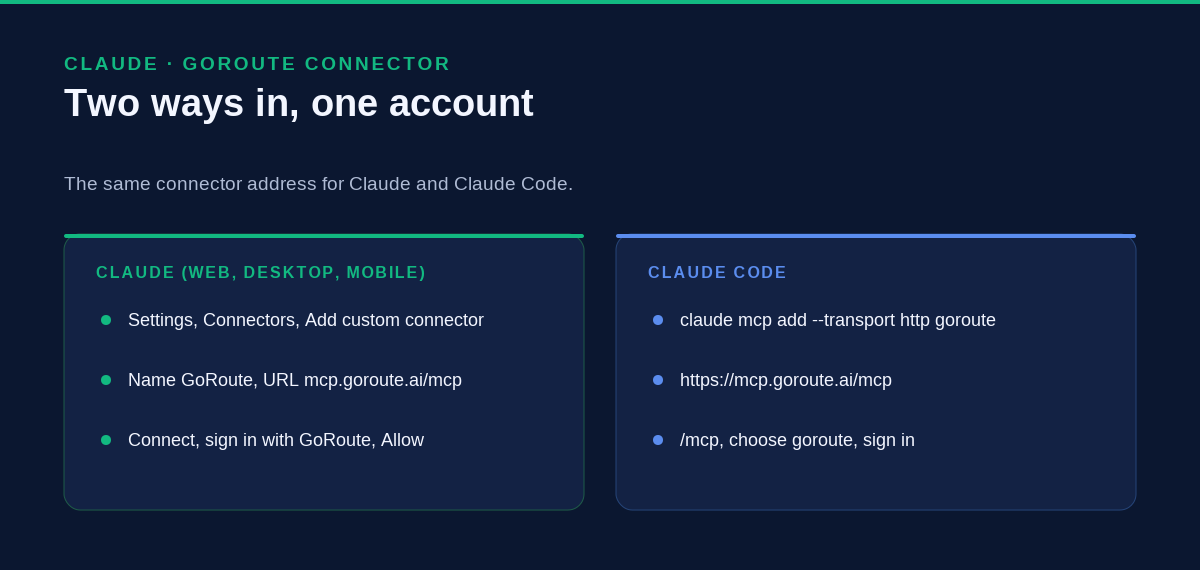
To connect Claude to Peppol e-invoicing, add GoRoute as a custom connector: in Claude open Settings, Connectors, Add custom connector, paste https://mcp.goroute.ai/mcp, press Connect, sign in with your GoRoute login and press Allow. Claude can then check companies on Peppol, send and credit e-invoices, and show what was sent and received, inside your own GoRoute account.
This guide is for teams that use Claude, Claude Code or another app that supports remote MCP servers. GoRoute's connector is a remote server on the Model Context Protocol, the open standard Claude uses for connectors. Anthropic's own steps for custom connectors are in its help centre.
How do you add GoRoute in Claude?
- In Claude on the web, desktop or mobile, open Settings, then Connectors, and choose Add custom connector.
- Name it GoRoute and paste
https://mcp.goroute.ai/mcpas the URL. - Press Connect. GoRoute's sign-in page opens: sign in with your normal GoRoute login.
- On the consent screen, check the account and organisation shown, then press Allow.
On a Team or Enterprise plan, an owner may need to add the connector for the organisation first. If you have no GoRoute account yet, the sign-in page links to creating one.
How do you add GoRoute in Claude Code?
Run this once in a terminal:
claude mcp add --transport http goroute https://mcp.goroute.ai/mcp
Then run /mcp inside Claude Code and choose goroute to sign in. The browser sign-in and consent are the same as in Claude.
What can Claude do once connected?
Whatever your GoRoute role allows, in your own organisation. For example:
- "Is 0192:974761076 on the Peppol network?" A live lookup, with the documents the company accepts.
- "Send an invoice to Acme BV for 3 hours of consulting at €95, 21% VAT." Built, checked and sent after you agree.
- "Which invoices failed this month, and why?" Status and reasons, with a resend.
- "Show me what our suppliers sent this week." Received invoices, with PDF and XML.
- With Odoo or Xero connected: "Create this invoice in Xero" or "What is unpaid?"
- For importers: "File an ISF from these shipping documents."
The full list of tools, with what each one does, is in the developer documentation.
What stays out of reach?
Anything that would outlive the connection or move money. The connector cannot create API keys or sign-in sessions, take payments or checkouts, or reach platform administration. Ask for one and it tells you to use the GoRoute dashboard instead. It never reaches another organisation's data: you sign in as yourself and your role is the limit.
How should you set the permissions?
Keep the sending tools on "ask". GoRoute marks every tool that sends, files or changes data as such, so Claude can ask you before it runs. Claude also lets you allow a tool always; for tools that send invoices, keep the prompt. The Model Context Protocol itself says there should always be a human in the loop with the ability to deny a tool call. Read more in MCP for e-invoicing: letting AI agents send invoices safely.
What to do next
- Connect Claude with the steps above, or read the overview on the GoRoute for Claude page.
- Check your first buyer: how to check whether a company is on Peppol.
- Use ChatGPT too? Read how to send a Peppol e-invoice from ChatGPT.
- Compare assistants on the AI agents page, or book a demo.
Related reading
- GoRoute brings production e-invoicing into AI workflows
- MCP for e-invoicing: letting AI agents send invoices safely
- How to send a Peppol e-invoice from ChatGPT
Sources, read on 26 November 2026: Anthropic, getting started with custom connectors using remote MCP; Model Context Protocol specification 2025-11-25, Tools; GoRoute, Claude and other AI apps (MCP).
Frequently asked questions
- Can Claude send Peppol e-invoices?
- Yes, with the GoRoute connector. Claude prepares the invoice from your words and GoRoute validates it and sends it over the Peppol network, as you.
- What address do I use?
- https://mcp.goroute.ai/mcp. Paste it into Claude's custom connector settings, or add it to Claude Code with claude mcp add.
- Do I need a Team or Enterprise plan?
- Custom connectors are a Claude feature; check Anthropic's help centre for the plans that include them. On a Team or Enterprise plan, an owner may need to add the connector for the organisation first.
- What can the connector not do?
- It cannot create API keys, take payments or reach another organisation's data. Those stay in the GoRoute dashboard.
- Does Claude ask before sending?
- GoRoute marks every tool that sends or changes data as such, so Claude can ask you before it runs. Keep those tools on ask rather than always allow.
About Dr. Syed Raza
Dr. Syed Raza is an IT Enterprise Architect at ClayDesk LLC and leads the GoRoute platform. He works across Peppol Access Point and SMP infrastructure, PINT jurisdictions (Oman, AU/NZ, EU, JP, MY, SG), and national CTC regimes, translating regulatory detail into production-grade e-invoicing systems.
Building on Peppol?
GoRoute is a certified Peppol Access Point & SMP. Book a demo or read the docs to get started.