
How to Send a Peppol E-Invoice From ChatGPT
How to send a Peppol e-invoice from ChatGPT: add the GoRoute plugin, sign in, describe the invoice, check it and approve it. Five steps, and what each does.

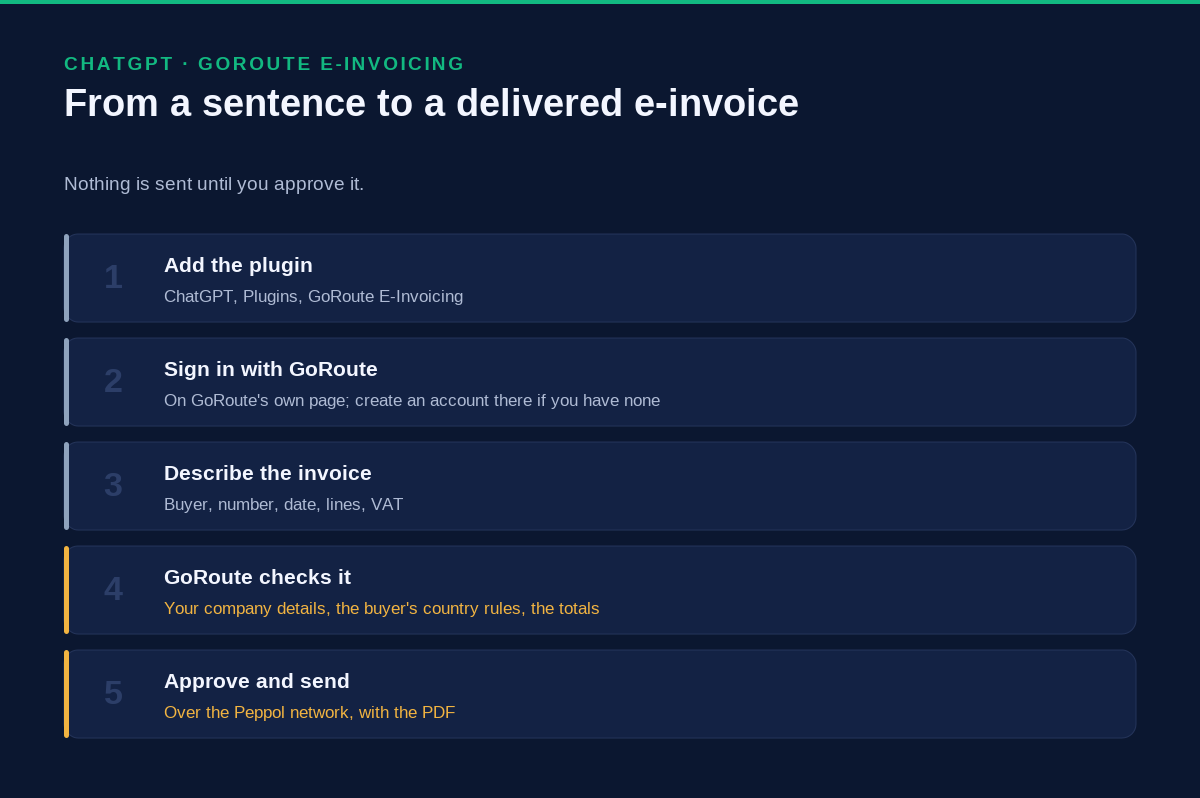
To send a Peppol e-invoice from ChatGPT, add the GoRoute E-Invoicing plugin, sign in with your GoRoute account, describe the invoice in your own words, and approve it when ChatGPT asks. GoRoute fills in your company details, checks the invoice against the buyer's country rules, sends it over the Peppol network and gives you the PDF.
This guide is for finance teams and business owners who already use ChatGPT. It shows each step and what happens behind it. Why this matters now: since 1 January 2026, Belgian businesses must exchange structured e-invoices with each other, as the Federal Public Service Finance explains, and Peppol is the network those invoices travel on.
How do you add GoRoute to ChatGPT?
Open Plugins in ChatGPT and add GoRoute E-Invoicing. The plugin is in ChatGPT's plugin directory, published by ClayDesk LLC. The first time you use it, GoRoute's own sign-in page opens. Sign in with your normal GoRoute login, check the organisation shown, and press Allow. If you do not have an account yet, the same page has a link to create one.
The plugin then acts as you, within your organisation and your role. You can disconnect it at any time under Settings, Connected AI apps, in GoRoute.
How do you describe the invoice?
In plain words, with the details an invoice needs. For example:
Send an invoice to our customer Acme BV for 3 hours of consulting at €95, 21% VAT, buyer reference PO-1001.
An invoice needs the buyer, an invoice number, an issue date, the currency, and for each line a description, quantity, unit price and VAT rate. If something is missing, ChatGPT asks rather than inventing it. If the buyer is saved in GoRoute, the plugin finds it by name.
What does GoRoute check before sending?
Your company details, the buyer's country rules and the totals. GoRoute fills in your company as the seller, validates the invoice against the rules for the buyer's country and recalculates the totals. You see a summary: for the example above, €285.00 net, €59.85 VAT and €344.85 in total. If the check finds a problem, ChatGPT tells you what to fix and nothing is sent.
How does the approval work?
ChatGPT shows an approval prompt before every send. GoRoute marks each tool that sends or changes data as such, and ChatGPT asks you before it runs. Choose Allow to send, or Deny to stop. The Model Context Protocol, which plugins use, says there should always be a human in the loop for tool calls; this is that step.
What happens after you approve?
The invoice travels over Peppol to the buyer's own system, and you get its status and PDF. Ask ChatGPT for the status at any time. "Queued" means it is on its way; only "delivered" means the buyer's access point received it. You can also ask for the XML, email the PDF to the buyer, or resend a failed delivery.
What else can you ask?
- "Is this company on the Peppol network?" See how to check whether a company is on Peppol from your AI assistant.
- "What did we send this week, and did anything fail?"
- "Show me the invoices our suppliers sent this month."
- "Credit invoice INV-1042 in full."
- With Odoo or Xero connected: "Create this invoice in Odoo" or "What is unpaid?"
What to do next
- Watch it first: the full tutorial, recorded in ChatGPT, runs four minutes.
- Add the plugin from the ChatGPT plugin directory, or read the overview on the GoRoute for ChatGPT page.
- Check your first buyer before you invoice: how to check a company on Peppol.
- Prefer Claude? Read how to connect Claude to Peppol e-invoicing.
- See the bigger picture in GoRoute brings production e-invoicing into AI workflows, or book a demo.
Related reading
- GoRoute brings production e-invoicing into AI workflows
- How to connect Claude to Peppol e-invoicing
- What is a Peppol access point?
Sources, read on 26 November 2026: Federal Public Service Finance, e-invoicing in Belgium; Model Context Protocol specification 2025-11-25, Tools; OpenAI, plugins for ChatGPT. The example totals are GoRoute's own answer for the example invoice.
Frequently asked questions
- Can ChatGPT send a Peppol e-invoice?
- Yes, with the GoRoute E-Invoicing plugin. ChatGPT prepares the invoice from your words; GoRoute checks it and sends it over the Peppol network after you approve.
- Does ChatGPT send anything without asking?
- No. Sending is marked as an action that changes data, so ChatGPT shows an approval prompt before every send.
- Do I need a GoRoute account?
- Yes. The plugin works with your own GoRoute account. If you do not have one, you can create it from the sign-in page the plugin opens.
- What if the buyer is not on Peppol?
- Ask the plugin to check first. If the buyer cannot receive Peppol invoices, GoRoute tells you; for some countries it can deliver another way, such as a tax-authority channel or email.
- Who decides the VAT rate?
- You do. Give the rate or the treatment, or let ChatGPT ask you. GoRoute checks it against the rules and recalculates the totals.
About Dr. Syed Raza
Dr. Syed Raza is an IT Enterprise Architect at ClayDesk LLC and leads the GoRoute platform. He works across Peppol Access Point and SMP infrastructure, PINT jurisdictions (Oman, AU/NZ, EU, JP, MY, SG), and national CTC regimes, translating regulatory detail into production-grade e-invoicing systems.
Building on Peppol?
GoRoute is a certified Peppol Access Point & SMP. Book a demo or read the docs to get started.