
What Is in an Oman E-Invoice QR Code?
The Oman e-invoice QR code holds ten fields on a consumer invoice and nine on a profit-margin one. The tags, the seller UUID, and how it differs from Saudi's.

The QR code on an Oman consumer invoice holds ten fields: QR version, invoice type, invoice number, seller name, seller VAT number, date, time, invoice total including VAT, VAT total and a seller UUID. A profit-margin invoice carries nine, with the total amount due in place of the two amounts. The fields are encoded as tag, length and value, then as Base64, and the result may not exceed 700 characters.
This page is for the developer building the code. It follows the Oman Solution Reference Architecture, version 1.0.3 (final, 27 July 2026), section 4.2 and Appendix D. For what a consumer sale produces around the code, read selling to consumers in Oman.
Which invoices carry the QR code?
Section 4.2 puts the code on the readable invoice that a consumer receives, printed or emailed. Its field table is for "a B2C invoice (full or simplified)", and a second table covers the profit-margin invoice. Section 4 describes no QR code for a business invoice sent over Peppol.
In the invoice file itself, the data dictionary (version 1.0.1) lists the QR code as term BT-OM-14, held in an additional document reference whose ID is QR, and rule BR-OM-162 requires one on a simplified tax invoice. The question of whether a simplified invoice needs a code has a short answer in the simplified tax invoice article. This page holds the detail.
What are the ten fields on a consumer invoice?
| Tag | Field | Source term | Value |
|---|---|---|---|
| 1 | QR version | none | 1.1, fixed, 3 characters |
| 2 | Invoice type | none | 01, fixed |
| 3 | Invoice number | IBT-001 | the unique sequential number of the invoice |
| 4 | Seller name | IBT-027 | name of the seller |
| 5 | Seller VAT number | IBT-031 | 12 characters, for example OM1234567891 |
| 6 | Date | IBT-002 | YYYY-MM-DD |
| 7 | Time stamp | IBT-168 | hh:mm:ss |
| 8 | Invoice total with VAT | IBT-112 | the invoice total including VAT |
| 9 | VAT total | IBT-110 | the VAT total of the invoice |
| 10 | Seller UUID | BTOM-004 | 36 characters, built as described below |
The same list in words: version, type, number, name, VAT number, date, time, total, VAT total, seller UUID, in tags 1 to 10. The version is fixed at 1.1, and the architecture adds that the Tax Authority can change it, in which case a new version may suggest a new structure. Read the version from your configuration, not from a constant.
What are the nine fields on a profit-margin invoice?
Tags 1 to 7 are the same as above, except that tag 2 is 02. Tag 8 is the total amount due (BTOM-020), the total amount of the profit-margin invoice including VAT. Tag 9 is the seller UUID. There is no VAT total, so the seller UUID moves from tag 10 to tag 9. A reader that looks for the seller UUID at a fixed tag position will read the wrong value on one of the two invoice types, so choose the position by the invoice type in tag 2. The profit-margin invoice article explains where that amount comes from.
What is the seller UUID, and how is it built?
The seller UUID is a version 5 UUID, which means it is calculated from content rather than drawn at random. The same inputs always give the same UUID. Appendix D.1 gives the method:
- Fix the QR version and the invoice type.
- Join the values into one string with
|between them, in the field order of the table. For a consumer invoice:1.1|01|INVOICENUMBER|SELLERNAME|VATTIN|DATE|TIMESTAMP|INVOICETOTALAMOUNT|VATTOTAL. For a profit-margin invoice, end withTOTALAMOUNTDUEand leave out the VAT total. - Make every letter upper case. The architecture says this matters, because UUID version 5 is case sensitive.
- Calculate the version 5 UUID from that string, in the fixed namespace
e0bc4ac8-b025-46e5-a76d-0c893fc3027e.
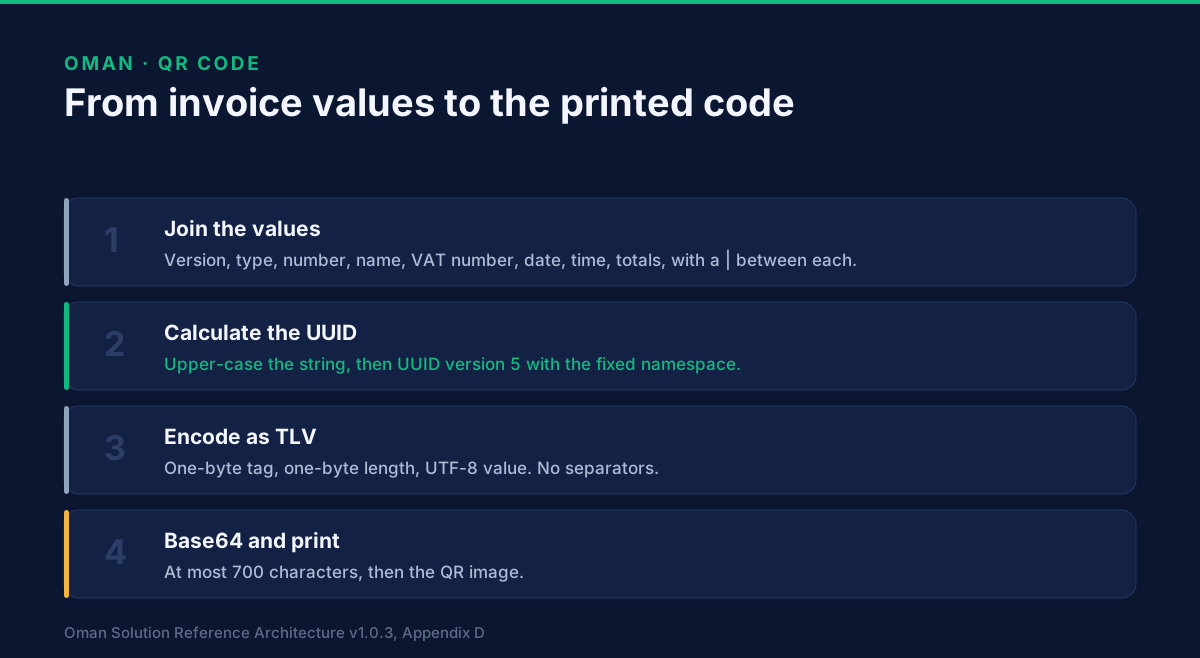
Here is the specification's own consumer example, run through those steps:
import uuid

NAMESPACE = uuid.UUID("e0bc4ac8-b025-46e5-a76d-0c893fc3027e")

fields = ["1.1", "01", "INVOICE-01", "بائع", "OM1234567891",
          "2026-05-13", "18:31:00", "302.340", "14.520"]
seed = "|".join(fields).upper()
print(uuid.uuid5(NAMESPACE, seed))
# 454cb7ea-f1f7-5b69-9e0b-756f002efa52
That is the value the specification prints for its example. We ran it on 19 November 2026. The profit-margin example, 1.1|02|INVOICE-01|بائع|OM1234567892|2026-05-13|18:30:00|1032.210, gives 9724a780-2360-502a-b6a2-201bf0f068c6, which also matches the specification.
Do not confuse this with the invoice UUID. Section 10.2.3 defines a second version 5 UUID for the invoice itself, with the same namespace but a different seed: the seller's scheme and identifier, invoice type code, number, date, total tax amount and total including tax, joined by single spaces, plus the total amount due on profit-margin invoices. The two are different values with different jobs.
How is the code encoded?
Appendix D.2 uses tag-length-value, known as TLV. For each field, write one byte for the tag, one byte for the length, and then the value as UTF-8. Concatenate all fields with no padding or separators, then encode the whole byte string as Base64.
Two details catch people. The length is the number of bytes, not characters. Arabic letters take two bytes each in UTF-8, so the four-letter seller name in the example is 8 bytes long. And because the length is one byte, no single value can exceed 255 bytes.
The example above encodes to 122 bytes, which is 164 Base64 characters, well inside the 700 limit:
AQMxLjECAjAxAwpJTlZPSUNFLTAxBAjYqNin2KbYuQUMT00xMjM0NTY3ODkxBgoyMDI2LTA1LTEzBwgxODozMTowMAgHMzAyLjM0MAkGMTQuNTIwCiQ0NTRjYjdlYS1mMWY3LTViNjktOWUwYi03NTZmMDAyZWZhNTI=
The value lengths in tag order are 3, 2, 10, 8, 12, 10, 8, 7, 6 and 36 bytes.
Where does the specification contradict itself?
Appendix D has worked examples, and four of them disagree with its own tables. I found these on a close read:
- The Python snippet in D.1 sets the invoice type to
"0". The field table, the JavaScript snippet and the hex all use01. - The profit-margin example encodes the QR version as
1.0(hex312e30), where the table says1.1. - The B2C example's length column gives the Arabic seller name as 7 bytes. The encoded value, shown in hex beside it, is 8.
- A later table labels the seller name as tag 3. The tag table says 4.
When an example and a table disagree, follow the tables. The UUID calculation above reproduces the tables' printed values, which is a better check than any of the snippets.
How does Oman's QR code differ from Saudi Arabia's?
Both use tag-length-value and Base64. Beyond that they differ. Oman defines its own tags, in its own order, with the invoice number, date and time as separate fields, and a seller UUID that Saudi Arabia's code has no place for. The Oman tables list no hash, no signature and no key. Saudi Phase 2 adds those. Oman's code also belongs on the readable consumer invoice, not on business invoices.
A generator written for Saudi Arabia therefore cannot be reused without change. The Saudi side, with its own tags and clearance step, is in the ZATCA QR code article.
What does GoRoute build?
GoRoute's platform builds this QR code and the seller UUID for consumer and profit-margin invoices, to the tables above and at version 1.1. It chooses the ten-field or nine-field layout from the invoice type. It does not print or lay out the receipt: printer formats are outside this page.
How do I check my own QR code?
Decode the Base64 string and walk the bytes: read a tag, read a length, read that many bytes, and repeat. Then check four things.
- There are ten tags on a consumer invoice, or nine on a profit-margin invoice, in order.
- Tag 1 reads
1.1and tag 2 reads01or02. - The seller UUID matches what you calculate from the other fields.
- The Base64 string is 700 characters or fewer.
Then check the invoice itself before you send it. How to test an Oman e-invoice before you send it covers that, and why Oman e-invoices get rejected lists what comes back when something is wrong.
What this page does not settle
The QR version can change. The specification's worked examples are not all reliable, as listed above. Printer formats and the physical size of the code are not covered. This page does not describe signing or hashing, because the field tables hold neither.
What to do with this
If you are building a till or an ERP integration, you can build the code from this page and the tables in Appendix D. If you would rather not maintain it, an accredited service provider does it for you. GoRoute takes the sale as plain JSON, builds the QR code and seller UUID, and reports the tax data. The e-invoice sending page describes the product, the Oman page gathers our Oman articles, the tutorials show it working, and the documentation has the API reference.
To talk through your own system, book a demo.
Read next: profit-margin invoices in Oman. Also in this set: when a company buys at the till.
GoRoute is accredited by the Oman Tax Authority on 29 July 2026 through Union Digital Technologies SPC, and is a certified Peppol Access Point (POP000991).
Primary sources: Oman Tax Authority — the authority that sets the e-invoicing rules; Oman Solution Reference Architecture v1.0.3 (final, 27 July 2026), section 4.2 and Appendix D, published by OpenPeppol with the Tax Authority; RFC 9562 — the definition of UUID version 5.
Frequently asked questions
- How many fields are in an Oman e-invoice QR code?
- Ten on a consumer invoice, full or simplified: QR version, invoice type, invoice number, seller name, seller VAT number, date, time, total including VAT, VAT total and seller UUID. Nine on a profit-margin invoice, which carries the total amount due instead of the two amounts.
- Which Oman invoices carry a QR code?
- The architecture's section 4 defines the code for the readable invoice a consumer receives, whether full or simplified, and for profit-margin invoices. It describes no QR code for a business invoice sent over Peppol.
- Does the Oman QR code contain a hash or a signature?
- Not in the field tables of the architecture. The ten consumer fields and the nine profit-margin fields are listed in full, and neither list holds a hash, a signature or a key. That is a difference from the Saudi Phase 2 code.
- How is the Oman seller UUID generated?
- Join the QR version, invoice type, invoice number, seller name, seller VAT number, date, time and amounts with a vertical bar, make the string upper case, and calculate a version 5 UUID from it using the fixed namespace e0bc4ac8-b025-46e5-a76d-0c893fc3027e.
- How large can the Oman QR code be?
- The Base64 string may not exceed 700 characters. Each value is also limited by its one-byte length field to 255 bytes, and Arabic letters take two bytes each.
- Is the Oman QR code the same as the Saudi one?
- No. Both use tag-length-value and Base64, but Oman defines its own tags in its own order, carries an invoice number and a seller UUID, and lists no hash or signature.
About Dr. Syed Raza
Dr. Syed Raza is an IT Enterprise Architect at ClayDesk LLC and leads the GoRoute platform. He works across Peppol Access Point and SMP infrastructure, PINT jurisdictions (Oman, AU/NZ, EU, JP, MY, SG), and national CTC regimes, translating regulatory detail into production-grade e-invoicing systems.
Building on Peppol?
GoRoute is a certified Peppol Access Point & SMP. Book a demo or read the docs to get started.