
Selling to Consumers in Oman Under E-Invoicing
In Oman a consumer sale produces a readable invoice with a QR code and a tax report from your provider. What each holds, the fixed buyer values, who reports.

In Oman, a sale to a consumer produces two separate things. The consumer receives a readable invoice, printed or emailed, with a QR code on it. Separately, the seller's service provider sends a tax report to the Tax Authority, and a simplified invoice in the Oman PINT format sits inside that report. The consumer is not registered on Peppol (the international e-invoicing network that Oman's system runs on), so no invoice file is ever delivered to them.
This page explains what each of those two outputs holds, what the file says about a buyer nobody knows, and which sales need the buyer's details after all. It is built from the Oman Solution Reference Architecture, version 1.0.3, published as final on 27 July 2026, and from the production PINT OM rule pack.
What does a consumer sale produce in Oman?
Two documents travel on two different roads.
The readable invoice. This is what the consumer holds: a receipt or an emailed invoice, with a QR code. Section 4.2 of the architecture says the seller provides it, and that it must carry the QR code. It leaves Peppol entirely. The QR code article lists every field in the code.
The tax report. This is a tax data document, known as a TDD, sent by the seller's access point (its service provider) to the Tax Authority's access point. The simplified OM PINT invoice is embedded inside it. The architecture's document-flow table lists this as the whole flow for a consumer sale where only the seller is VAT-registered: the TDD goes to the Authority's access point, and a status message comes back. Nothing goes to the buyer. The tax data document walkthrough covers its structure, and the five-corner model explains who the corners are.
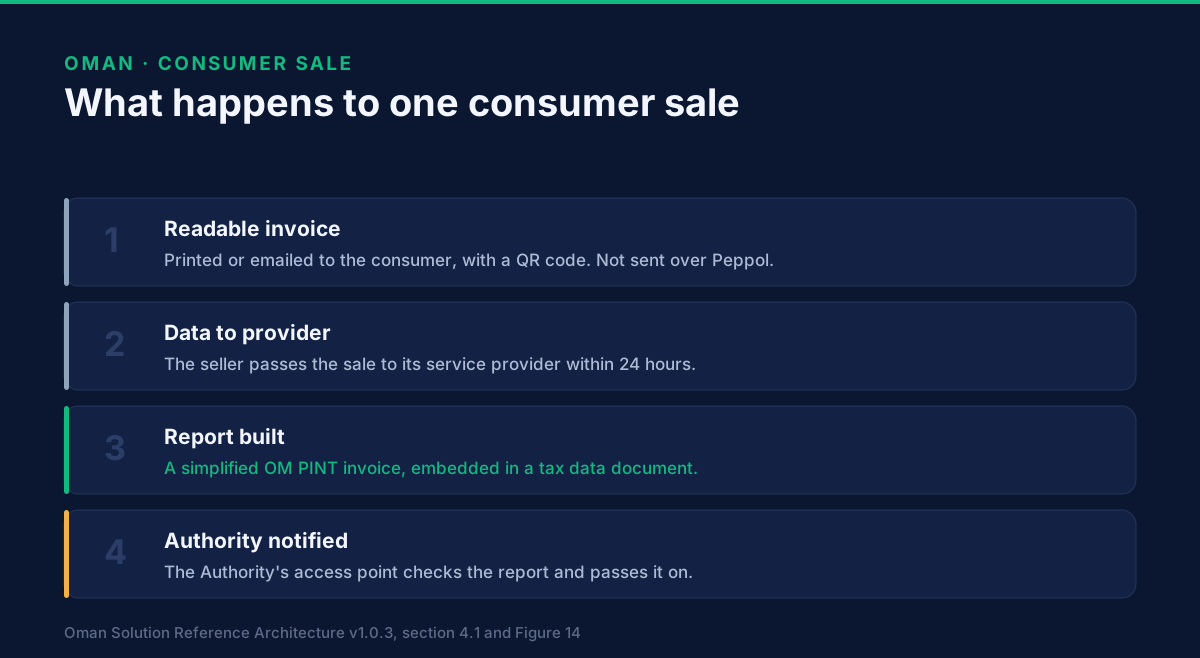
Who does what, step by step?
The architecture's sequence for a consumer sale (Figure 14) runs like this:
- The consumer buys. The seller generates a seller UUID (a code that identifies the invoice, explained in the QR article), generates the QR code, and produces the readable invoice.
- The seller gives the readable invoice to the consumer.
- The seller sends the invoice data to its service provider. The architecture says this should happen within 24 hours.
- The provider validates the data, generates the simplified or full PINT invoice, validates that too, and generates the TDD.
- The provider sends the TDD to the Authority's access point, which validates it and returns a positive status message to the provider.
- The Authority's access point passes the TDD to the Tax Authority.
In the architecture, the seller generates the QR code and the seller UUID. A seller who issues through GoRoute does not write that code: our platform builds both, and fills in the buyer values described below, when it issues a consumer invoice.
What goes in the buyer fields when the consumer is unknown?
A PINT invoice has mandatory buyer fields, and an anonymous consumer cannot supply them. Section 4.3 of the architecture solves this with fixed values, which the provider fills in so that validation succeeds:
- Buyer name (IBT-044):
General customer - Buyer country code (IBT-055):
OM - Buyer electronic address (IBT-049): the substitute participant
0248:997770000099 - Invoice number (IBT-001): generated by the seller
- Seller UUID (BTOM-004): generated by the seller
The architecture adds one business rule for these invoices, IBR-173-OM: if the buyer address is 997770000099, the seller UUID must be present. In the production rule pack, that rule also requires the UUID to be a valid version 5 UUID.
997770000099 is one of five fixed substitute participants in section 10.3.1. This one stands for a domestic consumer sale, and for the profit-margin scheme. The other four cover an unreachable domestic business buyer (…095), a deemed supply that must not be shared with the buyer (…096), an export to a receiver outside Peppol (…097) and an import that falls outside the e-invoicing rules (…098).
Which consumer sales need the buyer's details?
Section 4.1 makes three points that matter to a shop.
First, consumer sales are typically low value. Second, some of these buyers could be registered businesses and will still be treated as a consumer sale. The architecture's own example is a company buying stationery at a store. That case has its own page: what happens when a company buys at the till.
Third, for certain sales, usually higher-value items, the seller collects more information, including the buyer's details, even though the sale is to a consumer. The architecture's example is a mobile phone where a warranty may apply. It says that in this case "a different invoice type would apply".
It does not say which sales, and it sets no value threshold. I could not find one in the specifications we hold, so this page does not give one. What the rule pack does say is what the other invoice type asks for. A full tax invoice needs either a buyer identifier (IBT-046) or a buyer VAT number (IBT-048), under IBR-016-OM, and a full buyer address, under IBR-019-OM. The simplified invoice does not.
The QR code stays. Section 4.2 puts it on "a B2C invoice (full or simplified)", so a consumer who gives their details still gets a QR code on the readable invoice.
Who reports a consumer sale, and when?
The service provider reports it, not the consumer and not the seller directly. The only timing this architecture gives for a consumer sale is the 24 hours for the seller to pass the data to the provider. The timing of the provider's report to the Authority is set elsewhere, in the Peppol Authority Specific Requirements, and this page does not restate it.
Which date your business starts on is a separate question. The simplified tax invoice article covers the 2027 timing and the till, and which wave you are in sets your date.
What does a retailer need to have in place?
From the architecture alone, five things:
- A unique, sequential invoice number on every sale. The QR table describes the invoice number as the "unique sequential number of the invoice".
- A QR code on every readable consumer invoice, built to the field list in the QR code article.
- A seller UUID on every consumer invoice, which the provider needs in order to pass the rule above.
- A route for the sale data to reach the provider within 24 hours.
- A readable invoice the consumer can keep, printed or emailed.
A retailer taking deposits has an extra trigger to check. Advance payments and deemed supplies explains it.
What this page does not settle
- Print layout. Section 4 requires the QR code on the readable invoice and shows a sample receipt. I found no further layout rule there.
- A threshold for buyer details. None is given.
- The QR version. The architecture fixes it at 1.1 and says the Authority may change it, in which case a new version may suggest a new structure.
- POS hardware. Not covered here.
What to do with this
If you run counters, start by finding out how your till passes a sale to your provider, and how fast. Then check that every sale gets a unique number.
GoRoute is an accredited Oman e-invoicing service provider. Our e-invoice sending page describes how invoices are issued and reported, the Oman page sets out the rules and our articles on them, the tutorials show it working, and the documentation has the API reference.
To talk through your own counters, book a demo.
Read next: what is in an Oman e-invoice QR code. Also in this set: profit-margin invoices.
GoRoute is accredited by the Oman Tax Authority on 29 July 2026 through Union Digital Technologies SPC, and is a certified Peppol Access Point (POP000991).
Primary sources: Oman Tax Authority — the authority that sets the e-invoicing rules; Oman Solution Reference Architecture v1.0.3 (final, 27 July 2026), sections 4, 9 and 10.3.1, published by OpenPeppol with the Tax Authority; Peppol technical documentation — the PINT specification the Oman profile extends.
Frequently asked questions
- Does a consumer in Oman receive an e-invoice over Peppol?
- No. The consumer is not registered on Peppol. The seller gives them a readable invoice, printed or emailed, with a QR code. Only the tax report goes through the network, from the seller's service provider to the Tax Authority's access point.
- What goes in the buyer fields when the consumer is unknown?
- Fixed values. The buyer name is 'General customer', the buyer country is OM, and the buyer electronic address is the substitute participant 0248:997770000099. The service provider fills them in so the file passes validation.
- Does the Tax Authority see a consumer sale?
- Yes. The seller's service provider sends a tax data document to the Authority's access point, with the simplified invoice embedded in it. The access point checks it, sends an acknowledgement back, and passes it to the Authority.
- How soon must the seller pass the sale to its provider?
- The architecture says the supplier should send the invoice data to its access point within 24 hours. The same document treats this as a note on the sequence, not as the timing of the report to the Authority.
- When does a consumer sale need the buyer's details?
- For certain sales, usually higher-value items where a warranty may apply, the architecture says the seller collects more information, including the buyer's details, and that a different invoice type applies. It gives no value threshold.
About Dr. Syed Raza
Dr. Syed Raza is an IT Enterprise Architect at ClayDesk LLC and leads the GoRoute platform. He works across Peppol Access Point and SMP infrastructure, PINT jurisdictions (Oman, AU/NZ, EU, JP, MY, SG), and national CTC regimes, translating regulatory detail into production-grade e-invoicing systems.
Building on Peppol?
GoRoute is a certified Peppol Access Point & SMP. Book a demo or read the docs to get started.