
The ZATCA QR Code: What Its Nine Tags Hold
What the ZATCA Phase 2 QR code holds: tags 1 to 9 in TLV, which tags are new, why tag 9 sits on simplified invoices, and the byte mistakes ZATCA lists.

What does the ZATCA QR code hold?
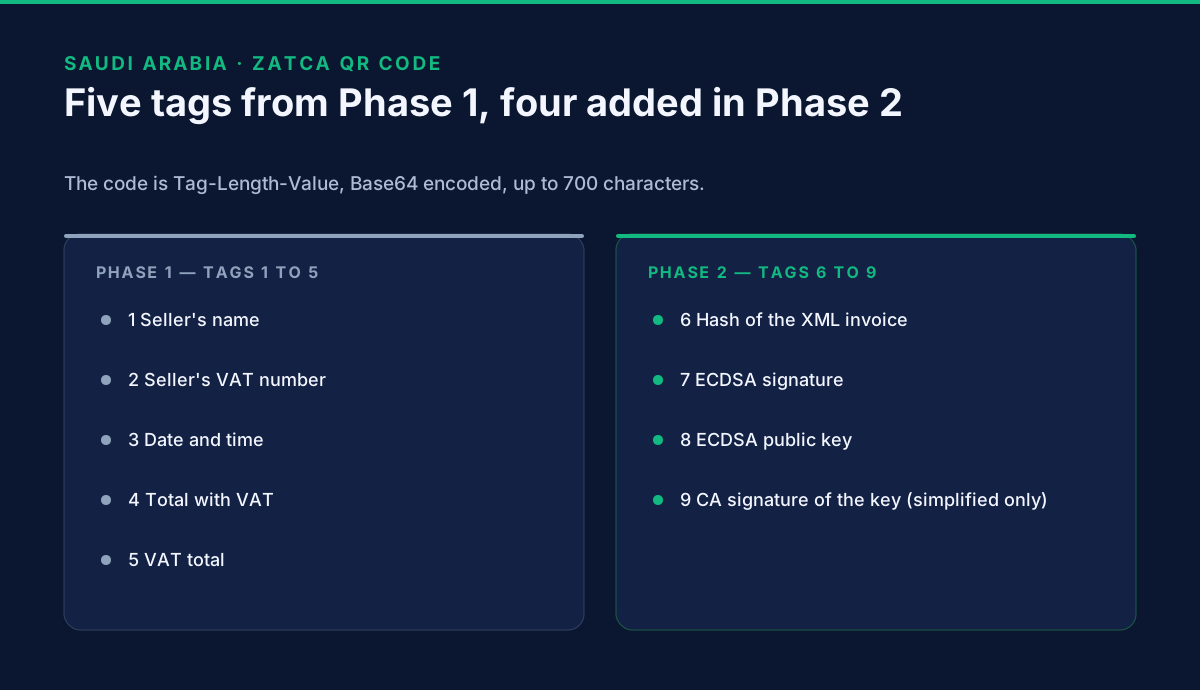
The ZATCA QR code holds up to nine fields: the seller's name, VAT number, the invoice timestamp, the total with VAT and the VAT total (tags 1 to 5), then the invoice hash, a digital signature and a public key (tags 6 to 8), and on simplified invoices a ninth tag signed by ZATCA's certificate authority. The fields are written in Tag-Length-Value (TLV) form and then Base64 encoded, with up to 700 characters in all. That is from section 6 of ZATCA's Detailed Technical Guideline.
This page is for the developer or implementer who has to build the code, or work out why it fails a check. The wider system is explained in our guide to Fatoora.
What is each tag?
| Tag | Field | Applies from |
|---|---|---|
| 1 | Seller's name | 4 December 2021 |
| 2 | VAT registration number of the seller | 4 December 2021 |
| 3 | Timestamp of the invoice (date and time) | 4 December 2021 |
| 4 | Invoice total, with VAT | 4 December 2021 |
| 5 | VAT total | 4 December 2021 |
| 6 | Hash of the XML invoice | 1 January 2023, in waves |
| 7 | ECDSA signature | 1 January 2023, in waves |
| 8 | ECDSA public key | 1 January 2023, in waves |
| 9 | For simplified tax invoices and their notes: the ECDSA signature of the stamp's public key, made by ZATCA's technical CA | 1 January 2023, in waves |
Tags 1 to 5 are the Phase 1 code. Phase 2 adds the four cryptographic tags, 6 to 9, so a Wave 25 business that already prints a Phase 1 code has to extend it. The Wave 25 page covers who that is.
Each tag is read from the invoice XML. The guideline maps tag 1 to the seller's registration name, tag 2 to the seller's VAT number, tag 3 to the issue date and time, tag 4 to the tax-inclusive amount, and tag 5 to the tax total. Tag 6 is the digest value in the document signature, tag 7 is the signature value, and tag 8 is the X.509 certificate.
How is the TLV built?
Each field is three parts, with no gaps between fields:
- Tag: the tag number, stored in one byte.
- Length: the length of the field's UTF-8 byte array, stored in one byte.
- Value: the UTF-8 bytes of the field.
The fields are joined, and the whole is Base64 encoded. A worked example from the guideline, which we decoded again to check, has five fields:
| Tag | Length | Value |
|---|---|---|
| 1 | 21 | Bobs Basement Records |
| 2 | 15 | 100025906700003 |
| 3 | 20 | 2022-04-25T15:30:00Z |
| 4 | 10 | 2100100.99 |
| 5 | 9 | 315015.15 |
In hex the first field begins 01 15 42 6f 62 73. The tag is 01, the length is 15 (which is 21 in decimal), and 42 6f 62 73 is "Bobs". Base64 of the whole starts ARVCb2Jz.
Length counts bytes, not characters. An Arabic seller name takes more bytes than it has letters, so counting characters gives the wrong length. This is the most likely cause of a bad code on an Arabic-language business.
Which mistakes does ZATCA list?
ZATCA's guideline names four common mistakes:
- Tag and length written as text. They are binary values. The example it gives is that 21 must be written as
15in hex, and if the string "21" is converted, it becomes32 31, which is wrong. - The value is not converted to hex before Base64.
- Padding or separators between the TLV sets. There should be none.
- Not using UTF-8 for Arabic text.
You can check a finished code by decoding the Base64 to hex and reading it with a TLV decoder. The guideline points to public decoders for this. ZATCA's SDK can also validate QR codes against the prescribed structure, and the onboarding page explains where the SDK sits among ZATCA's test tools.
Why does tag 9 sit on simplified invoices only?
The guideline says tag 9 applies "for Simplified Tax Invoices and their associated notes". It does not say why. Our reading, which is inference, is that the platform's role differs by type:
- A standard invoice goes to ZATCA for clearance, and on clearance the platform applies its own cryptographic stamp and adds or updates the QR code in its response.
- A simplified invoice is reported afterwards. The guideline says the seller must include its stamp and QR code in the submission, and that the platform does not stamp simplified documents.
So the simplified invoice leaves the till before ZATCA sees it, and the code on it must already carry proof that the seller's certificate came from ZATCA. That is what tag 9 is.
To fill it in, the guideline says to take the production CSID (the certificate you get at the end of onboarding), decode it, and copy the value of "Signature Algorithm: ecdsa-with-SHA256" into tag 9.
Why does ZATCA write the QR code on a cleared standard invoice?
Because on a standard invoice the clearance is the point. A standard document is valid only once ZATCA has cleared it. The platform stamps it and returns it with the QR code, and the seller then gives that cleared document to the buyer. If the seller included its own stamp and QR code first, the platform adds a second stamp and updates the code. ZATCA's guideline also notes that the stamp and QR code are not part of the document hash, so a unit can keep generating invoices without waiting for clearance.
How does this differ from Oman's QR code?
Both use TLV and Base64. They differ in what goes inside and where it appears. On our Oman Fawtara page, the QR code belongs on the readable invoice that a consumer receives (a B2C invoice), not on business invoices sent over Peppol. It carries the QR version, invoice type, invoice number, seller name, seller VAT number, date, time, total, VAT total and a seller UUID. The Saudi code has no UUID in its nine tags, and it adds an invoice hash, a signature and a key. Oman is a Peppol-based system and Saudi Arabia is not; the reasons are in Peppol vs PINT.
What this page does not cover
It does not repeat the Phase 1 printing rules beyond one line: simplified invoices must carry a QR code. It does not give signing code.
Where does GoRoute stand?
Our ZATCA integration is in development on ZATCA's developer sandbox. It is not live, there is no trial for Saudi Arabia, and we promise no date. If you are building or buying a QR code generator for a Wave 25 deadline, read our Saudi Arabia page and talk to us before your wave deadline. You can book a call. Recorded guides are on the tutorials page, and the technical reference is at docs.goroute.ai.
Read next: credit and debit notes under ZATCA Phase 2, because the QR code rules apply to notes as well.
Sources: ZATCA, E-invoicing Detailed Technical Guideline, sections 4 and 6 and the FAQ, read 2 November 2026. We could not open ZATCA's separate Security Features Implementation Standards, so nothing here rests on it. This is not tax or legal advice.
Frequently asked questions
- What does the ZATCA QR code contain?
- Nine fields in Tag-Length-Value form, Base64 encoded. Tags 1 to 5 are the seller name, VAT number, timestamp, invoice total with VAT and VAT total. Tags 6 to 8 add the XML hash, the ECDSA signature and the public key. Tag 9 applies to simplified invoices and notes.
- What is new in the Phase 2 QR code?
- Four tags. Tags 1 to 5 applied from 4 December 2021 under Phase 1. Tags 6 to 9 apply from 1 January 2023, in waves, according to ZATCA's technical guideline.
- Who writes the QR code on a standard invoice?
- ZATCA's platform. On clearance it stamps the standard document and adds or updates the QR code in its response. The seller may include its own stamp and QR code first, and the platform then adds a further stamp and updates the code.
- How long can the QR code be?
- ZATCA says it is Base64 encoded with up to 700 characters.
- What are the common mistakes when building the QR code?
- ZATCA lists four. Writing tag and length as text instead of binary bytes, not converting the value to hex before Base64, putting padding or separators between the fields, and not using UTF-8 for Arabic text.
About Dr. Syed Raza
Dr. Syed Raza is an IT Enterprise Architect at ClayDesk LLC and leads the GoRoute platform. He works across Peppol Access Point and SMP infrastructure, PINT jurisdictions (Oman, AU/NZ, EU, JP, MY, SG), and national CTC regimes, translating regulatory detail into production-grade e-invoicing systems.
Building on Peppol?
GoRoute is a certified Peppol Access Point & SMP. Book a demo or read the docs to get started.