
How to Set Up InvoiceNow in Singapore, from Peppol ID to First Invoice
How to set up InvoiceNow in Singapore: choose a route, get a Peppol ID from your UEN, confirm it in Corppass, then switch on GST submission and test it.

How do you set up InvoiceNow in Singapore?
IRAS publishes the steps. If you use off-the-shelf accounting software, check that it is an accredited InvoiceNow-Ready Solution. If you run your own system, engage an IMDA-accredited Access Point Provider. The provider registers your UEN to give you a Peppol ID. You then switch on GST submission and test it.
That is the whole process in one sentence each. The rest of this page covers what each step needs from you, and the parts that catch people out. One of those is a Corppass confirmation with a deadline. Another is that a registration nobody finishes is removed.
This page covers the set-up only. Three related questions have their own pages:
- Who has to use InvoiceNow, and when: the Singapore InvoiceNow guide has IRAS's phase table.
- Which provider to pick: how to choose an InvoiceNow solution provider explains IMDA's two lists and how to check a name against them.
- Whether your own system can do it: what an InvoiceNow-ready ERP is gives six checks to run against your installation.
Which route applies to your business?
Your route depends on the software that issues your invoices today. IRAS's onboarding guide, Getting Started with the GST InvoiceNow Requirement (24 June 2026), starts from that question. It gives three answers, each with the same three steps:
| If your invoices come from… | Who connects you | First step IRAS lists |
|---|---|---|
| Off-the-shelf accounting or finance software | An InvoiceNow-Ready Solution Provider (IRSP) | Check your software is on IMDA's list of accredited InvoiceNow-Ready Solutions. If it is not, contact an accredited IRSP |
| A customised in-house enterprise system (ERP) | An Access Point Provider (AP) | Get in touch with an IMDA-accredited Access Point Provider |
| You are not sure where to start | An InvoiceNow-Ready Solution Provider | Consider a free-of-charge InvoiceNow-Ready solution, or contact an accredited IRSP |
The guide defines the two kinds of provider. An IRSP offers accounting or finance software that is connected to InvoiceNow through access points. An AP is the connectivity gateway to the network. Both lists are published by IMDA (the Infocomm Media Development Authority), which runs InvoiceNow as Singapore's Peppol Authority.
If your existing software is not InvoiceNow-Ready, IRAS's FAQ gives three options. You can connect it through an accredited Access Point Provider. You can switch to a free-of-charge package. Or you can move to an InvoiceNow-Ready Solution.
What do you need before you start?
Have these ready before you contact a provider. Each one is something a provider will ask for, or something that stalls the work if it is missing.
- Your UEN. Your Peppol ID is built from your Unique Entity Number, so the registration cannot start without it.
- A Corppass user who can act for the company. IMDA's registry asks the business to confirm its own registration through Corppass, Singapore's corporate login. IMDA notes that the Corppass Admin is normally a founder or director, who can give access to employees. Find out who that person is first.
- One named business representative and their email address. The confirmation request goes to that address, so it should be a mailbox someone reads.
- Your customers' UENs. IRAS's mandatory data elements include the customer's details, even for customers who are not on InvoiceNow. Counting the customers with no UEN in your system tells you how much data work there is.
- Your GST codes mapped to IRAS's categories. You can keep your internal tax codes, but each one must map to an IRAS GST category code before data is submitted.
- Your implementation date. IRAS has written to businesses registered before 2026 with their date. It also publishes an implementation date calculator on its requirement page.
What are the steps to set up InvoiceNow?
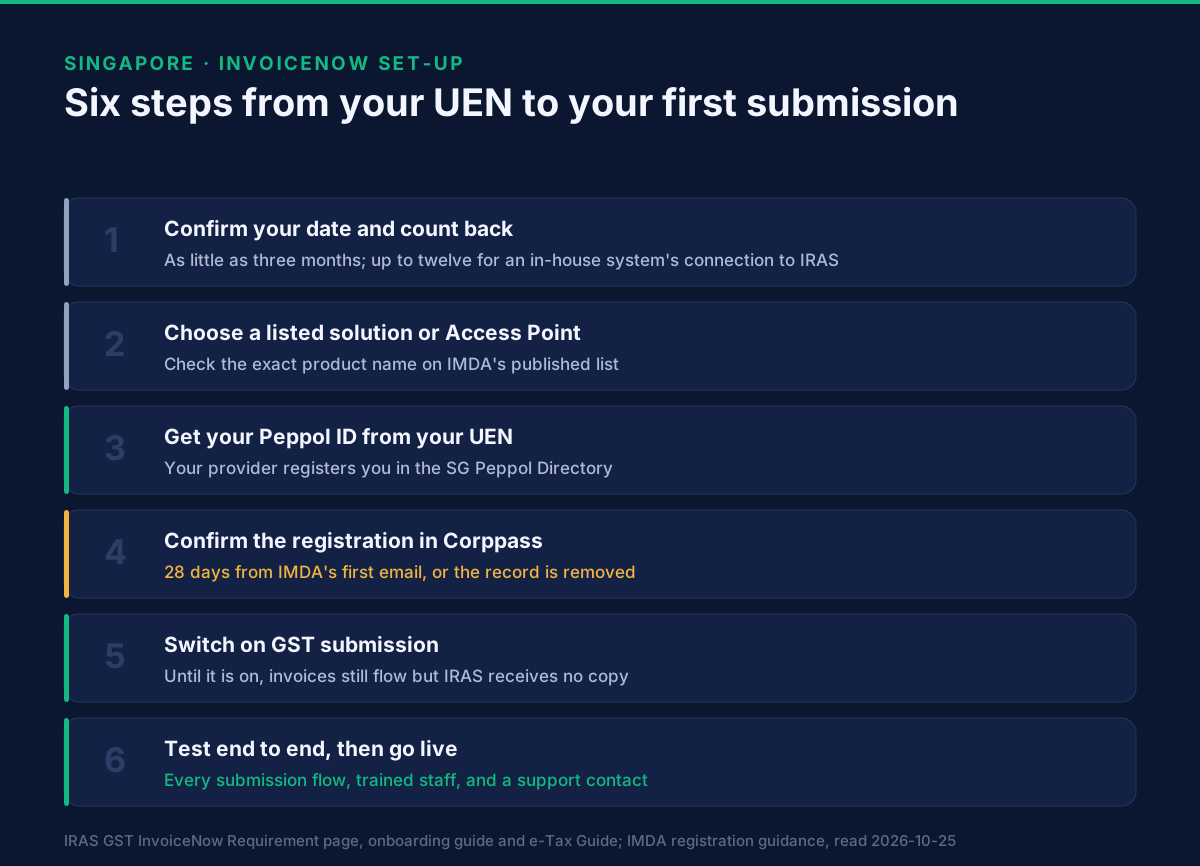
These six steps follow IRAS's three. Its first step is split here into checking your date and choosing a provider. The confirmation that sits inside "get a Peppol ID" is a step of its own, and so is the test IRAS's readiness check asks for.
Step 1: Confirm your date and count back
Start from your mandatory date, not from the day you begin looking. IRAS says onboarding may take as little as three months, and that most businesses complete it within a year. For an in-house enterprise system, the e-Tax Guide advises allowing three to twelve months for the connection to IRAS alone. If your date is 1 April 2028 and you run your own ERP, that allowance means starting by April 2027.
Step 2: Choose your solution or Access Point Provider
Check the provider against IMDA's published list: InvoiceNow-Ready Solutions for software, or Access Point Providers for an in-house system. Match the exact product name, not just the company, because the solutions list is kept per product. How to read both lists, and what to ask before you sign, is covered in how to choose an InvoiceNow solution provider.
Step 3: Get your Peppol ID
Your provider registers your business in the SG Peppol Directory with your UEN. IRAS's e-Tax Guide says IRSPs and APs register the business for a Peppol ID and update its details in the Service Metadata Publisher (SMP), the register the network uses to find each business. That is what makes you appear in the directory.
The Peppol ID is the address other businesses send your invoices to. In IRAS's worked examples, a business with UEN 202012345M has the Peppol ID SGUEN202012345M under identifier scheme 0195. How identifier schemes work in other countries is set out in which Peppol identifier is yours.
Step 4: Confirm the registration through Corppass
For a Singapore company with a UEN, registration is not finished when the provider submits it. IMDA's registry emails the business representative, who confirms the registration by logging in with Corppass. IMDA's guidance to access points sets a 28-day window from the first email, with reminders every seven days. If nobody confirms in time, the record is removed from the registry, and the provider has to start the registration again.
The common failures are ordinary ones: the email lands in a spam folder, it goes to the wrong address, or someone logs in under a different company's UEN. Each one is fixed by cancelling and restarting the registration with the right details, so it is worth checking the email address before the provider submits.
Step 5: Switch on the GST InvoiceNow submission feature
Being on InvoiceNow and reporting to IRAS are two separate switches. Until the submission feature is on, IRAS's FAQ says your Peppol invoices still reach your customers as usual, but no copy goes to IRAS. Your IRSP or AP switches it on with you. For an in-house system, the AP also works with you to connect the system to IRAS first.
Once it is on, IRAS receives a copy of each invoice you send over the network automatically. Invoices that never travel over the network still have to be submitted, from your solution, on a schedule. How each kind of invoice reaches IRAS is explained in how invoice data reaches IRAS through InvoiceNow.
Step 6: Test end to end, then go live
IRAS's onboarding guide ends with a readiness check in three parts:
- Prepare your team. The staff who issue and record invoices know the solution and understand the requirement. IRAS recommends its webinars run with IMDA.
- Test your system. Run every submission flow end to end: sales to customers on the network, sales to customers who are not, and purchases both ways. Make sure no problem specific to your solution is left.
- Set up support. Confirm how to reach your provider when something fails.
A test environment for the connection to IRAS has been open since September 2024, according to IRAS's FAQ. Ask your provider how they use it. IRAS also encourages you to start submitting early, before your mandatory date, so that problems surface while they cost nothing.
How long does InvoiceNow set-up take?
IRAS's own range is three months to a year, and up to twelve months for an in-house system's connection to IRAS. The Corppass confirmation adds a fixed limit of its own: 28 days, after which the registration is removed. Nothing on the government side publishes a shorter path, so plan against IRAS's range.
Three things usually set the length, and all three are on your side of the work:
- Your customer data. Missing UENs and unmapped GST codes are data problems, and they take longer than the connection.
- Your software. An accredited InvoiceNow-Ready product mostly needs switching on. An in-house system needs a real integration.
- Your internal approvals. The Corppass user has to be available within the 28-day window.
What if your business is already registered?
Search the SG Peppol Directory before a new registration is started. A business can be registered with only one provider at a time. If yours is listed already, it is registered with another provider. That provider has to deregister you before a new one can register you, and IMDA's rules for access points give it three working days to do so.
If you are not listed but a new registration is refused, another provider may already have a registration under way for you. That provider must cancel it first. Both cases are common when a business changes software. Ask your old provider to release the registration on the day you sign with the new one.
What this page does not cover
- Your phase and date. IRAS's GST InvoiceNow Requirement page is the authority. Our Singapore guide sets out the phase table.
- Grants. IRAS lists transition grants, with eligibility set by IMDA. Check the current amounts and conditions on IMDA's InvoiceNow grants page before relying on them.
- The technical build. For providers and in-house teams, IMDA publishes the InvoiceNow Technical Playbook.
Next steps
If you want to go through your own set-up before you choose a provider, book a demo. We will look at your invoicing system and data with you, and list what to ask any provider. For the API side of a Peppol connection, the developer documentation covers it end to end. The video tutorials show ERP connections working.
- Singapore at a glance: Peppol e-invoicing for Singapore.
- Read next: how to choose an InvoiceNow solution provider, the step that decides most of the rest.
Sources, read on 25 October 2026: IRAS — GST InvoiceNow Requirement (last updated 8 October 2026), for the two onboarding routes, the onboarding time, the implementation date notice and calculator, and the grants listing; IRAS — Getting Started with the GST InvoiceNow Requirement: A Guide for Businesses (24 June 2026), for the three routes, the provider definitions and the readiness check; IRAS e-Tax Guide — Adopting GST InvoiceNow Requirement for GST-registered Businesses, second edition, for the Peppol ID and SMP registration, the three-to-twelve-month connection time and the Peppol ID examples; IRAS — Frequently Asked Questions for GST InvoiceNow Requirement (version 23 September 2026), for the test environment, the submission feature and the options for software that is not InvoiceNow-Ready; IMDA's lists of InvoiceNow-Ready Solutions and Access Point Providers; IMDA's Corppass registration guidance for access points (March 2026), for the confirmation step, the 28-day window and the switching rule; SG Peppol Directory; Corppass.
Frequently asked questions
- How do I register my business for InvoiceNow?
- You do not register directly. Your InvoiceNow-Ready Solution Provider or Access Point Provider registers your business in the SG Peppol Directory with your UEN, and that gives you a Peppol ID. A Singapore company then confirms the registration itself through Corppass.
- What is my InvoiceNow Peppol ID?
- For a Singapore company it is built from your Unique Entity Number. In IRAS's worked examples, a business with UEN 202012345M has the Peppol ID SGUEN202012345M under identifier scheme 0195. Your provider assigns it when it registers you.
- How long does it take to set up InvoiceNow?
- IRAS says onboarding may take as little as three months and that most businesses finish within a year. For an in-house enterprise system, IRAS's e-Tax Guide advises allowing three to twelve months for the connection to IRAS.
- Do I need Corppass to set up InvoiceNow?
- Yes, for a Singapore company with a UEN. IMDA's registry asks the business to confirm a new registration by logging in with Corppass. If the company has no Corppass account yet, it applies for one at corppass.gov.sg before the registration can be completed.
- Can I set up InvoiceNow before my mandatory date?
- Yes, and IRAS encourages it. You can register, switch on the GST InvoiceNow submission feature and start sending data before your phase begins. A test environment for the connection to IRAS has been open since September 2024.
- What happens if the GST InvoiceNow submission feature is not switched on?
- Your Peppol invoices still reach your customers as usual, but no copy of the invoice data goes to IRAS. Once your phase applies, the feature has to be on.
About Dr. Syed Raza
Dr. Syed Raza is an IT Enterprise Architect at ClayDesk LLC and leads the GoRoute platform. He works across Peppol Access Point and SMP infrastructure, PINT jurisdictions (Oman, AU/NZ, EU, JP, MY, SG), and national CTC regimes, translating regulatory detail into production-grade e-invoicing systems.
Building on Peppol?
GoRoute is a certified Peppol Access Point & SMP. Book a demo or read the docs to get started.