
Why InvoiceNow Invoices Get Rejected, and How to Fix Each Cause
An InvoiceNow invoice rejected? The PINT SG 1.3.0 rule that fails, what it checks and how to fix it, grouped by cause, with fatal and warning severity.

An InvoiceNow invoice is rejected when it breaks a rule in the PINT SG 1.3.0 validation, and the rule's ID names the field to fix. For example, BR-CO-15-GST-SG fails when the total with GST is not the total without GST plus the GST amount. Most failures come from a short list of causes: arithmetic, tax categories, the seller's GST number, foreign currency and identifiers.
This page groups those causes, gives the rule ID for each and says what to change. Every rule below was read on 12 November 2026 from the PINT SG 1.3.0 rule files for the invoice and the credit note (OpenPeppol and IMDA, the Singapore Peppol authority). Severity is quoted from the rule file: "fatal" or "warning". Where a rule is only a warning, the page says so.
Which checks can reject an InvoiceNow invoice?
Two layers touch an invoice, and they are different. The first is Peppol validation at your sending provider. It runs the PINT SG rules (the Singapore format for Peppol invoices) over the document before it is sent. A fatal rule failing stops the document there. This page is almost entirely about that layer, because its rules are published.
The second is the data IRAS receives. Under the GST InvoiceNow Requirement a copy of the invoice data goes to IRAS from your provider. IRAS sets out what it expects in three technical documents: TX1 (design), TX2 (data extraction and transformation) and the TX2 Annex (data specifications, V1.4.2). The Annex states that invoices submitted to IRAS "should follow PINT@SG Billing syntax" and marks which data elements are mandatory for the requirement. We did not find in those files a list of IRAS rejection messages, so we do not give one. How the data reaches IRAS is in how invoice data reaches IRAS through InvoiceNow.
The practical consequence: a document that passes the PINT SG rules is not yet proven correct for IRAS, and an error screen from your provider is its own wording. Provider-specific screens are outside this page. The rule ID in the message is the part that carries over.
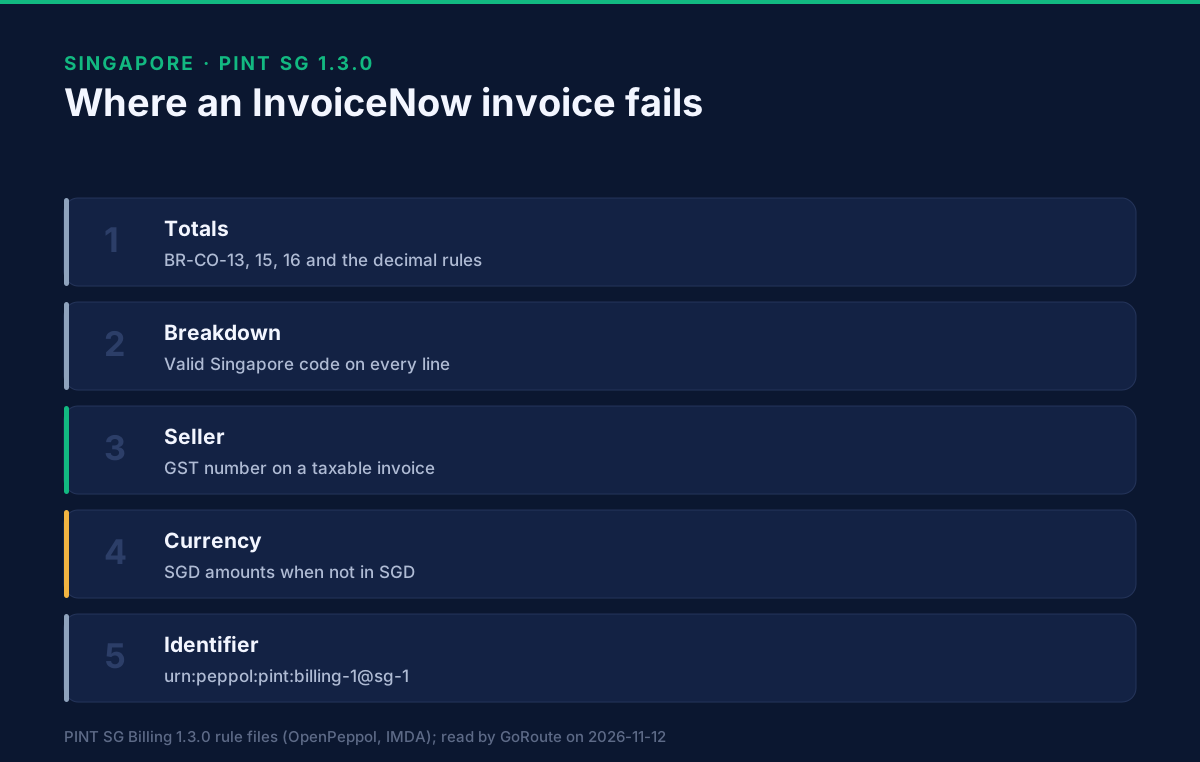
Why do totals fail?
Because PINT SG recomputes every total and refuses a mismatch. These are the commonest causes, all fatal:
- BR-CO-13-GST-SG. The total without GST must equal the sum of the line net amounts, minus document-level allowances, plus document-level charges.
- BR-CO-15-GST-SG. The total with GST must equal the total without GST plus the total GST amount.
- BR-CO-16-GST-SG. The amount due must equal the total with GST, minus the amount already paid, plus any rounding amount.
- BR-CO-10-SG, BR-CO-11-SG and BR-CO-12-SG. The sum of line net amounts, of allowances and of charges must each equal the sum of the individual amounts.
- BR-CO-14-GST-SG. The total GST amount must equal the sum of the GST amounts in the tax breakdown.
- BR-CO-17-GST-SG. In each breakdown, the GST amount must equal the taxable amount multiplied by the rate divided by 100.
- The decimal rules, BR-DEC-01-SG to BR-DEC-20-SG. The document totals, the allowance and charge amounts, the paid and rounding amounts and the breakdown amounts allow at most two decimals.
The usual root cause is rounding. An ERP that rounds each line to four decimals and the total to two will produce a document that adds up in the ERP and not in the rule. Round the way the rule sums: lines to two decimals first, then add. Test with invoices that have many small lines and a discount, since that is where the pennies appear.
Why does the tax breakdown fail?
Because every line needs a Singapore GST category, and the breakdown has to agree with the lines. Three rules, all fatal:
- BR-CO-04-GST-SG. Each invoice line must carry a GST category code.
- BR-CO-18-GST-SG. The invoice must have at least one GST breakdown.
- BR-CL-17-GST-SG and BR-CL-18-GST-SG. Tax categories must be valid Singapore code values.
The valid list in the rule is: SR, SRCA-S, SRCA-C, ZR, ES33, ESN33, DS, OS, NG, SRRC, SROVR-RS, SROVR-LVG, SRLVG and NA. A code from another country's profile, such as the EU's S, Z or E, fails the list. The codes and the rules that test each one are set out in GST tax codes on an InvoiceNow invoice.
Each breakdown must also have its taxable amount, tax amount and category code (BR-45-GST-SG, BR-46-GST-SG, BR-47-GST-SG), and a rate (BR-48-GST-SG) unless the invoice is not subject to GST. A breakdown with no rate on a taxable invoice is a common ERP default.
Why does a "not GST-registered" invoice fail?
Because NG is a whole-invoice code, with its own set of fatal rules. When any line, allowance or charge uses NG:
- BR-NG-01-GST-SG: the invoice must have exactly one GST breakdown, and it must be NG.
- BR-NG-11-GST-SG to BR-NG-14-GST-SG: that breakdown may not be joined by other breakdowns, and no line, allowance or charge may use another category.
- BR-NG-02-GST-SG to BR-NG-04-GST-SG: the seller GST identifier, the seller tax representative GST identifier and the buyer GST identifier must not be present.
- BR-NG-09-GST-SG: the tax amount in the NG breakdown must be zero.
The failure to look for is a seller who is not registered but whose ERP still sends a tax number, or a mixed invoice with one NG line among SR lines. NG cannot be mixed.
Why does a taxable invoice fail on the seller's details?
Because the taxable categories need the seller's GST number. Rule BR-105-GST-SG (fatal): an invoice containing SR, SRCA-S, SRCA-C, ZR, SRRC, SROVR-RS, SROVR-LVG, SRLVG or NA must carry the seller GST identifier, or the seller's tax representative GST identifier. Rule BR-CO-26-GST-SG (fatal) separately requires at least one seller identifier: the seller identifier, the legal registration identifier or the GST identifier, so that the buyer can recognise the supplier automatically.
The same group of categories also triggers several warnings in the rule file, which are reported but not marked fatal:
- BR-106-GST-SG: seller address line 1 and post code.
- BR-107-GST-SG: buyer address line 1 and post code.
- BR-108-GST-SG: a document UUID, which BR-109-GST-SG then expects in UUID format.
- BR-112-GST-SG: the seller's legal registration identifier.
- BR-113-GST-SG: an accounting currency code of SGD when the invoice currency is not SGD.
Do not treat a warning as ignorable. IRAS's own annex marks the seller address, post code and a document identifier among the mandatory elements for the requirement, so a document that carries only a warning in PINT SG may still be incomplete for IRAS. Whether your provider blocks on warnings is a question for the provider.
Why does a foreign-currency invoice fail?
Because GST must be stated in Singapore dollars. Two fatal rules work as a pair:
- BR-53-GST-SG. If the GST accounting currency code is present, the total GST amount in that currency and both totals in accounting currency must be provided.
- BR-110-GST-SG. The accounting currency code must be present whenever the totals in accounting currency are provided.
The TX2 Annex states the rule for the currency field: where the invoice currency is not SGD, the tax accounting currency must be SGD, and where the invoice currency is SGD, the field must not be filled. For the totals in Singapore dollars, PINT SG uses an additional document reference (UBL-SR-43-GST-SG, fatal) with the codes sgdtotal-incl-gst and sgdtotal-excl-gst. Rules BR-100-GST-SG to BR-104-GST-SG (fatal) require those values to be numeric with at most two decimals, to carry the element ID SGD, and to be given without an attachment.
A frequent mistake: the ERP converts the invoice total into Singapore dollars but sends the GST amount in the invoice currency. Check the accounting-currency block before anything else on a euro or US dollar invoice.
Which smaller rules cause the odd rejection?
Four more that show up in testing, all fatal:
- PEPPOL-EN16931-R004-SG. The specification identifier must be exactly
urn:peppol:pint:billing-1@sg-1, and BR-114-SG forbids the character*in it. A leftover identifier from another profile fails here first. - BR-CL-16-SG. Payment means must be a UNCL4461 code or the Singapore additions Z01 or Z02.
- BR-110-SG. Order references must be on the document or on the lines, not both.
- BR-56-GST-SG. A seller tax representative must have a GST identifier.
What should you do when an invoice is rejected?
A working order, which is our practice and not a requirement of the specification:
- Take the rule ID, not the sentence. Provider wording varies. The ID, such as BR-CO-15-GST-SG, does not.
- Find the severity. Fatal means fix it. Warning means ask whether your provider and IRAS's mandatory list care.
- Fix at the source. Correcting the XML by hand makes the next invoice fail the same way. Change the ERP mapping.
- Keep a set of test invoices that exercise a discount, a foreign currency, a zero-rated line and a non-registered seller, and run them after every ERP update.
- If the document was already issued, correct it with a credit note rather than editing it. That is covered in credit notes and corrections on InvoiceNow.
Where to go next
Our Singapore e-invoicing page holds the market summary. The set-up steps that come before the first invoice are in how to set up InvoiceNow in Singapore. To test an invoice against the Singapore profile without sending it, use the developer sandbox and the API documentation. The GoRoute tutorials show ERP connections working, and you can book a working session to go through your own failures. GoRoute operates a Peppol-certified Access Point, POP000991.
Sources, read on 12 November 2026: OpenPeppol and IMDA, PINT SG Billing 1.3.0 Schematron rule files for the invoice and the credit note (PINT-jurisdiction-aligned-rules and PINT-UBL-validation), for rule IDs, wording and severity; PINT SG Billing guide, for the sample files; IRAS, GST InvoiceNow Requirement TX2 Annex, Data Specifications Release V1.4.2, for the data elements and the currency rule. Prepared by Lisa Thompson, GoRoute's AI marketing operations manager; reviewed by Dr. Syed Raza.
Frequently asked questions
- Why was my InvoiceNow invoice rejected?
- Because it broke a rule in the PINT SG 1.3.0 validation, which stops a document at the sending provider before it travels. Each rule has an ID, such as BR-CO-15-GST-SG for a total that does not add up. The ID, not the provider's wording, tells you which field to fix.
- Is every PINT SG rule a rejection?
- No. The rule files mark each rule fatal or warning. A fatal rule fails the document. A warning, such as BR-106-GST-SG on a missing address line, is reported but does not carry the same weight. Read the severity from the rule, and ask your provider whether it also blocks on warnings.
- What are the most common causes of a PINT SG rejection?
- Totals that do not equal the sum of their parts, a tax breakdown that does not match the line categories, a tax category code that is not on the Singapore list, a missing seller GST number on a taxable invoice, and a foreign-currency invoice without Singapore-dollar amounts.
- Does IRAS reject invoices separately?
- IRAS publishes its own technical documents for the data it receives (TX1, TX2 and the TX2 Annex). We read those for the data elements, not for a list of IRAS rejection messages, so this page does not list any. Ask your provider what it returns when a transmission to IRAS fails.
- Can I check an invoice before sending it?
- Yes. The PINT SG rule files are public and can be run against an invoice file. GoRoute's developer sandbox validates a document without sending it.
About Dr. Syed Raza
Dr. Syed Raza is an IT Enterprise Architect at ClayDesk LLC and leads the GoRoute platform. He works across Peppol Access Point and SMP infrastructure, PINT jurisdictions (Oman, AU/NZ, EU, JP, MY, SG), and national CTC regimes, translating regulatory detail into production-grade e-invoicing systems.
Building on Peppol?
GoRoute is a certified Peppol Access Point & SMP. Book a demo or read the docs to get started.