
GST Tax Codes on an InvoiceNow Invoice: The PINT SG List
The 14 GST category codes PINT SG accepts on an InvoiceNow invoice, which rules test each one, and the mistakes that fail validation or misstate a return.

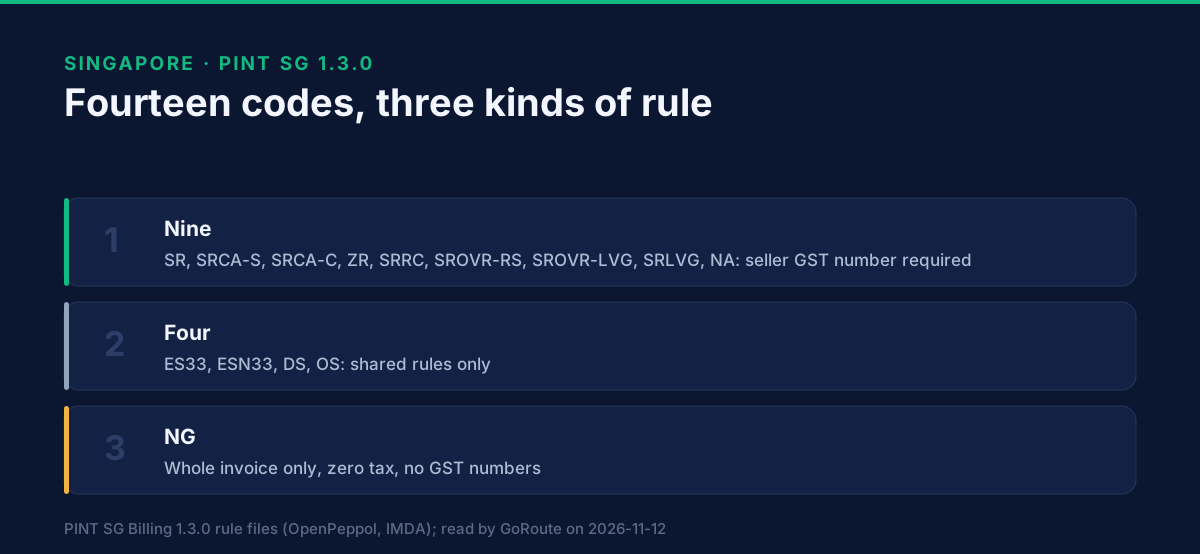
An InvoiceNow invoice must carry one GST category code on every line, and the code must be one of fourteen values in the PINT SG 1.3.0 list: SR, SRCA-S, SRCA-C, ZR, ES33, ESN33, DS, OS, NG, SRRC, SROVR-RS, SROVR-LVG, SRLVG and NA. Anything else fails validation. Choosing the right one of the fourteen is a tax decision, and this page shows what the format does with each choice.
One limit first. The files we read, the PINT SG rule files and IRAS's GST InvoiceNow technical documents, list the codes and test them. They do not define each code's tax treatment. So this page does not say which supply belongs under which code. It says which rules apply, so a finance team knows what the format will demand once the tax team has chosen. Everything below was read on 12 November 2026 from the PINT SG 1.3.0 rule files for the invoice and the credit note.
What are the PINT SG GST category codes?
The list is in the validation rule itself, in the same order for the invoice line (BR-CL-18-GST-SG) and the tax breakdown (BR-CL-17-GST-SG). Both are fatal.
| Code | Where the rules treat it |
|---|---|
| SR | Taxable group: needs the seller's GST number |
| SRCA-S | Taxable group |
| SRCA-C | Taxable group |
| ZR | Taxable group |
| SRRC | Taxable group |
| SROVR-RS | Taxable group |
| SROVR-LVG | Taxable group |
| SRLVG | Taxable group |
| NA | Taxable group |
| ES33 | On the list, with no further code-specific rule in the files |
| ESN33 | On the list, with no further code-specific rule in the files |
| DS | On the list, with no further code-specific rule in the files |
| OS | On the list, with no further code-specific rule in the files |
| NG | Own rule set: whole invoice only |
"Taxable group" is our label for the nine codes that the rules name together, in BR-105-GST-SG to BR-113-GST-SG. The next three sections explain what that group carries.
The PINT SG guide's sample files show the codes in use: a GST invoice, one with zero rating, a non-GST invoice, and invoices with SRCA-C and SRCA-S (the guide spells the second one "SCRA-S" in its list; the rule files spell it SRCA-S). The sample files are in the PINT SG download from OpenPeppol.
What does the taxable group require?
The seller's GST number, first of all. Rule BR-105-GST-SG is fatal: an invoice that contains any of the nine codes (SR, SRCA-S, SRCA-C, ZR, SRRC, SROVR-RS, SROVR-LVG, SRLVG, NA) must contain the seller GST identifier or the seller's tax representative GST identifier. This is the commonest reason a taxable invoice is rejected: the ERP holds the GST number on the company record and does not map it to the document.
The same group triggers warnings, not fatal failures:
- BR-106-GST-SG: the seller's address line 1 and post code.
- BR-107-GST-SG: the buyer's address line 1 and post code.
- BR-108-GST-SG: a document UUID.
- BR-112-GST-SG: the seller's legal registration identifier.
- BR-113-GST-SG: an accounting currency of SGD where the invoice currency is not SGD.
- BR-111-GST-SG: on a credit note, an invoice note giving the reason for credit.
A warning is not a licence to skip the field. IRAS's TX2 Annex marks the seller address line 1, the seller post code and the document identifier as mandatory elements, so an invoice that is only warned by PINT SG may still be incomplete for the data IRAS receives.
What does NG change?
NG applies to the whole invoice or not at all. It is the one code with its own rule set, all fatal:
- BR-NG-01-GST-SG: any line, allowance or charge using NG means exactly one breakdown, and it is NG.
- BR-NG-11-GST-SG: that breakdown may not sit beside another breakdown.
- BR-NG-12-GST-SG, BR-NG-13-GST-SG, BR-NG-14-GST-SG: no line, document allowance or document charge may use another code.
- BR-NG-02-GST-SG, BR-NG-03-GST-SG, BR-NG-04-GST-SG: no seller GST identifier, tax representative GST identifier or buyer GST identifier on the document.
- BR-NG-08-GST-SG: the taxable amount equals the sum of the NG lines, plus charges, minus allowances.
- BR-NG-09-GST-SG: the tax amount is zero.
In practice, an ERP that always prints the company's GST number cannot issue an NG document without a template change. The reverse also holds: NG with a GST number fails, and an SR line on an NG invoice fails.
What do the other codes have in common?
For ES33, ESN33, DS and OS the files we read set no extra rule beyond the shared ones: each line and breakdown must still carry a valid code, an amount and a tax amount (BR-45-GST-SG to BR-47-GST-SG), and the arithmetic must hold. A breakdown needs a rate (BR-48-GST-SG) "except if the Invoice is not subject to GST". That wording is the rule's own, and the files do not say which codes it covers. Where the exception applies, and what an exemption reason text should say (UBL-SR-38-GST-SG and UBL-SR-32-SG allow one each), is a matter for the tax guidance.
We did not read a rule that ties a code to a rate, such as SR to a fixed percentage. Singapore's rate is a data value in the breakdown, checked only for the arithmetic of BR-CO-17-GST-SG: tax amount equals taxable amount times rate divided by 100. A wrong rate that is internally consistent passes validation and misstates the return.
What goes wrong most often?
- Code from the wrong profile.
S,Z,EorOfrom the EU list fail the Singapore list. Map codes per country, not globally. - One code per invoice instead of per line. BR-CO-04-GST-SG needs each line categorised, and the breakdown has to agree with them.
- Breakdown and lines out of step. An ERP that totals a breakdown from the wrong lines fails the arithmetic rules; see why InvoiceNow invoices get rejected.
- Mixed NG. One NG line among SR lines fails the NG rules, BR-NG-11-GST-SG and BR-NG-12-GST-SG among them.
- Missing GST number. Nine of the fourteen codes need it. The ERP's customer and company master data must carry it through to the document.
- A reverse charge or overseas-vendor supply sent as plain SR. The format has separate codes (SRRC, SROVR-RS, SROVR-LVG, SRLVG) for these. Whether a supply qualifies is a tax question we do not answer here.
How do you set up a code map?
A working method, not a requirement:
- Ask your tax adviser for the list of GST treatments your business actually uses.
- Map each treatment, with its tax rate, to one of the fourteen codes, and write down any treatment that has no code.
- Make the ERP choose the code per line from the product or the transaction type, not from a free-text field.
- Run invoices for each treatment through validation, and a credit note for each, because the credit note carries the same codes. See credit notes and corrections on InvoiceNow.
Where to go next
The wider picture is on our Singapore e-invoicing page. To validate an invoice with each code against the Singapore profile, use the developer sandbox and the API documentation. The GoRoute tutorials show an ERP connection working, and you can book a working session to map your own codes. For the reporting side, read how invoice data reaches IRAS through InvoiceNow. GoRoute operates a Peppol-certified Access Point, POP000991.
Sources, read on 12 November 2026: OpenPeppol and IMDA, PINT SG Billing 1.3.0 Schematron rule files for the invoice and the credit note, for the code list, rule IDs and severity; PINT SG Billing guide, for the sample files; IRAS, GST InvoiceNow Requirement TX2 Annex V1.4.2, for the mandatory elements. Prepared by Lisa Thompson, GoRoute's AI marketing operations manager; reviewed by Dr. Syed Raza.
Frequently asked questions
- Which GST tax codes does an InvoiceNow invoice accept?
- Fourteen. The PINT SG 1.3.0 rules BR-CL-17-GST-SG and BR-CL-18-GST-SG accept SR, SRCA-S, SRCA-C, ZR, ES33, ESN33, DS, OS, NG, SRRC, SROVR-RS, SROVR-LVG, SRLVG and NA. Any other value fails validation.
- Can I use the EU codes S, Z and E on a Singapore invoice?
- No. The Singapore profile has its own list, and the EU single-letter codes are not on it. An invoice that carries one fails BR-CL-17-GST-SG or BR-CL-18-GST-SG.
- Does every line need a GST code?
- Yes. Rule BR-CO-04-GST-SG requires each invoice line to be categorised with a GST category code, and BR-CO-18-GST-SG requires at least one GST breakdown on the invoice.
- What is special about the NG code?
- NG cannot be mixed. Where it is used, the invoice must have exactly one breakdown, and it must be NG, with a zero tax amount and no GST identifier for the seller, a tax representative or the buyer.
- Where do I find what each code means for my GST return?
- In IRAS's own guidance. The PINT SG files we read list the codes and the rules that test them but do not define each code's tax treatment, so this page does not either. Confirm the treatment with IRAS or your tax adviser.
About Dr. Syed Raza
Dr. Syed Raza is an IT Enterprise Architect at ClayDesk LLC and leads the GoRoute platform. He works across Peppol Access Point and SMP infrastructure, PINT jurisdictions (Oman, AU/NZ, EU, JP, MY, SG), and national CTC regimes, translating regulatory detail into production-grade e-invoicing systems.
Building on Peppol?
GoRoute is a certified Peppol Access Point & SMP. Book a demo or read the docs to get started.