
How to Validate an EHF Invoice Before Sending It, and Read the Errors
Run an EHF invoice through DFØ's official validator before it leaves your system: the specification to pick, fatal versus warning, and the errors that recur.

Run the invoice through DFØ's official validator before you send it, choose the specification EHF Fakturering 3.0 og Peppol BIS billing 3.0, and treat every fatal result as a stop. A document that fails there will fail again on the receiving side, usually with a worse error message and a day's delay. This page covers what the validator checks, how to read a result, and the handful of rules that account for most Norwegian rejections.
It is written for the developer or ERP administrator who is building or debugging the sending side. The VAT category codes are covered on their own page and are only touched here.
What is the official EHF validator?
It is a service run by DFØ, the Norwegian Agency for Public and Financial Management, on its specification site anskaffelser.dev. You give it a document and a specification, and it returns the rule results.
The list of specifications it supports is long. It includes the current invoice specification, EHF Fakturering 3.0 og Peppol BIS billing 3.0, and also the general PEPPOL BIS Billing 3.0, the older EHF Invoice and Creditnote 2.0.17 and the other EHF documents such as ordering, despatch advice, reminder and payment request. DFØ's invoicing page for suppliers points to it directly and says you can test files before you send them.
Picking the wrong specification is the first avoidable mistake. A 3.0 document checked against the 2.0 rules is checked against the wrong thing, and whatever it reports tells you nothing about whether the invoice will be accepted.
Which specification do I choose?
For an invoice or credit note today, EHF Fakturering 3.0 og Peppol BIS billing 3.0. DFØ's specification explains why the two names are one thing: the Norwegian rules were folded into Peppol BIS Billing 3.0, and DFØ "does not see a need to implement a different CIUS targeting the Norwegian market". EHF Billing 3.0 is implemented by implementing Peppol BIS Billing 3.0 "without extensions or extra rules". The specification identifier your document carries is the Peppol one:
urn:cen.eu:en16931:2017#compliant#urn:fdc:peppol.eu:2017:poacc:billing:3.0
with the business process identifier urn:fdc:peppol.eu:2017:poacc:billing:01:1.0. Both are in the Peppol BIS Billing 3.0 specification, version 3.0.21, section 13.
What does the validator check?
Three layers, in the order the Peppol specification describes: the file's syntax against the UBL schema, the European norm EN 16931's business rules (the BR- rules), and the Peppol rules on top of them (PEPPOL-EN16931- and PEPPOL-COMMON-). The Norwegian rules, NO-R-001 and NO-R-002, sit in the same Peppol rule list as national rules for Norwegian suppliers.
Each rule has an identifier, a message and a flag. Fatal means the document is not valid. Warning means it is valid, with something the rule authors expected missing or doubtful. Read the identifier first; the message is often generic.
Which errors come up most often?
These are the rules most likely to catch a Norwegian invoice. The causes are our reading of the rule texts, not a count of live failures, because we have carried no Norwegian production traffic. All of them are in the published rule list.
| Rule | Flag | What it says | The usual cause |
|---|---|---|---|
BR-CL-17, BR-CL-18 |
fatal | The VAT category code must be one EN 16931 permits | A code invented for a reduced rate. See the VAT codes page |
NO-R-001 |
fatal | A Norwegian seller's VAT number must be NO, then nine digits, then MVA |
NO and the number without the letters MVA |
NO-R-002 |
warning | Most Norwegian issuers must add "Foretaksregisteret" | A limited company that omits the word |
PEPPOL-COMMON-R041 |
fatal | A Norwegian organisation number must be nine digits with a valid mod-11 check digit | A typo in the number, or a number that has spaces in it |
PEPPOL-EN16931-R003 |
fatal | A buyer reference or purchase order reference must be provided | Neither field populated. Public buyers need it |
PEPPOL-EN16931-R008 |
fatal | The document must not contain empty elements | An element written as <cbc:Note/> rather than left out |
PEPPOL-EN16931-R010, -R020 |
fatal | The buyer's and the seller's electronic address must be present | The endpoint ID is missing or built from the wrong field |
BR-CO-13, BR-CO-14, BR-CO-15, BR-CO-16 |
fatal | The totals must add up: net, VAT, gross and amount due | Rounding done per line in the ERP and per invoice in the file |
The arithmetic rules deserve a note. The totals have to reconcile exactly, so if your ERP rounds at a different level from the file, the invoice will fail on a difference of a few øre. The fix is in the mapping, not in the invoice.
What does a validation report look like, and how do I read it?
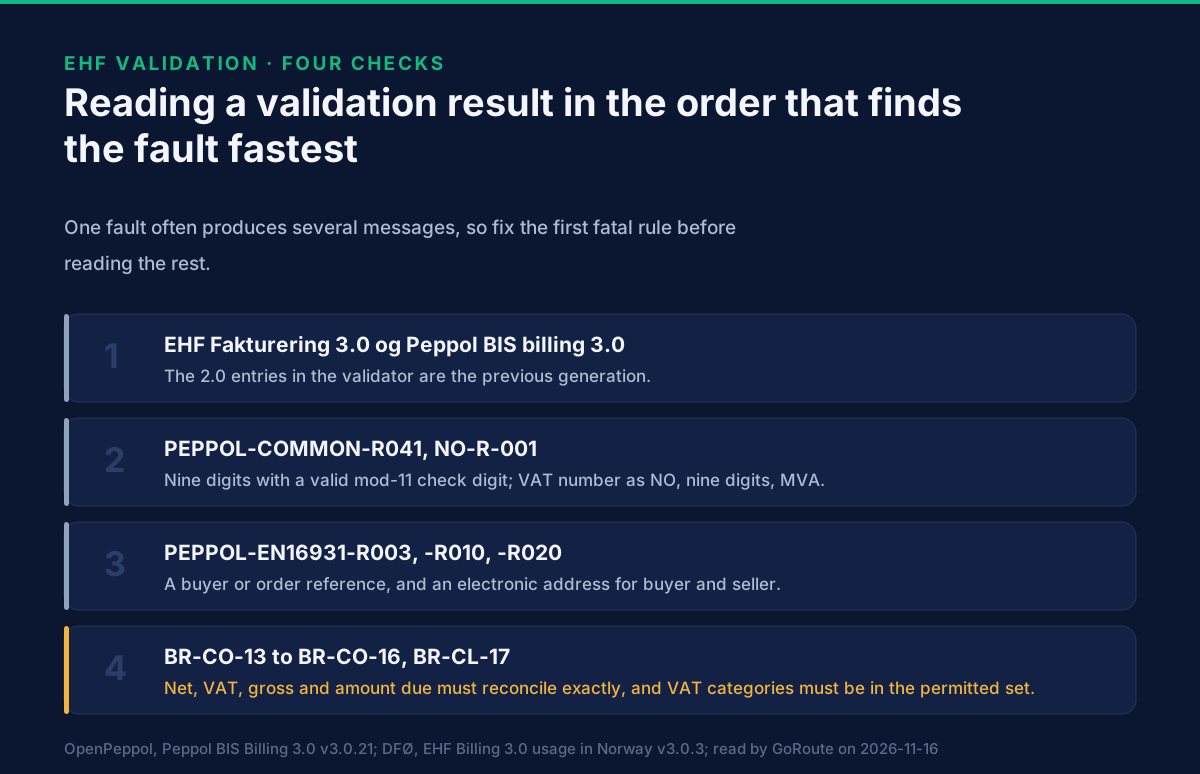
Start with the fatal rules, in order, and fix the first one before reading the rest. One fault often produces several messages. A bad VAT code on a line, for example, produces a line-level failure and a failure in the VAT breakdown that summarises it, which is why BR-CL-17 and BR-CL-18 arrive together.
Three habits save time, and none of them depends on the validator:
- Look at the value you sent, not at the rule text. Most failures are a field populated from the wrong place.
- Fix identifiers before amounts. An organisation number or endpoint that fails changes what everything after it means.
- Keep the failing file. Rerun the same file after each change so you know which change fixed which rule.
What does a clean validation not prove?
That the buyer will accept it. The validator tests the document, not the relationship. Three things sit outside it:
- The address. A valid invoice sent to a participant who does not receive that document type is returned by the network, not by the validator. How a Norwegian business becomes reachable explains how to check.
- The reference. A public buyer such as a state body asks for particular references, and the content of a reference is not validated. Invoicing Norwegian public bodies in EHF sets out what DFØ asks for.
- The payment details. A wrong KID passes validation and loses the payment. The KID and IBAN page covers it.
What we do not know
We have not tested every rule in the list against the live validator and do not claim to. The rule texts quoted here are from the published Peppol BIS Billing 3.0 specification, and the table lists the ones we meet most often rather than every rule that can fire. Where the specification and the validator disagree, the validator is what the receiving system will run, and we would rather you tell us than assume.
What to do next
Put the validator in the path of your first live invoice, with a real document and not a hand-built sample. If you are building the integration, the validation responses and error codes GoRoute returns for Norway are in the developer documentation, and the Norway page lists the country rules we apply before anything is sent. Our own validation errors you can prevent covers the cross-country cases, and a test bed is the place to send documents before they matter. Recorded ERP walkthroughs are on tutorials. To go through a failing file with someone, book a session.
Next read: how an EHF credit note works, because a document that passes validation and is wrong still has to be corrected, and the correction has its own rules.
Sources: DFØ, anskaffelser.dev validator, list of supported specifications, read 16 November 2026; DFØ, EHF Billing 3.0, usage in Norway, version 3.0.3 (updated 2026-10-02), for the relation to Peppol BIS Billing 3.0; OpenPeppol, Peppol BIS Billing 3.0, version 3.0.21, for the texts of rules NO-R-001, NO-R-002, PEPPOL-COMMON-R041, PEPPOL-EN16931-R003, -R008, -R010, -R020, BR-CO-13 to BR-CO-16, the fatal and warning flags and the specification identifiers; DFØ, Send faktura til en kunde av DFØ, updated 4 October 2024. The BR-CL-17 and BR-CL-18 results are from GoRoute's validation of 16 September 2026, described on the VAT codes page. Last reviewed 2026-11-16.
Frequently asked questions
- Where is the official EHF validator?
- DFØ, the Norwegian Agency for Public and Financial Management, runs it on anskaffelser.dev. It checks a document against a specification you choose from its list, which includes EHF Fakturering 3.0 og Peppol BIS billing 3.0 and, separately, the older EHF Invoice and Creditnote 2.0.
- Which specification do I choose for a current Norwegian invoice?
- EHF Fakturering 3.0 og Peppol BIS billing 3.0. DFØ's own specification says EHF Billing 3.0 is implemented by implementing Peppol BIS Billing 3.0 without extensions or extra rules, so the two names describe one set of rules. The 2.0 entries are the previous generation.
- What is the difference between fatal and warning?
- In the Peppol rule list every rule is flagged either fatal or warning. A fatal rule means the document is not valid and should not be sent. A warning means the document is valid but something the rule authors expected is missing or doubtful. NO-R-002, the Foretaksregisteret rule, is a warning; NO-R-001, the Norwegian VAT number format, is fatal.
- Why does a validated invoice still get rejected?
- Validation checks the document against the rules, not against the buyer. A valid invoice can still be sent to an address the buyer does not receive on, carry the wrong reference for the buyer's system, or quote a KID that does not match. Those failures are not in the rule set.
- Can I validate a VAT category code here?
- The validator will report a wrong code, usually as BR-CL-17 or BR-CL-18, but explaining the codes is a separate page. See which VAT category code carries each Norwegian rate.
About Dr. Syed Raza
Dr. Syed Raza is an IT Enterprise Architect at ClayDesk LLC and leads the GoRoute platform. He works across Peppol Access Point and SMP infrastructure, PINT jurisdictions (Oman, AU/NZ, EU, JP, MY, SG), and national CTC regimes, translating regulatory detail into production-grade e-invoicing systems.
Building on Peppol?
GoRoute is a certified Peppol Access Point & SMP. Book a demo or read the docs to get started.