
SdI Notifications Explained: Every Message After You Send
SdI notifications after you send an Italian e-invoice: the delivery receipt, failed delivery, rejection, the 15-day lapse notice, and what to do next.

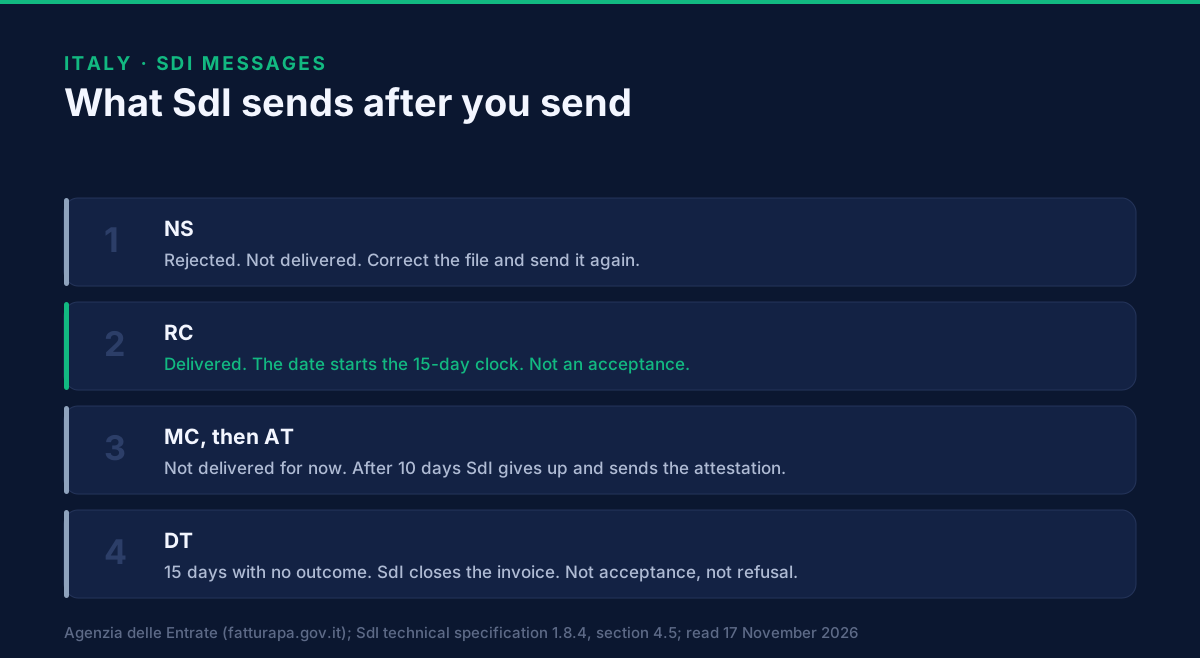
After you send a FatturaPA file, SdI answers with one of two messages: a delivery receipt if the file was delivered, or a rejection notice if it failed SdI's checks. A third, a failed-delivery notice, means the checks passed and the delivery did not. Later messages exist, but those first answers decide what you do next. A rejection means the recipient has not seen the invoice. A delivery receipt means it has been delivered, which is not the same as accepted.
This page is for the accounts receivable lead at a supplier who has sent a first file to Italy and received a message nobody explained. It lists every SdI message, who gets it and what it means, from the Agency's pages on fatturapa.gov.it and the SdI technical specification version 1.8.4, read on 17 November 2026. It does not cover error codes, which belong to the FatturaPA XML format page.
Which messages does SdI send?
Nine types, each named in the message file by a two-letter code. The specification gives the file name as the name of your file, the message type and a counter: for example <your file name>_NS_001.xml for a rejection. These are the types, in the order they usually appear.
| Code | Italian name | Goes to | What it tells you |
|---|---|---|---|
| NS | Notifica di scarto | Sender | The file failed a check. It was not delivered. |
| RC | Ricevuta di consegna | Sender | The file was delivered to the recipient. |
| MC | Notifica di mancata consegna | Sender | The file passed the checks, but SdI could not deliver it for now. |
| AT | Attestazione di avvenuta trasmissione con impossibilità di recapito | Sender | SdI gave up delivering after 10 days. |
| EC | Notifica di esito committente | From the recipient to SdI | The recipient accepts or refuses the invoice. |
| NE | Notifica di esito | Sender | SdI passes you the recipient's outcome. |
| SE | Scarto esito committente | Recipient | SdI rejected the recipient's outcome message. |
| DT | Notifica di decorrenza termini | Both | 15 days passed without an outcome. SdI closes the invoice. |
| MT | File dei metadati | Recipient | Travels with the invoice. It is not a message to you. |
Two details from the Agency. SdI signs every message except the metadata file. And the recipient's outcome is the only message that goes from the recipient to SdI.
What does the delivery receipt prove?
That SdI delivered the file to the recipient's channel, and the date when it did. The Agency's FAQ says delivery to a public body is communicated to the sender by the delivery receipt. The same message exists for private recipients. It carries the date of receipt by SdI and the date of delivery. The specification names the two moments T0, when SdI receives the file, and T1, when the recipient receives it. T0 is the DataOraRicezione field of the receipt or of the failed-delivery notice. T1 is DataOraConsegna in the delivery receipt.
A receipt is not an acceptance. The recipient may still say nothing, accept or refuse. Do not close the sale in your ledger on the receipt alone if the customer is a public body, and read invoicing the Italian public administration for what a refusal can rest on.
Delivery is not instant. The specification estimates the whole delivery process at around 48 hours on average, depending on the recipient's channel and on volume. It adds that the certified-email service rules allow 24 hours as the maximum for the delivery step alone. Do not chase a customer on day one.
What does a failed-delivery notice mean?
The file was valid, and the recipient's side did not take it, for a reason SdI does not attribute to you. The Agency's FAQ calls it the temporary impossibility of delivery. The specification sets out what follows.
- SdI sends you the failed-delivery notice.
- If the invoice is for a public body, SdI contacts the body and asks it to fix the problem. In the following 10 days it tries again.
- If a retry succeeds, you receive a delivery receipt.
- If 10 days pass from the notice with no success, SdI sends the attestation of transmission with impossibility of delivery. It is made of your original invoice file and a signed notice.
For a public body, the attestation lets you send the invoice yourself, by a channel you know, such as email or certified email, without another pass through SdI. For a recipient that is not a public body, the specification says the attestation gives definitive standing to the failed delivery. It does not say in these words what the sender and the buyer must then do. How the buyer obtains the invoice in that case, and what the sender must tell the buyer, is not in the pages we read, and this page does not describe it. Ask your Italian tax adviser before relying on an invoice that ended this way. The recipient code is what tells SdI where to deliver, and how it works is in the SDI code page.
A failed delivery to a public body can also be a registry problem. If SdI cannot place the body in IPA, the public index of administrations, it ends with the same attestation, and the cause is on the body's side.
What happens after a rejection?
Nothing is delivered, and you correct the file and send it again. The notice carries error codes saying why. The list of codes and their causes is in FatturaPA XML format. This page only covers the message.
The specification's duplicate check shows why a corrected file is not blocked by the failed one. SdI refuses a file whose seller, year and number match an earlier invoice, but only an earlier invoice for which no rejection notice and no refusal by the recipient has been sent. So a number that was rejected, or refused by the recipient, can be used again. The specification sets no resubmission period for a rejection. The time limit that applies to issuing an invoice is a VAT rule: article 21(4) of the VAT act, in the text in force on 17 November 2026, says an invoice is issued within twelve days of the operation, with exceptions. How that interacts with a rejected file is a question for your adviser.
Note the other direction. A refusal by a public body is not a rejection. SdI delivered the file and the body answered. The two have different messages, different causes and different fixes.
What is the 15-day lapse notice?
It is SdI saying it has finished with the invoice, and it says nothing else. The recipient has 15 days to send an outcome. The count starts at the date in the delivery receipt, or at the date of the failed-delivery notice, but only if a delivery receipt later follows it. If no outcome arrives, SdI sends the lapse notice to both parties.
After it, the recipient can no longer send an outcome through SdI, and you can no longer receive one. SdI rejects the invoice if it is sent again, and any communication about it. The Agency's FAQ is explicit that the notice has no implication for the recipient's checks or later handling, which remain between supplier and customer. The specification adds that the outcome is optional and that silence is not acceptance.
For your ledger, that means three states for a delivered invoice: delivered with no outcome yet, an outcome of accepted or refused, and closed by lapse. The last is not a fourth kind of answer from the customer. Chase payment with the customer as usual.
Where do you see the messages?
In the channel you sent from, and in the Agency's monitoring tool. The Agency lists four channels for sending a file: certified email, web upload, the SDICoop service and SDIFTP. With certified email, the replies come back to the sending mailbox. The first reply tells you which SdI address to use next time, and the Agency warns that sending from another address does not guarantee the outcome. A web upload is limited to 5 megabytes, and a certified-email message with its attachment to 30 megabytes.
If your own system or mailbox could not receive the messages, the Agency's FAQ says the delivery receipt and the notices are in its monitoring service for transmitted files, on the Fatture e Corrispettivi portal. The sender, the issuer or a delegate can read them with Entratel or Fisconline credentials.
If you receive invoices through SdI as well as sending them, one more rule applies. SdI retries delivery when it has no certain confirmation, so the same file can arrive twice with the same SdI identifier. The metadata file carries a counter, TentativiInvio. A value above 1 means a retry, and the Agency advises taking the file in anyway and treating it as a copy.
What is still open?
Three things, as of 17 November 2026.
- When an invoice counts as issued for VAT. We read the twelve-day rule and the SdI timestamps. We did not find a source that fixes the issue date to one of them, so we do not state it.
- What a buyer who is not a public body sees after an attestation of failed delivery. The pages we read do not describe it.
- How the rules read from 2027. The VAT act is replaced by a consolidated text from 1 January 2027, and we cite the article as numbered today.
What to do next
- Route every SdI message into a mailbox or queue that a named person reads, not only into the system that sent the file.
- Treat a rejection as a task with an owner, and a failed-delivery notice as a 10-day watch.
- Record the delivery receipt date next to the invoice, and the lapse date once it arrives.
- Do not read silence as acceptance. Follow up with the customer for payment.
- Read the neighbouring pages: the SDI code, stamp duty on Italian e-invoices and keeping the invoice afterwards.
- To talk through status handling for invoices in several countries, book a demo. The developer documentation, the tutorials and the GoRoute API show how documents and their statuses are handled on the Peppol network, where GoRoute is a certified access point (POP000991).
Related reading
- E-invoicing in Italy, the country page.
- Invoicing the Italian Public Administration
- FatturaPA XML Format: Structure, File Name and Signature
- What Is an SDI Code? The Codice Destinatario Explained
Sources, all read on 17 November 2026: Agenzia delle Entrate, fatturapa.gov.it, pages "File, fatture e messaggi", "Inviare la FatturaPA", "Dopo l'invio della FatturaPA" and the FAQ on the invoicing flow; Sistema di Interscambio technical specification version 1.8.4 (31 March 2026), section 4.5, section 5.1.2 and annex B-1; Presidential Decree 633/1972, article 21, on Normattiva. Translations from the Italian are ours.
Frequently asked questions
- What does a ricevuta di consegna mean?
- It is the message SdI sends the sender to certify that the invoice file was delivered to the recipient. Its date is the delivery date. It is not an acceptance: the recipient has not yet said anything.
- What is a notifica di mancata consegna?
- SdI's message that it could not deliver the file for now. For a public body, SdI contacts the body and retries for 10 days. If delivery succeeds you receive the delivery receipt. If it does not, after 10 days SdI sends an attestation of transmission with impossibility of delivery.
- What is a notifica di decorrenza termini?
- A notice, sent to both sides when 15 days pass from the delivery receipt without an outcome from the recipient, that SdI has closed the invoice. It does not mean accepted and it does not mean refused.
- Is an invoice accepted if the recipient says nothing?
- No. The SdI specification says the recipient's outcome is optional, and that an invoice is not accepted automatically because the recipient did not refuse it through SdI.
- Where do I see the SdI messages for my invoice?
- In the channel you sent from, and in the Agency's monitoring tool for files sent to SdI, on the Fatture e Corrispettivi portal, with Entratel or Fisconline credentials. The Agency's FAQ points there when your own system or certified-email box could not receive them.
About Dr. Syed Raza
Dr. Syed Raza is an IT Enterprise Architect at ClayDesk LLC and leads the GoRoute platform. He works across Peppol Access Point and SMP infrastructure, PINT jurisdictions (Oman, AU/NZ, EU, JP, MY, SG), and national CTC regimes, translating regulatory detail into production-grade e-invoicing systems.
Building on Peppol?
GoRoute is a certified Peppol Access Point & SMP. Book a demo or read the docs to get started.