
How an Australian Business Starts Receiving E-Invoices
How an Australian business starts receiving e-invoices: your ABN becomes a Peppol address, a registered provider takes delivery, and PINT A-NZ files reach AP.

How does an Australian business start receiving e-invoices?
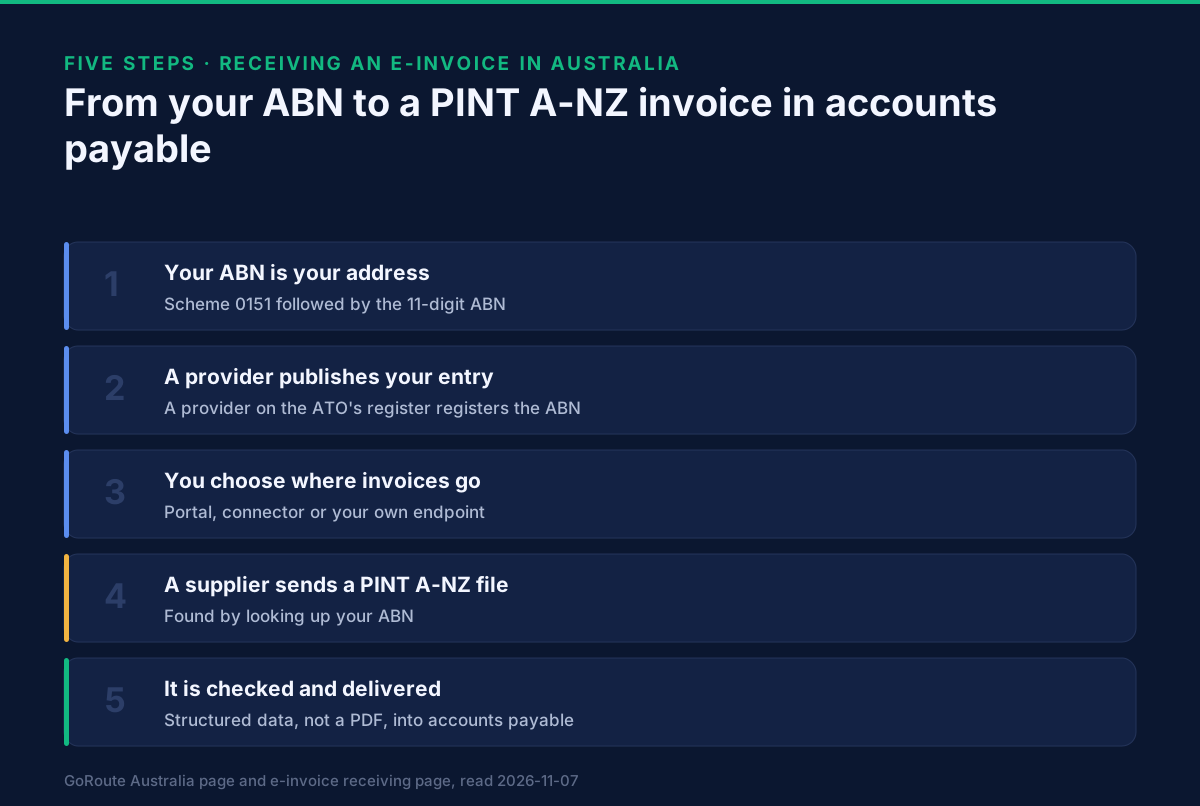
An Australian business starts receiving e-invoices by registering its ABN as a Peppol address through a provider on the ATO's Peppol service provider register. Once that entry exists, any supplier on the network can look you up by ABN and send you a PINT A-NZ file, which arrives as structured data and goes to your accounts system instead of a mailbox. There is no business-to-business mandate, so you decide when to switch it on. The rest of this page covers what each step involves and what changes in accounts payable.
Every other Australian page on this site speaks to the sender. This one is for the person who opens the invoices.
Why does receiving come first?
Receiving is the side the Australian Taxation Office (ATO) measures. The target discussed in Australia eInvoicing in 2026: the ATO target counts invoices received through eInvoicing, and an invoice cannot be received that way unless the receiver has an address to receive it on.
It is also the side that businesses tend to leave until a supplier asks. The sending side gets a project. Receiving is only noticed when someone says "we already send these, where do we send yours?" and nobody knows. If you start with receiving, that question has an answer ready.
What is your Peppol address?
In Australia your address on Peppol is your ABN. A Peppol participant identifier has two parts: a scheme code, which says what kind of number follows, and the number itself. For an Australian business the scheme is 0151 and the number is the 11-digit ABN, so the identifier is written 0151: followed by the ABN. Australia's e-invoicing page sets out the ABN-based identifiers in more detail, and which Peppol identifier is yours covers what to do when a business could use more than one.
Two details are worth knowing before you register:
- The ABN identifies the legal entity that is registered. If invoices are addressed to a trading name, the entity's ABN is still what goes in the address. Suppliers will use the ABN printed on your purchase orders, so make sure it is the entity that actually pays.
- A mistyped ABN looks the same as an unregistered business. The network answers "not found" in both cases, which is why the lookup in how to check whether a business can receive e-invoices is worth reading before you give the number to suppliers.
How do you register?
You register through a Peppol access point provider. The access point is the software that sends and receives on the network on your behalf. The ATO is Australia's Peppol Authority and publishes a register of the providers it lists, which is the right place to start: ATO Peppol service provider register. Check any provider you consider against it, including GoRoute, which is listed there under ClayDesk LLC.
In practice the steps are short:
- Choose a provider that receives as well as sends. Choosing an accredited Peppol service provider lists the questions to ask.
- Give the provider your ABN and the document types you want to receive. For an Australian buyer that is invoices and credit notes on PINT A-NZ.
- The provider publishes your entry in a service metadata publisher (SMP), the directory record that tells other access points where to deliver to your ABN. GoRoute is a certified Peppol Access Point and SMP (POP000991), so it holds both halves.
- Say where the invoices should go. That is the decision that matters most, and the next section covers it.
- Send a test document from a supplier or from the provider before you tell anyone else.
The registration does not move or change your ABN, your bank details or your GST registration. It adds an address.
What actually arrives?
What arrives is a PINT A-NZ file. PINT A-NZ is the Australia and New Zealand version of the Peppol invoice format, jointly governed by the ATO and New Zealand's Ministry of Business, Innovation and Employment, and based on Peppol BIS Billing 3.0. It became the required profile on 15 November 2024, and the legacy ANZ profiles were retired on 15 May 2025. PINT A-NZ explained covers the format, and PINT A-NZ is now the only accepted profile covers the retirement.
For you, the practical points are:
- It is data, not a picture of an invoice. The supplier, your ABN, each line, the GST and the total are separate fields.
- It is checked before it reaches you. A receiving platform validates the file against the profile's rules and records the result, so a malformed document is flagged on arrival rather than discovered at payment.
- Credit notes arrive the same way. A correction from a supplier comes as a credit note on the same profile, not as an email saying "ignore the last one".
How does it reach your accounts system?
This is where receiving projects succeed or stall, because the network delivers to your access point, and your accounts system is a separate thing. There are three common routes, and GoRoute's e-invoice receiving page describes what each involves:
| Route | What it means | Suits |
|---|---|---|
| Portal | Invoices appear in the provider's portal, where someone reviews and exports them | Low volumes, or a first month of testing |
| Connector | The provider pushes each invoice into your accounting or ERP system | A business whose payables run in one system |
| Your own endpoint | The provider calls your endpoint when a document arrives, and your system fetches it | A business with developers, or a software house |
Whichever route you choose, a record of what arrived, from whom and what it was checked against is what you will want when an invoice is queried. The documentation sets out the delivery options and the notification that tells your system a document has arrived.
What changes in accounts payable?
Less than most teams expect, and in the right places.
- No retyping. The lines, GST and totals come in as data, so the keying step and its errors disappear for invoices that arrive this way.
- Matching is easier. If a supplier includes your purchase order number in the file, it sits in a named field rather than somewhere on a PDF.
- Two streams, for a while. Suppliers who are not on Peppol keep emailing PDFs. Plan for both. The share on the network grows as suppliers join, and nothing forces a cut-over date.
- The tax question moves to the front. The person approving an invoice will ask whether the file is a valid tax invoice for a GST credit. Can you claim GST credits on an e-invoice? answers that.
- The risk profile changes. A structured file from a registered sender closes some doors and leaves others open. Does e-invoicing stop invoice fraud? is specific about which.
Is receiving a legal obligation?
No. Commonwealth government agencies have had to be able to receive Peppol e-invoices since July 2022, and the Australian Government's Business eInvoicing Right lets a business ask its trading partners to send Peppol e-invoices. Neither puts a duty on a private-sector business to receive them. This page does not say what the ATO will do next, because nothing it has published settles that.
The reason to start now is therefore commercial, not legal: your largest suppliers and any government customer that is also your supplier are the ones most likely to ask first. Being able to answer "yes, here is our ABN on Peppol" removes a reason for them to delay.
What should you do this month?
- List your ten largest suppliers and ask each whether they can send on Peppol.
- Pick the delivery route from the table above, and who in accounts payable will watch the first month.
- Choose a provider from the ATO register and register your ABN.
- Run one test invoice end to end, including a credit note.
If you want to see an invoice go from a supplier to an Australian buyer's accounts system, book a demo. If you would rather look first, the tutorials show the portal and the connectors, and the e-invoice receiving page is where to start with the product.
Related guides
- Can this business receive e-invoices? Checking an ABN on Peppol
- Can you claim GST credits on an e-invoice?
- Does e-invoicing stop invoice fraud? What Peppol changes
- Australia eInvoicing in 2026: the ATO target
- E-invoicing in Australia
Sources: ATO eInvoicing for the ATO's role and adoption goals; the ATO Peppol service provider register for the listing of providers; OpenPeppol for the identifier scheme and the network; GoRoute's Australia page and e-invoice receiving page for how GoRoute registers and delivers. This page describes how receiving works and is not tax or legal advice. GoRoute operates certified Peppol Access Point and SMP POP000991.
Frequently asked questions
- Is receiving e-invoices compulsory for an Australian business?
- There is no business-to-business mandate in Australia. Commonwealth agencies have had to be able to receive Peppol e-invoices since July 2022, but a private business is not required to switch receiving on. In practice, the first sign is usually a supplier asking whether you can take their invoices as structured data.
- What do I need to receive e-invoices in Australia?
- Your ABN, a Peppol access point provider that will register that ABN as your address, and somewhere for the invoices to go, such as your accounting system or a payables inbox. You do not need to buy software for the network itself.
- What does an Australian e-invoice look like when it arrives?
- It is a structured XML file in the PINT A-NZ format, not a PDF. It carries the supplier, your ABN, the lines, the GST and the amount payable as data fields, which your system reads instead of someone retyping them.
- Do I have to stop receiving invoices by email?
- No. Registering on Peppol adds a second route. Suppliers who are not on the network keep emailing PDFs, and you handle those as you do today.
- Can I receive e-invoices and send them with different providers?
- The registration for your ABN sits with one provider at a time, and that provider is the one that receives. Sending can be arranged separately, but most businesses keep both with one provider so that one entry and one set of records cover both directions.
About Dr. Syed Raza
Dr. Syed Raza is an IT Enterprise Architect at ClayDesk LLC and leads the GoRoute platform. He works across Peppol Access Point and SMP infrastructure, PINT jurisdictions (Oman, AU/NZ, EU, JP, MY, SG), and national CTC regimes, translating regulatory detail into production-grade e-invoicing systems.
Building on Peppol?
GoRoute is a certified Peppol Access Point & SMP. Book a demo or read the docs to get started.