
Oman E-Invoicing from Sage: Sage 50, Sage 200 and Business Cloud
Sage 50, Sage 200 and Sage Business Cloud reach Oman's Fawtara programme through GoRoute. What a Sage invoice already carries, and what Oman asks for on top.

The short answer
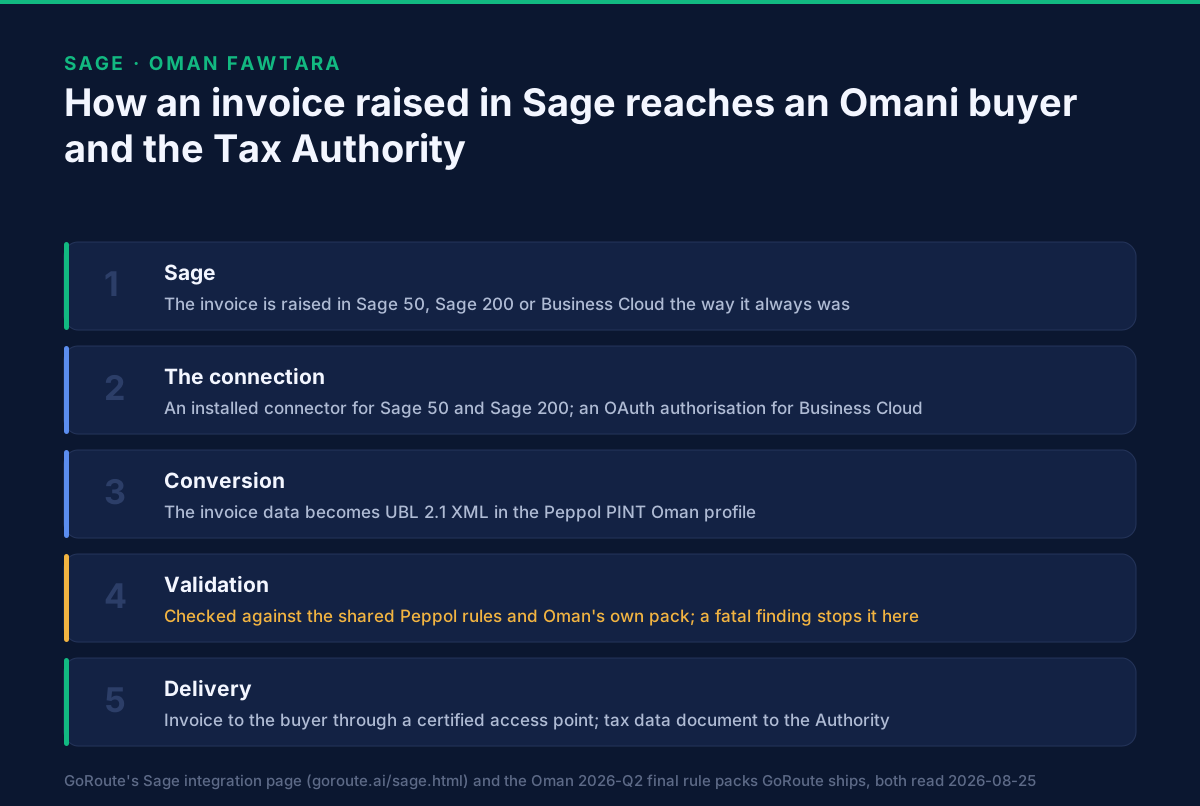
If your finance team runs Sage, the connection is the easy part — and the work that decides your timetable is sitting in your company and customer records today. GoRoute publishes a Sage integration covering Sage 50, Sage 200 and Sage Business Cloud. Once that connection exists, an invoice raised in Sage is converted into UBL 2.1 XML in the Peppol PINT Oman profile, validated against Oman's rules, delivered to your buyer through a certified Peppol access point, and accompanied by a separate tax data document filed with the Oman Tax Authority.
Nothing about how your team raises an invoice has to change.
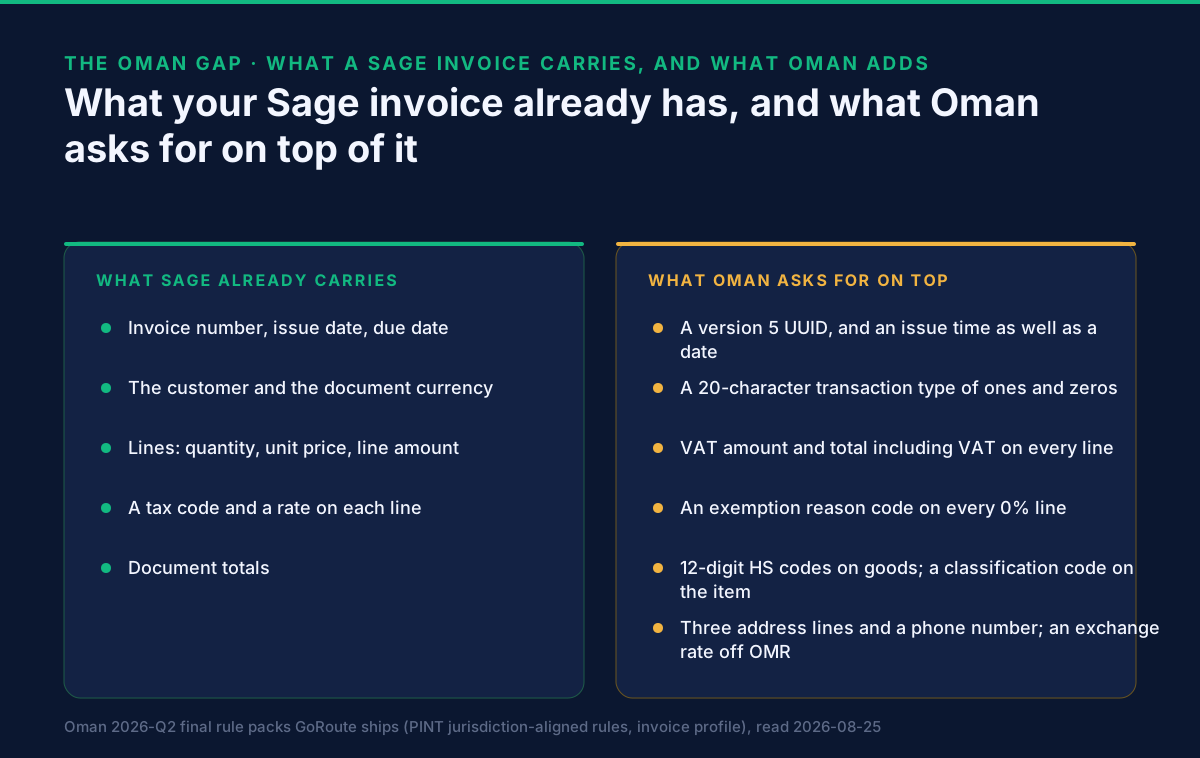
What does have to change is what the invoice carries. Oman asks for seven things an ordinary sales invoice does not have, and no integration invents them. This page names them, says where each one has to come from, and gives you a list you can work through in your own Sage file this week.
Does Sage work with Oman's Fawtara programme?
Yes — through a connection to GoRoute rather than through anything Oman-specific inside Sage. Sage produces the invoice. Everything Oman requires is added after it leaves.
What happens after that is the same for every source system, and it is worth knowing in outline because it explains where problems surface:
| Stage | What it does | Where a problem shows up |
|---|---|---|
| Conversion | Your invoice data becomes a UBL 2.1 XML document in the PINT Oman profile | A missing field appears as an empty element rather than an error |
| Validation | The document is checked against the shared Peppol rules and Oman's own pack | Here, by rule identifier, before anything is sent |
| Delivery | The invoice travels to the buyer through a certified access point | A buyer not registered on the network cannot receive it |
| Reporting | A separate tax data document goes to the Oman Tax Authority | Its own rule pack, and its own findings |
GoRoute's Sage page covers the commercial ground — which Sage products are in scope, and how the integration is set up. This page answers only the Oman question, because that is the part no general integration page can answer for you.
Does Making Tax Digital compliance mean you are ready for Oman?
No, and this is the assumption most likely to cost a Sage user time. They are two unrelated regimes.
Making Tax Digital is a United Kingdom requirement about how VAT records are kept and how returns reach HMRC. It says nothing about the structure of an individual invoice. Oman's Fawtara programme is the opposite: it is almost entirely about the structure of each individual invoice — a UBL 2.1 document in the PINT Oman profile, carrying fields a UK invoice never needed, validated against Oman's own rule pack, and reported to the Oman Tax Authority as a separate document.
A Sage installation that satisfies HMRC perfectly can fail every Oman rule named on this page. The reverse is also true. Neither regime substitutes for the other, and no supplier can make one do the work of the other.
That is worth stating plainly because GoRoute's own Sage page is written for the United Kingdom and the United States, where most Sage users are. If you are reading it from Muscat, the compliance section on that page is not your compliance section. This one is.
Does it matter whether you run Sage 50, Sage 200 or Business Cloud?
It changes how the data leaves Sage, and nothing else. GoRoute's Sage page describes an installed connector for Sage 50 and Sage 200, and an OAuth authorisation — a consent screen rather than an installation — for Sage Business Cloud.
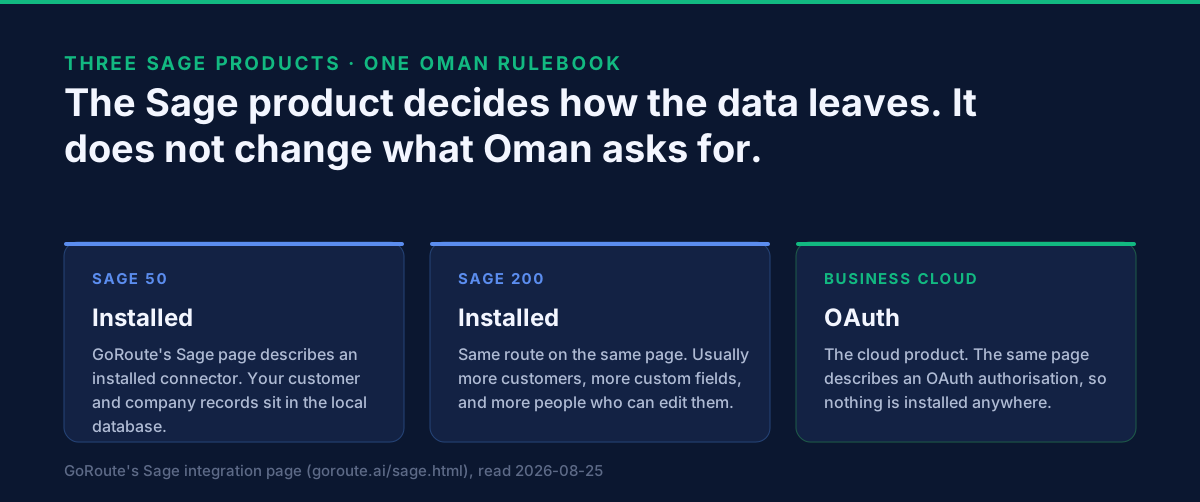
Oman's requirements are identical in all three cases, because they are set by Oman rather than by your software. The practical difference is where the data clean-up happens. On the installed products your customer and company records sit in a local database that a small number of people maintain, often for years, and nobody has had a reason to fill in a third address line. On Business Cloud the same records are shared more widely and change more often, so the risk is that a cleaned record is re-broken by someone who did not know why it mattered.
Either way, name the owner before you start. That is the single decision that most reliably keeps an Oman rollout on its dates.
What does Oman ask for that a Sage invoice does not carry?
Seven things, and the useful split is which of them software can produce and which of them only your business can decide.
Produced in the conversion, so not your problem. Oman requires a version 5 UUID on every
document — the kind derived from a name rather than generated at random, so the same invoice always
produces the same identifier and a retry is recognisable as a retry (IBR-002-OM). It requires an
issue time as well as an issue date (ALIGNED-IBRP-016-OM). And it carries a transaction
type: under IBR-001-OM this is a 20-character string made only of the digits 1 and 0, each
position standing for a kind of supply — export, import of goods, reverse-charge import of
services, summary invoice, continuous supply, special-zone supply, profit margin, self-billing.
Several other rules only fire because of what that string says, which is why it looks like an
implementation detail and behaves like a business decision.
Your decision, and the reason Oman projects run long.
A VAT amount and a total including VAT on every line. Oman wants both figures in the file: the
line VAT amount under IBR-038-OM and the line total including VAT under IBR-158-OM. Sage, like
most accounting systems, calculates those numbers to display a line and never emits them as fields.
They are derivable, and the derivation has to be right to the baisa.
An exemption reason code on every 0% line. This is the expensive one. Sage records a tax code
and a rate; it does not record why a line is 0%. Oman requires the reason, coded. IBR-069-OM
refuses a VAT breakdown in category E (exempt) or Z (zero-rated) with no exemption reason code,
and two further rules constrain the value: CL-05-OM limits an exempt line to the twelve codes
VATEX-OM-01 to VATEX-OM-12, and CL-10-OM limits a zero-rated line to the sixteen codes
VATZR-OM-01 to VATZR-OM-16. So each 0% tax code in your Sage file has to be mapped, once, to an
Oman code, by someone who knows why that line is 0%. Nobody can derive that from the ledger.
Item classification. A goods line needs a Harmonized System code of exactly twelve digits
(IBR-079-OM, with IBR-080-OM enforcing the length), and the item needs an industrial
classification code (IBR-081-OM). Services carry a code from Oman's service-type list instead.
These live in your product data, not on the invoice, and they are usually assembled by whoever owns
the item master.
An exchange rate on anything not in rials — the next section, because for Sage users it is a larger question than it looks.
What if you invoice Omani customers in sterling or dollars?
It works, and it adds one requirement that Sage will not add for you.
IBR-004-OM requires a currency exchange rate on the document whenever the invoice currency is
not OMR. IBR-005-OM limits that rate to a maximum of seven decimal places where the VAT
accounting currency is OMR and the invoice currency differs from it.
Both are flagged fatal in the rule pack. That matters twice over. First, a GBP or USD invoice
carrying no exchange rate is refused rather than warned about. Second, IBR-005-OM is worded with
the word "should" and is fatal anyway — a reminder that severity comes from the rule file, not
from how the message reads. A finding phrased as advice can still stop the document. If you are
reading validation output for the first time, that is the thing to know before you triage anything.
The distinction to hold on to: Sage's multi-currency handling produces an exchange rate for your accounts. Oman requires the rate to travel inside the invoice document, at the right precision. Those are different jobs and only the first one is done today.
What has to be right inside Sage before the first invoice is sent?
Three records and one list. None of this needs an integration to start — it can be done today, in your own Sage file, by whoever maintains it.
Your company record, in full. IBR-010-OM requires the seller's address line 1, address
line 2, address line 3, city and postal code all to be present. IBR-011-OM requires a seller
contact telephone number. Three address lines is the one that catches people: a company record
set up for a UK or a Gulf address usually has one or two lines filled and the rest blank, and it
has never mattered because no human reading the invoice noticed. Oman's validator notices.
Your customer records, to the same standard. IBR-019-OM requires buyer address line 1, line
2, line 3, city and post code. For a Sage file with hundreds of Omani customers, this is the
single largest piece of data work on the project, and it is entirely doable before anyone has
chosen a provider.
VAT identification numbers, in Oman's format. IBR-003-OM requires the seller's, the buyer's
and any third party's VAT identification number to be exactly twelve characters: OM followed
by ten digits. A number in any other shape is refused, and a customer master that looks complete
because every field has something in it is the commonest unpleasant surprise in week nine.
Amount precision — three decimal places, not two. IBR-DEC-03-OM refuses any amount carrying
more than three decimals, and three is not a nicety: the rial has 1,000 baisa. A file whose prices
have always been rounded to two decimals produces documents that look right to every human who
reads them and fail on arithmetic.
Every 0% tax code in the file. List them. For each one, decide: zero-rated or exempt, and which Oman code. That is a short table, it needs your finance lead rather than your integrator, and it is the single item most likely to still be open the week before go-live.
Then count one number: how many active customers have no usable VAT identification number and no third address line. That figure is the size of the data work, and it is far cheaper to know in week one.
How do you know an invoice will be accepted before you send it?
By validating a real one, early. A document is checked against the full PINT OM rule set
including its Schematron rules, and what comes back names the rule that fired by its own identifier
— IBR-069-OM rather than "invalid tax line". An error naming the field and the rule is a ticket
somebody can act on.
Two things about reading those results matter more than they look. Severity comes from the rule
file, not from how the message reads — as IBR-005-OM above demonstrates. And a warning is not
noise: Oman deliberately accepts some documents with a warning, and the difference between
"rejected" and "accepted, please confirm this was deliberate" is one an integrator needs to see
rather than have flattened into a red cross.
The order the checks run in, and what each layer refuses, is set out in what format an Oman e-invoice must be in; why Oman e-invoices get rejected reads an actual result identifier by identifier, and how to test an Oman e-invoice before you send it covers doing this before the Authority ever sees the document.
Does the Tax Authority receive the same file as your buyer?
No, and assuming it does is the second most common misunderstanding after the format. Your buyer receives the invoice. A tax data document, derived from that invoice and carrying it, goes to the Oman Tax Authority. It has its own structure and its own rule pack, which is why a clean validation on the invoice can still leave work to do.
The document itself is walked through field by field in inside the Oman tax data document, and the exchange model behind it — five corners rather than the familiar four — is explained in Oman's Fawtara five-corner model.
Which Oman deadline applies to a Sage user?
The same one that applies to everyone else. It depends on annual supplies, not on your accounting system. Decision 189/2026 makes electronic tax invoices mandatory from 1 April 2027 for taxable persons whose annual supplies exceed OMR 5,000,000, and from 1 October 2027 for those at or below that figure.
What the Decision changed is on the page that owns the Oman dates, and which wave am I in works through the threshold. This page states no further dates deliberately: one page should own that question.
Where do the invoices live?
For Oman, in Oman. GoRoute operates in-country data residency for Omani clients — invoices, keys, tax data documents and audit logs. The detail is on data residency and compliance in Oman.
Data residency is usually raised late, by a security review, at the point where changing the answer is expensive. It is a much cheaper question in week one.
What to do this week
- Export your customer list and count two things: records with no VAT identification number in
the
OMplus ten digits form, and records with fewer than three address lines. Those two numbers size the data work. - Open your own company record and fill in address lines 1, 2 and 3, the city, the postal code and a contact telephone number. That is one screen and it is done.
- List every 0% tax code in your file and decide, for each, zero-rated or exempt and which Oman code. This is the long pole.
- Check your amount precision — three decimal places, not two.
- Decide where the exchange rate comes from if you invoice in anything other than rials.
- Name three owners: the customer master, the item master, and the VAT treatment.
- Establish which date applies to you by annual supplies.
- Ask any shortlisted provider for their Oman accreditation in writing, and check it.
Running something other than Sage?
The same question, answered for the systems next to Sage in Omani finance functions: Oman e-invoicing from SAP S/4HANA, Odoo, Microsoft Dynamics 365, Oracle Applications, QuickBooks, Xero, Zoho Books, TallyPrime, and, where invoices start in a spreadsheet, Excel. If you wrote your own billing or point-of-sale software, connect it directly.
For the interface itself, see the API and services page and the developer documentation; for the market as a whole, the Oman page. A document can be validated against the full Oman rule set before you commit to anything through the free sandbox. If it is easier to talk it through against your own Sage file, book a working session.
Where GoRoute stands
GoRoute is an e-invoicing service provider accredited in Oman by the Oman Tax Authority, on 29 July 2026, through Union Digital Technologies SPC. It operates a Peppol-certified Access Point (Service Provider ID POP000991, ClayDesk LLC).
Those are checkable facts rather than adjectives, which is the point: ask any provider for the equivalent. How to check an Oman provider's claim sets out the questions worth asking.
Sources
- PINT OM Billing Process v1.0.1 — the Oman specification the validation rules come from
- Oman Tax Authority — Fawtara — the national e-invoicing programme
- Oman Tax Authority tax portal
- OASIS UBL 2.1 — the underlying document syntax
- OpenPeppol — the network the exchange runs on
The Sage capability described here is what GoRoute publishes on its own Sage integration page, read on 25 August 2026. Every rule identifier and field constraint was read on the same day in the Oman 2026-Q2 final rule packs GoRoute ships. No other capability is claimed for any Sage product on this page.
Frequently asked questions
- Does Sage work with Oman's Fawtara e-invoicing?
- Yes, through GoRoute. GoRoute publishes a Sage integration covering Sage 50, Sage 200 and Sage Business Cloud, and once the connection exists an invoice raised in Sage is converted into UBL 2.1 XML in the Peppol PINT Oman profile, validated against Oman's rules, delivered to your buyer through a certified Peppol access point, and accompanied by a separate tax data document filed with the Oman Tax Authority. Nothing about how your team raises an invoice has to change.
- Does Making Tax Digital compliance mean we are ready for Oman?
- No. They are two separate regimes and neither one implies the other. Making Tax Digital is a United Kingdom requirement about how VAT records are kept and returns are filed to HMRC. Oman's Fawtara programme is about the structure of each individual invoice — a UBL 2.1 document in the PINT Oman profile, carrying fields a UK invoice never needed, validated against Oman's own rule pack and reported to the Oman Tax Authority as a separate document. A Sage installation that satisfies HMRC perfectly can still fail every Oman rule on this page.
- Does it matter whether we run Sage 50, Sage 200 or Business Cloud?
- It changes how the data leaves Sage and nothing else. GoRoute's Sage page describes an installed connector for Sage 50 and Sage 200 and an OAuth authorisation for Sage Business Cloud. The Oman requirements are identical in all three cases, because they are set by Oman rather than by your software. The practical difference is where the data clean-up happens: for the installed products your customer and company records sit in a local database, so decide early who owns them.
- What does Oman require that an ordinary Sage invoice does not carry?
- Seven things. A version 5 UUID on the document, under IBR-002-OM. An issue time as well as an issue date, under ALIGNED-IBRP-016-OM. A transaction type that is a 20-character string of ones and zeros saying what kind of supply this is, under IBR-001-OM. A VAT amount and a total including VAT on every line, under IBR-038-OM and IBR-158-OM, which most accounting systems calculate for display and never emit. An exemption reason code on every zero-rated or exempt line, under IBR-069-OM. A twelve-digit Harmonized System code on goods lines with an industrial classification code on the item, under IBR-079-OM to IBR-081-OM. And an exchange rate whenever the invoice is not in Omani rials, under IBR-004-OM.
- What has to be right inside Sage before the first invoice is sent?
- Your company record, your customer records and your tax codes. Oman requires seller address line 1, address line 2, address line 3, city and postal code all to be present, under IBR-010-OM, and a seller contact telephone number, under IBR-011-OM. The same three address lines, city and post code are required for the buyer under IBR-019-OM. Every VAT identification number — yours and your customers' — must be exactly twelve characters, the letters OM followed by ten digits, under IBR-003-OM. Amounts must not carry more than three decimal places, under IBR-DEC-03-OM. And every 0% tax code in your file needs a decision: zero-rated or exempt, and which Oman code.
- Which Oman reason codes apply to a zero-rated or exempt line?
- Fixed lists, and the rule packs check the value rather than accepting any text. An exempt line must carry one of the twelve codes VATEX-OM-01 to VATEX-OM-12 under CL-05-OM. A zero-rated line must carry one of the sixteen codes VATZR-OM-01 to VATZR-OM-16 under CL-10-OM. A 0% line with no reason code fails outright under IBR-069-OM, whatever the invoice looks like on screen in Sage.
- We invoice Omani customers in sterling. Does that work?
- Yes, and it adds one requirement. IBR-004-OM requires a currency exchange rate on the document whenever the invoice currency is not OMR, and IBR-005-OM limits that rate to seven decimal places where the VAT accounting currency is OMR. Both are flagged fatal in the rule pack, so a GBP invoice with no rate on it is refused rather than warned about. Sage's own multi-currency handling produces a rate for your accounts; the Oman requirement is that the rate travels inside the invoice document, at the right precision.
- Does the Oman Tax Authority receive the same file as the buyer?
- No. Your buyer receives the invoice; a separate tax data document, derived from that invoice and carrying it, goes to the Authority. It has its own rule pack, which is why an invoice that validates cleanly can still leave work to do. Sending an invoice does not report it, and reporting it does not send it.
- Which Oman e-invoicing date applies to a Sage user?
- The same dates as everyone else — they depend on annual supplies, not on which accounting system you run. Decision 189/2026 makes electronic tax invoices mandatory from 1 April 2027 for taxable persons whose annual supplies exceed OMR 5,000,000, and from 1 October 2027 for those at or below that figure.
About Dr. Syed Raza
Dr. Syed Raza is an IT Enterprise Architect at ClayDesk LLC and leads the GoRoute platform. He works across Peppol Access Point and SMP infrastructure, PINT jurisdictions (Oman, AU/NZ, EU, JP, MY, SG), and national CTC regimes, translating regulatory detail into production-grade e-invoicing systems.
Building on Peppol?
GoRoute is a certified Peppol Access Point & SMP. Book a demo or read the docs to get started.