
Portugal Invoice Requirements: ATCUD, QR Code and Certified Software
What a Portuguese invoice must carry: the ATCUD code, a QR code from certified software, and who must use that software. Read from the Tax Authority.

A Portuguese invoice must carry the ATCUD, the unique document code, and a QR code if the
software that issued it is certified by the Tax Authority. The ATCUD is written
ATCUD: followed by a validation code from the Authority, a hyphen and the document's sequence
number. Which software may issue invoices at all is a second rule, and it is the one most often
missed.
This page is for the bookkeeper or controller who needs the list of what goes on the document and who has to use certified software. It is read from the Authority's own texts, which are linked at the foot. It does not cover how a program becomes certified, because that is a procedure for software producers. It does not cover the qualified signature or seal that PDFs need from 1 January 2027, which has its own page.
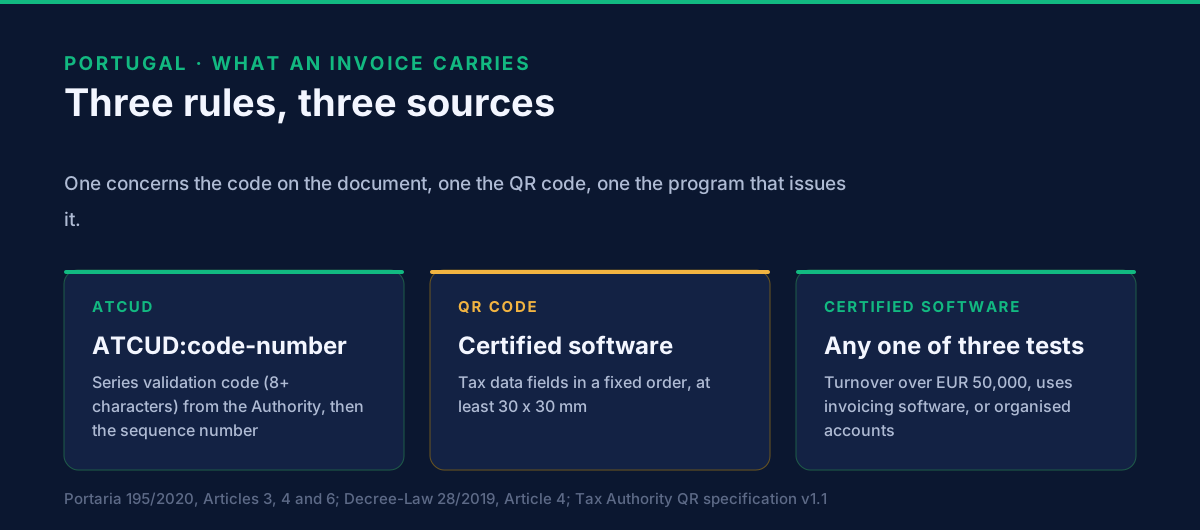
What are the three rules, and how do they differ?
One concerns the document, one the program that issues it, and one the Authority's data. Readers mix them up, so keep them apart:
| Rule | What it asks | Source |
|---|---|---|
| ATCUD | A unique code on every invoice and tax-relevant document | Portaria 195/2020, Articles 3 and 4 |
| QR code | A two-dimensional code on documents issued by certified software | Portaria 195/2020, Article 6; the Authority's technical specification, version 1.1 |
| Certified software | Taxpayers meeting a test may only use programs the Authority has certified | Decree-Law 28/2019, Article 4 |
A fourth item, the monthly SAF-T (PT) file, is a reporting duty to the Authority. It is described on our Portugal page and is not repeated here.
What is the ATCUD and how is it built?
The ATCUD is the series validation code and the sequence number, joined by a hyphen. Portaria 195/2020 fixes the pieces:
- The validation code is given by the Tax Authority to a document series. It is a string of at least eight characters (Article 3(1)).
- The sequence number is the document's number inside the series. In a billing program it is the numeric part after the slash in the document identifier (Article 3(3)).
- The mention takes the form
ATCUD:ValidationCode-SequenceNumberand must appear on every invoice and other tax-relevant document, whatever the means of processing (Article 4(1)). - It must be perfectly legible whatever the medium shown to the customer (Article 4(2)).
- On a document of more than one page it must appear on every page and, where a QR code is required, directly above the QR code (Article 4(3)).
The Authority's technical specification gives an example of the code inside a QR message:
H:CSDF7T5H-0035. The first part is a series code, the second the sequence number 35.
Where does the validation code come from?
From the Tax Authority, after you tell it about the series. This is the step that catches teams out, because the code is not something a billing system can compute from the invoice number, the year or the company's tax number. Under Article 2 of the Portaria, the taxpayer communicates, through the processing system it uses:
- the series identifier;
- the document type, from the list in Portaria 321-A/2007;
- the first sequence number to use in the series; and
- the planned date the series starts.
The Authority replies with the validation code for that series. The Authority's pages on communicating series list web-service manuals for software producers and also the Portal das Finanças route for doing it by hand. A series that is in use and was communicated in December 2020 under the transitional rule keeps its numbering, with the last number used replacing the first number (Article 7(1)).
A new series therefore needs communicating before the first document in it goes out. If a billing system is set up for Portuguese invoicing without this step, its first invoices have no validation code to print.
On dates. The Portaria's own entry-into-force date is 1 January 2021 (Article 8). Our Portugal page states that the ATCUD has been required on invoices since 2023. We have not read the later law that set 2023, and we cite it as the date we publish.
What must the QR code hold?
A message of tax data fields built to the Authority's specification. The Portaria says the QR code must follow technical specifications the Authority publishes (Article 5). Version 1.1, of October 2020, sets the form:
- Image. Error correction level M, byte mode, 2 points per module, version 9 as a minimum, at least 30 by 30 millimetres, with a 0.25 cm margin.
- Message. Each field is a code, a colon and a value. Fields follow a fixed order and are joined by an asterisk. Money is in euros with a full stop and exactly two decimals. For a document in another currency, the amounts are converted to euros first.
- Required fields. Among them: the issuer's tax number (
A), the buyer's tax number or999999990for a final consumer (B), the buyer's country (C), the document type (D) and status (E), the date asYYYYMMDD(F), the unique document identification (G), the ATCUD (H), the total of taxes (N), the document total with taxes (O), four characters of the document's hash (Q) and the number of the software certificate (R). - Optional fields. Withholding tax, and a free field (
S) that can carry, for example, payment information. The free field cannot contain an asterisk.
Two fields tie the QR code to the certified software. The hash characters come from the signature rules of Portaria 363/2010. The certificate number is the number the Authority gave the program. A QR code printed by a tool that is not part of the certified program cannot fill these honestly.
Placement. The QR code must be readable inside the body of the document whatever the medium. On a multi-page document it may sit on the first page or the last (Portaria 195/2020, Article 6).
Who has to use certified software?
Taxpayers who meet any one of three conditions. Decree-Law 28/2019, Article 4(1), applies to taxpayers with a registered office, permanent establishment or domicile in Portugal, and to other taxpayers whose duty to issue invoices is subject to the Portuguese VAT Code's rules under its Article 35-A. They must use only certified programs when:
- turnover in the previous calendar year exceeded 50,000 euros (or, in a first year shorter than twelve months, the annualised turnover exceeds it); or
- they use invoicing software; or
- they are required to keep organised accounts, or have opted to.
The Authority's FAQ on the decree confirms that these conditions are not cumulative. One is enough. The same FAQ says that if you use invoicing software at all, it must be certified, even if it was not before. The decree lists other means of processing (Article 3): other electronic means such as cash registers, and pre-printed documents from an authorised printer. Those do not help a business that already issues invoices from software.
For the foreign-supplier case, see Invoicing Portuguese customers from outside Portugal.
How do you check that a program is certified?
Use the Authority's list, and check the version. Article 4(3) of the decree requires the Authority to keep a current list of certified programs, their versions and their producers, on its site. Certification attaches to a program and a version, so "the vendor is certified" is not enough. Treat any statement of certification from a vendor's own site, including ours, as a pointer to the list and not as the answer.
This also marks the boundary of what GoRoute does. GoRoute is a certified Peppol access point (POP000991). It is not stated here to be a certified Portuguese billing program, and nothing on this page says it is.
What should you check on your own invoices?
A short list, in the order an inspector would meet it:
- Is the issuing program on the Authority's certified list, in the version you run?
- Is every series communicated and does every document print
ATCUD:code-number, on every page? - Does the QR code read, and does its tax number, ATCUD, hash characters and certificate number match the document?
- Is the PDF what the program issued, or did a later step change it? Any later signing step, such as the 2027 qualified signature or seal, should apply to the finished document and leave its contents unchanged.
What is still open?
Two points, as of 29 October 2026.
- The law that sets 2023 as the start for the ATCUD. We use the date on our country page and have not read its source.
- Which invoices of a foreign supplier fall under these rules. The Authority's FAQ says certified software applies to non-resident VAT-registered taxpayers where Portuguese invoicing rules apply to the invoice. When that is true is the subject of the next guide.
What to do next
- List your billing programs and look each one up on the Authority's certified list.
- Print a sample invoice and check the ATCUD, the QR code and the page rules above.
- Read the 2027 change in Portugal E-Invoicing 2027.
- If you want to move invoices between systems over Peppol, book a demo. The Peppol API integration page, the developer documentation and the tutorials show how GoRoute connects.
Related Portugal guides
- Portugal E-Invoicing 2027: what changes on 1 January — the qualified signature or seal on PDF invoices.
- Invoicing Portuguese customers from outside Portugal — which of these rules reach a foreign supplier.
- E-invoicing in Portugal — SAF-T, the public sector and the country calendar.
- What is a UBL invoice? — the structured format behind Peppol.
Sources: Portaria 195/2020 of 13 August (ATCUD and QR code), Articles 2 to 8, as published on the Tax Authority's site, Portaria 195/2020; the Authority's technical specification for the QR code, version 1.1, October 2020; Decree-Law 28/2019 of 15 February, Articles 3 and 4; the Authority's FAQ on Decree-Law 28/2019, October 2019. All read 29 October 2026. Translations from the Portuguese are ours.
Frequently asked questions
- What must a Portuguese invoice carry?
- Two codes beyond the usual invoice content. The ATCUD, written as ATCUD:ValidationCode-SequenceNumber, goes on every invoice and tax-relevant document. A QR code goes on documents issued by software the Tax Authority has certified. The software, not the invoice, is the other half of the rule: certain taxpayers may only use certified programs.
- What is the ATCUD?
- The unique document code. It joins two things with a hyphen: the validation code the Tax Authority gave the document's series, which is at least eight characters long, and the document's sequence number inside that series. Portaria 195/2020, Article 3 and Article 4, sets the form.
- Where does the series validation code come from?
- From the Tax Authority. The taxpayer, normally through its billing program, communicates the series identifier, the document type, the first sequence number and the planned start date. The Authority returns the validation code. A system cannot calculate it.
- Does a PDF invoice need the QR code?
- If it was issued by certified software, yes. The Portaria requires the QR code on invoices and other tax-relevant documents issued by programs certified by the Tax Authority, readable inside the document whatever the medium. A PDF is a medium. On a multi-page document the QR code can sit on the first or last page.
- Who has to use certified billing software in Portugal?
- Taxpayers established in Portugal, and other taxpayers whose invoicing is subject to Portuguese rules, if any one of three conditions is met. Turnover last year above 50,000 euros, use of invoicing software, or a duty to keep organised accounts. The conditions are not cumulative.
- Which billing programs are certified?
- The Tax Authority publishes the list of certified programs and their versions on its site. Do not take certification from a vendor's own page, including ours. Check the list for the exact program and version you use.
About Dr. Syed Raza
Dr. Syed Raza is an IT Enterprise Architect at ClayDesk LLC and leads the GoRoute platform. He works across Peppol Access Point and SMP infrastructure, PINT jurisdictions (Oman, AU/NZ, EU, JP, MY, SG), and national CTC regimes, translating regulatory detail into production-grade e-invoicing systems.
Building on Peppol?
GoRoute is a certified Peppol Access Point & SMP. Book a demo or read the docs to get started.