
ZATCA Onboarding: OTP, CSR and the Two CSIDs
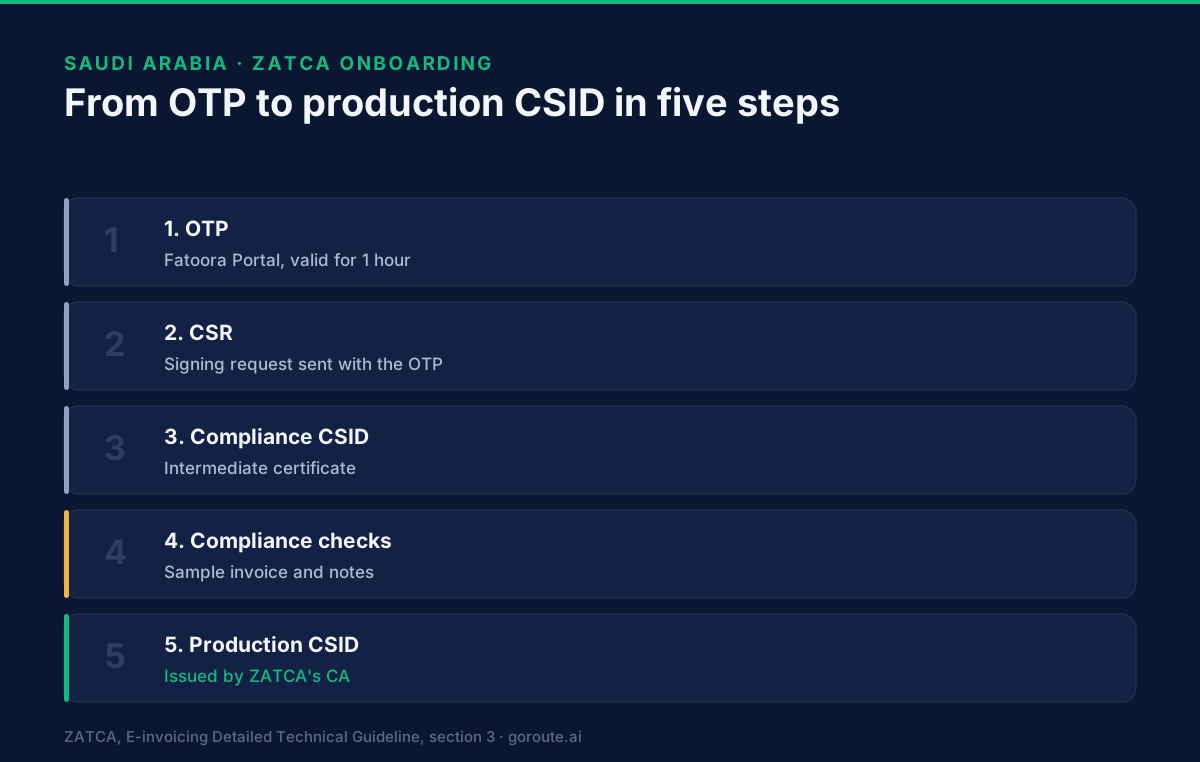
How a billing system onboards with ZATCA: the one-hour OTP, the signing request, the compliance CSID, the compliance checks and the production CSID.

What does onboarding with ZATCA involve?
Onboarding is a fixed sequence: generate a one-hour OTP in the Fatoora Portal, send ZATCA a signing request with that OTP to get a compliance CSID, pass the compliance checks, then collect a production CSID. Only a unit holding a production CSID can clear or report invoices. The steps below follow ZATCA's Detailed Technical Guideline, section 3, and its Fatoora Portal User Manual.
If your business is in Wave 25, this sequence is the work that sits between you and the 1 February 2027 deadline. The Wave 25 page explains who is in. Here we cover how a billing system connects.
ZATCA calls a billing system or device an EGS unit, short for E-invoicing Generation Solution. We say "unit" below.
Who can onboard?
A taxpayer registered for VAT, with a registration status of "Active" or "Reactive". Anyone "Deregistered" or "Suspended" cannot use the Fatoora Portal. A taxpayer whose status changes to one of those can still view the list of onboarded units for 90 days and can do nothing else.
You log in with your existing taxpayer portal credentials. The portal then shows tiles including "Onboard New Solution Unit/Device", "Renew Existing Cryptographic Stamp Identifier (CSID)" and "View List of Solutions and Devices".
Step 1: How do you get the OTP?
In the Fatoora Portal, click "Onboard New Solution Unit/Device", choose "Generate OTP code", and enter how many codes you need. The guideline says:
- one request can generate up to 100 codes, one per unit you are onboarding;
- each code is valid for one hour, so it must be entered on the unit within that time;
- the portal shows the codes, and you can copy them or download them as a file;
- there is no API for OTPs. They come from the portal only.
There is an automatic variant. If you open the portal from the billing unit itself, the unit can read the OTP from the browser header and enter it without your help. ZATCA says this works for a single unit only.
Step 2: What is in the signing request?
After the OTP is on the unit, the unit generates a key pair and sends a Certificate Signing Request (CSR) with the OTP. The guideline lists the CSR inputs, and it says all of them are mandatory and must follow the specification, or the request may be rejected:
| Input | What goes in it |
|---|---|
| Common name | Your name or asset number for the unit |
| EGS serial number | Maker or provider, model or version, and serial number, in one string |
| Organization identifier | The VAT registration number: 15 digits, starting and ending with 3 |
| Organization unit name | The branch name; for a VAT group, the 10-digit number of the member |
| Organization name | The taxpayer name |
| Country name | A two-letter ISO 3166 code |
| Invoice type | A four-digit map of what the unit issues |
| Location | The branch address, preferably in the Saudi short-address format |
| Industry | The sector the unit invoices for |
The invoice type input is worth a moment. The guideline says 1000 means standard invoices only, 0100 means simplified invoices only, and 1100 means both. ZATCA says a unit may keep submitting only if its CSID was obtained for the right invoice type, so choose it with care.
The errors ZATCA lists for this step are an invalid OTP (not exactly six digits, not numeric), an OTP that does not match this VAT number, an expired OTP, an invalid VAT number, an invalid request type, missing fields, and failed compliance steps.
Step 3: What is the compliance CSID?
The reply to a valid CSR is a compliance CSID. The guideline describes it as a self-signed certificate issued by the e-invoicing platform itself, not by ZATCA's certificate authority, "allowing clients to continue the Onboarding process". It exists only to let the unit run the compliance checks.
Step 4: What are the compliance checks?
The unit submits sample documents, and ZATCA checks them against the same validations used in production. The number depends on the invoice type in the CSR. The guideline says:
- for
1000, send three: a standard tax invoice, a standard debit note and a standard credit note; - for
0100, send three: a simplified tax invoice, a simplified debit note and a simplified credit note.
For 1100 the guideline does not spell the count out. Because it lists three for each type, we read it as six documents, and we mark that as our reading.
ZATCA says the unit performs these steps automatically, and the taxpayer should follow the billing system's own guide. If checks fail, the unit starts again from a new OTP and a new CSR. Corrections are part of the test, which is why credit and debit notes under Phase 2 matter before go-live.
Step 5: What is the production CSID?
Once the checks pass, the unit asks for its production CSID. ZATCA's certificate authority issues it, and the unit then uses it to authenticate to the reporting and clearance APIs. The guideline adds that a unit can keep submitting as long as the CSID has not expired, has not been revoked, and was obtained for the right invoice type.
The list of onboarded units in the portal shows each one's status (active, expired or revoked), onboarding date and expiry date. To renew, you repeat the process with a new OTP. The old CSID is revoked and a new one issued. You can also revoke a CSID yourself, for example if the private key is compromised or the unit is lost or sold.
How many CSIDs do you need?
It depends on where the signing happens. ZATCA's guideline says:
- a central server that signs invoices needs one CSID per taxpayer and per unique document sequence;
- a POS device that signs and sends its own invoices needs its own CSID;
- where dumb terminals pass invoices to a server that stamps them, the terminals need none and the server does.
For a VAT group, the representative member starts onboarding, renewal and revocation.
Where do you practise before the real thing?
ZATCA runs three non-production tools, and they are easy to confuse.
| Tool | What it is | Limits |
|---|---|---|
| Developer Portal SDK | An offline tool that validates XML invoices, credit notes, debit notes and QR codes | Validation only, no connection to ZATCA |
| Integration Sandbox | A test ZATCA backend with the onboarding, reporting and clearance APIs, described in Swagger files | Test CSIDs cannot be used in the live system. Compliance checks are not required between the two CSID calls. Each VAT number needs its own test CSID, and dummy numbers are allowed |
| Fatoora Simulation Portal | An optional tool for end-to-end functional testing, reached with taxpayer credentials | Not for load testing, and its credentials differ from the Developer Portal |
The Developer Portal needs its own registered account. The sandbox is for building the integration. The live system adds checks the sandbox does not run, such as security features and referential checks, so a pass in the sandbox is not a pass in production.
What this page does not cover
It does not cover the signing code, key handling or the XML itself. Those are in ZATCA's implementation standards, which we have not reproduced here. The QR code page covers one of the stamped fields.
Where does GoRoute stand?
Our ZATCA integration is in development on ZATCA's developer sandbox. It is not live, there is no trial for Saudi Arabia, and no date is promised. If you are planning an onboarding, read our Saudi Arabia page and talk to us before your wave deadline. You can book a call. Recorded walkthroughs are on the tutorials page, and the technical reference is at docs.goroute.ai.
The background on what Fatoora is lives in our Fatoora guide. Read next: what the nine tags of the ZATCA QR code hold.
Sources: ZATCA, E-invoicing Detailed Technical Guideline, sections 2 and 3 and the FAQ. ZATCA, Fatoora Portal User Manual. ZATCA, Developer Portal Manual. All read 2 November 2026. This is not tax or legal advice.
Frequently asked questions
- What is a CSID?
- A CSID is a Cryptographic Stamp Identifier. ZATCA's guideline says it is technically a cryptographic certificate, used to identify and authenticate a billing unit. A unit first gets a compliance CSID, then a production CSID.
- How long does a ZATCA OTP last?
- One hour. The Fatoora Portal generates it, and it must be entered on the billing unit within an hour. A request can ask for up to 100 OTPs at once, and there is no API for OTPs.
- What is the difference between the compliance CSID and the production CSID?
- The compliance CSID is an intermediate certificate, issued by the e-invoicing platform itself, that lets the unit run the compliance checks. The production CSID is issued by ZATCA's certificate authority once those checks pass, and it authenticates the unit to the reporting and clearance APIs.
- Can I test with the developer portal instead of the real portal?
- Yes, for integration work. ZATCA's Integration Sandbox is a test backend. Its test CSIDs cannot be used in the live system, and the live system adds checks the sandbox does not. ZATCA also runs an optional simulation portal for end-to-end tests.
- Does every till or branch need its own CSID?
- It depends on where the invoice is signed. ZATCA says a central server that signs needs one CSID per taxpayer and per unique document sequence, while a POS device that signs and sends needs its own. A dumb terminal whose server signs needs none.
About Dr. Syed Raza
Dr. Syed Raza is an IT Enterprise Architect at ClayDesk LLC and leads the GoRoute platform. He works across Peppol Access Point and SMP infrastructure, PINT jurisdictions (Oman, AU/NZ, EU, JP, MY, SG), and national CTC regimes, translating regulatory detail into production-grade e-invoicing systems.
Building on Peppol?
GoRoute is a certified Peppol Access Point & SMP. Book a demo or read the docs to get started.