
Your Shop Says the E-Invoice Was Not Delivered. What Now?
Your shop order does not say the e-invoice was delivered. What each state on the order means, which ones need you, and how to reissue or resend from the order.

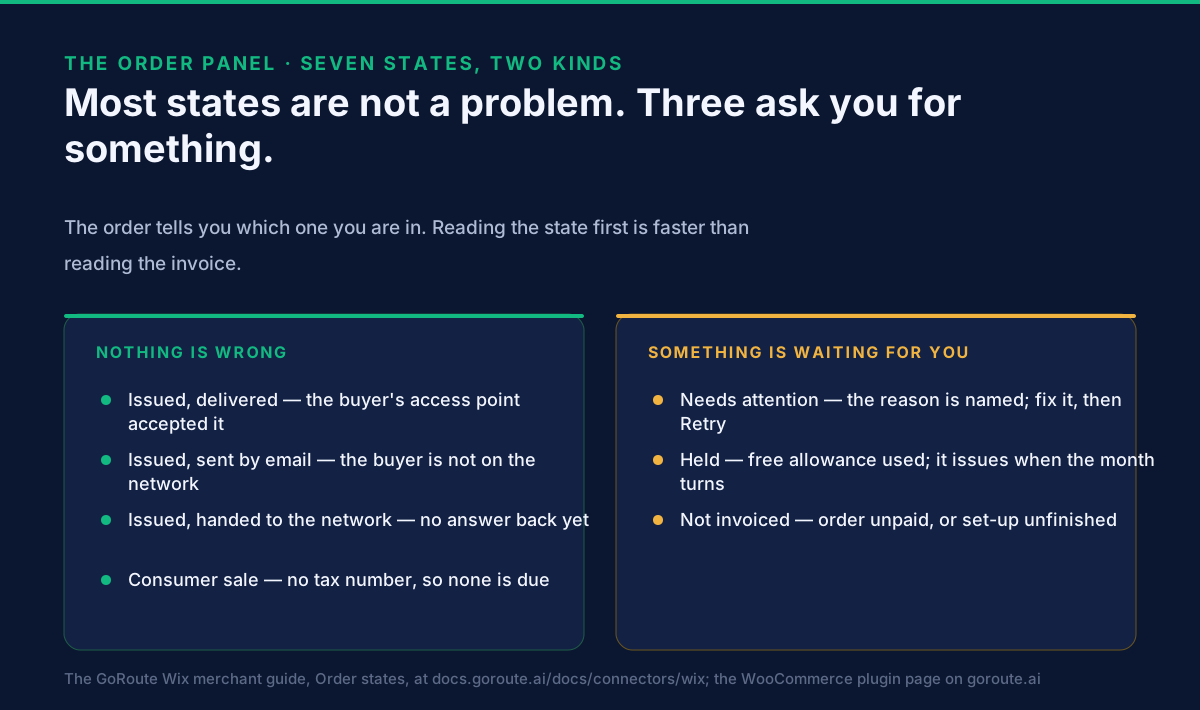
A shop order that does not say the e-invoice was delivered is almost never a lost invoice. The GoRoute storefront apps write a state onto every order they touch, and of the seven states only one — Needs attention — means a document could not be issued or delivered. The rest mean the invoice is already with the buyer, went by email because the buyer is not on the Peppol network, is still waiting for a delivery answer that arrives by itself, was held against a monthly allowance, or was never due at all because the sale was to a consumer. So the first thing to do is read the state on the order, not search your sent folder.
This page is for the owner or store manager of a WooCommerce or Wix shop that has already installed the app and met an order whose invoice did not land where expected. It stays on the order: what each state means, which three ask something of you, and how to reissue or resend without creating a second invoice.
What does the delivery state on the order actually mean?
It is the answer that came back from the delivery attempt, written onto the order itself.
The point of putting it there is that a question about one order gets answered from that order. The invoice number, the channel it went by and the delivery state appear on the order page, next to the PDF and the invoice file. You do not open a second system to find out what happened to a sale, which matters most on the day a buyer rings up asking where their invoice is.
The seven states, with what each one means:
| State on the order | What it means | What to do |
|---|---|---|
| Issued, delivered | The buyer's access point accepted it. | Nothing. |
| Issued, sent by email | The buyer is not on the network; the PDF and the e-invoice file went by email. | Nothing. |
| Issued, handed to the network | Handed over; the delivery answer has not come back yet. | Wait — the state updates itself. |
| Needs attention | The invoice could not be issued or delivered. The reason is shown. | Fix what the reason names, then Retry. |
| Consumer sale | No tax number was given, so no e-invoice is required. | Nothing — or enter the buyer's number and press Issue now. |
| Held | The free monthly allowance is used. The document is kept, not lost. | Nothing: it issues when the month turns. |
| Not invoiced | The order is not yet paid, or set-up is not finished. | Finish set-up, or wait for payment. |
Those names are the ones the Wix app writes, and they are set out in full in the Wix merchant guide. The WooCommerce plugin reports the same outcomes on the order and collects refused documents into a daily digest, so a failure is explained in words rather than dropped silently. Either way the state is the diagnosis, and the invoice is only worth opening after you have read it.
What do I do when the state says "Needs attention"?
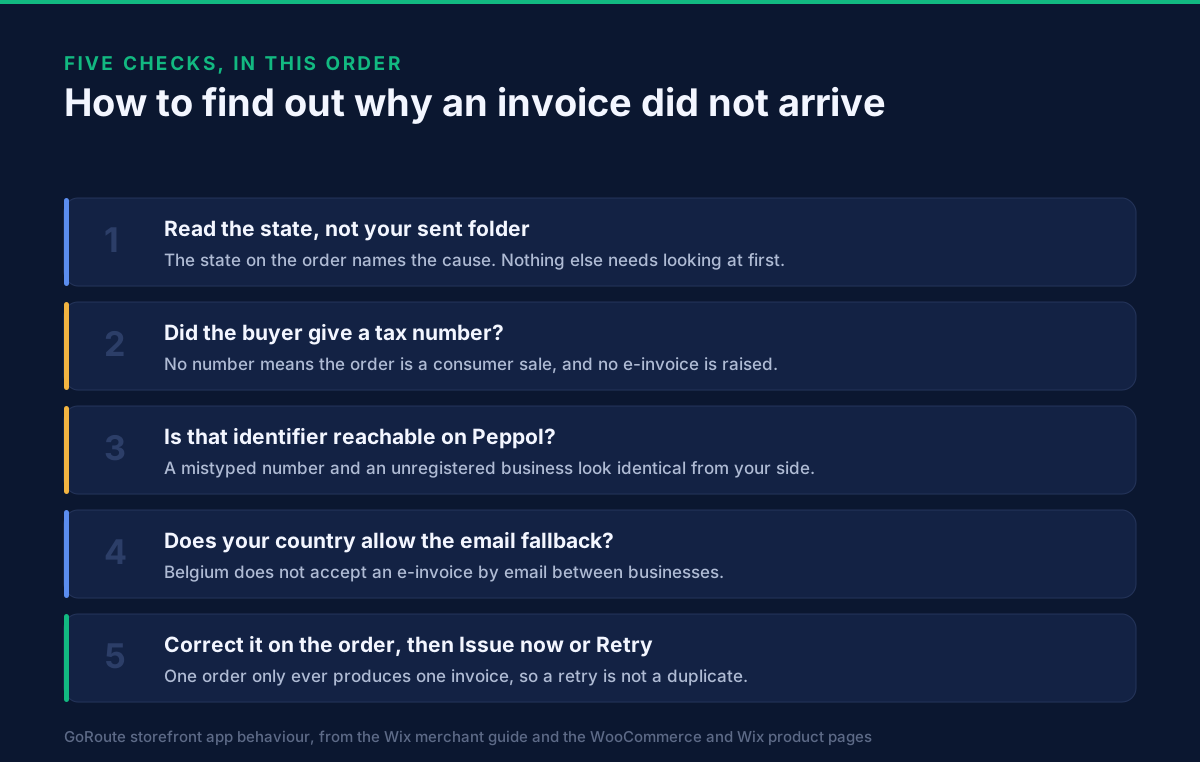
Read the reason printed with it, fix that, then press Retry.
Needs attention is the only state that reports a fault, and it never reports one without naming it. Two reasons account for most of them.
The identifier cannot be resolved on the Peppol network. A structured invoice has to be addressed to something a machine can look up — a VAT or enterprise number, an ABN, an NZBN — and a number that does not resolve cannot be delivered to. The important and slightly uncomfortable part is that a mistyped number and a genuinely unregistered business look identical from your side. So the next step is a question to the buyer rather than a change to your shop: ask which identifier their accounting software receives under, enter it on the order panel, and press Issue now.
The buyer's country does not allow the email fallback. That is Belgium, and it is deliberate: Belgium does not accept an e-invoice by email between businesses, so the app says so on the order instead of emailing a PDF and calling it delivered. The Belgian shop page sets out why that is the honest behaviour and what the conversation with the buyer looks like.
One more reason worth knowing, because it looks alarming and is not: minutes after you register,
the On the network card may say your own identifier is not found, or is found but does not
accept your country's invoices. That normally means another provider already holds it. Press
Register now once more, and if it stays that way write to admin@goroute.ai, who can move it.
Why does every order say "Consumer sale", including my business customers?
Because the tax-number field is not on your checkout, so business buyers have nowhere to type one.
An order with no tax number is correctly read as a sale to a consumer, and none of the countries these apps serve requires an e-invoice for a consumer sale. The state is right; the checkout is what is missing.
On Wix the fix is one button: Settings → Add the field to my checkout. Wix does not place an app's checkout field for a merchant, and it cannot be added from the editor, so it has to be switched on once. The field then sits above the totals, in the language of the page, and checks the number's format for your country while the buyer is still there. On WooCommerce the field is part of the plugin's checkout, including the block checkout, and is checked against the network as the buyer types — the detail is on the WooCommerce plugin page and the Wix app page.
For orders already placed, nothing is lost: enter the buyer's number in the order panel and press Issue now.
What happens when the buyer is not on the Peppol network?
They are emailed two files — and what is inside the PDF depends on where your business is registered.
A buyer on the network receives the invoice in their accounting software. Anyone else is sent a PDF to read and the e-invoice itself as a separate XML attachment. Beyond that it varies by seller:
- A German seller's e-invoice is also carried inside the PDF, as ZUGFeRD.
- A Dutch seller's is carried inside the PDF as EN 16931.
- An Australian or New Zealand seller's PDF is a plain one, with the e-invoice as the attachment beside it. No combined file is produced.
- A Belgian seller does not get this route at all between businesses, because Belgium does not accept it.
Which profile the invoice follows is decided by the buyer's country, not yours: an Australian or New Zealand buyer is invoiced under PINT A-NZ, and every other buyer under Peppol BIS Billing 3.0. XRechnung is used only where the buyer advertises on the network that it wants it, which in practice means German public-sector buyers. So an Australian store invoicing a German business sends Peppol BIS Billing 3.0, and a German store invoicing an Australian business sends PINT A-NZ. The Australia and New Zealand shop page covers the PINT A-NZ side, and the German shop page covers the two German formats and which of your dates applies.
What does "Held" mean, and did I lose the invoice?
No. Held means the free allowance of fifty e-invoices a month is used up, and the document is kept rather than discarded.
It is issued by itself when the month turns. If you do not want to wait, upgrading does it at once, and so does Refresh on the Plan page. Paid plans do not hold anything — a document past the allowance is still issued. Pro forma invoices and delivery notes never count against the allowance, because they are not tax documents.
Where the plan is bought depends on the platform, and it is worth saying plainly: Wix plans are bought and billed inside Wix, on the Wix bill the merchant already has, and the app never asks for a card. WooCommerce plans are bought from GoRoute inside WordPress. The current ladder is on each product page rather than here, because a price written into an article goes stale without anybody noticing.
How do I resend or reissue an invoice from the order?
From the order panel, or from the Documents page when it is more than one.
The order panel carries the actions for a single sale: Retry for a document that failed, Issue now for an order that has nothing yet, Email to send the PDF to the customer again, and Credit refunds for a refund the app did not hear about. The Documents page lists every invoice, credit note, pro forma and delivery note the store has issued, with the PDF, the XML, the channel and the state, and does the same things across many rows at once.
The reassuring rule underneath all of it: one order can only ever produce one invoice. A retry, a double-clicked checkout or a gateway retry returns the original document rather than minting a second one, so pressing the button again is not how a duplicate is made.
Why did my customer receive two invoices?
On Wix, because Wix's own Invoices toggle is on, and the GoRoute e-invoice is the tax invoice of the two.
Wix can produce its own document for every order paid online, under Checkout settings in the Wix dashboard. By Wix's own description that document is a payment record rather than a tax invoice, and it does not follow refunds. Switch the toggle off and the GoRoute e-invoice is the one the customer gets.
A related oddity is worth knowing before it puzzles you: Wix's View Invoice action and the invoice column of the Orders list show only documents made by Wix's built-in Invoices app. Wix gives no app a way to register its invoice there, so the GoRoute e-invoice lives on the GoRoute e-invoice panel and under Additional info on the order. It is not missing; it is in the place Wix makes available.
Which of these states can another app read?
Seven fields, written onto every order the app touches: the GoRoute status, the invoice number, the delivery channel, the GoRoute transaction id, the document type, the buyer's tax id, and when it was last updated. On a Wix order they appear under Additional info, and other apps can read them.
That is the difference between a delivery answer and a delivery notification: the answer is part of the order record, so a reconciliation or an export can read it without anyone logging into our system. What a Peppol Access Point is explains why an answer exists at all — GoRoute issues the document and delivers it as the access point, so the acknowledgement comes back to one place rather than being somebody else's to chase.
What this page does not cover
Tax clearance regimes. Some countries put a tax authority between seller and buyer, so a document can be delivered and still not be cleared. Nothing on this page applies to that; it is a different sequence with different states.
The buyer's own obligations. Whether your buyer must be able to receive a structured invoice, and by when, is their rule to meet. It is on the country pages, not here.
Shopify. The GoRoute Shopify app is going through Shopify's review and the App Store listing is not live, so there is nothing to install today and nothing claimed here. If your shop is on Shopify, book a session and we will set it up with you in the meantime.
Related storefront guides
- Does your Belgian online shop have to send e-invoices? — the live B2B mandate, and why Belgium is the one country where the email fallback is not allowed.
- Does your German online shop have to send e-invoices? — the receiving obligation that is already live, the two issuing dates, and ZUGFeRD by email.
- Does your Australian or New Zealand online shop need to send e-invoices? — no mandate either side of the Tasman, PINT A-NZ, and ABN or NZBN at checkout.
- The WooCommerce Peppol plugin — what the plugin does to an order, across every country it supports.
- Wix e-invoicing — the three-step set-up, the checkout field, and the panel these states appear on.
- What a Peppol Access Point is — the delivery half, and why an answer comes back at all.
What to do next
Open your three most recent business orders and read the state on each. If any says Consumer sale, your checkout field is not on, and that is a one-button fix worth making before the next order. If any says Needs attention, the reason is printed with it, and the next move is a short question to that buyer rather than a change to your shop.
If you have not installed yet, the apps are on the WordPress.org plugin directory for WooCommerce and the Wix App Market for Wix, both free for the first fifty e-invoices a month. The state table and the troubleshooting list in full are in the Wix merchant guide; recorded walkthroughs of the connectors are on tutorials; the document types, statuses and identifier formats are in the developer documentation. To walk your own order, refund and delivery-answer flow through with our team, book a session.
Sources: the GoRoute Wix merchant guide at docs.goroute.ai/docs/connectors/wix, for the seven order states, the seven order fields written under Additional info, the troubleshooting list, the email fallback per seller country, the profile chosen by the buyer's country, the free allowance and held documents, and Wix's own Invoices toggle; the WooCommerce plugin page and the Wix app page for the checkout field, the order panel and the daily digest of refused documents; the OpenPeppol BIS Billing 3.0 specification for the delivery profile. Belgium's refusal of e-invoices by email between businesses follows its business-to-business obligation in force since 1 January 2026, under the framework set by FPS Finance. GoRoute operates certified Peppol Access Point POP000991.
Frequently asked questions
- My shop says the e-invoice was not delivered. Was it lost?
- Almost certainly not. A GoRoute storefront app writes a state onto every order it touches, and only one of the seven states means a document could not be issued or delivered: Needs attention, which also shows the reason. The others mean the invoice is with the buyer, went by email instead, is still waiting for a delivery answer, was held against a monthly allowance, or was never due because the sale was to a consumer. Read the state on the order before anything else.
- What does the delivery state on the order actually mean?
- It is the answer that came back from the delivery attempt, written onto the order so you do not have to open a second system. Issued, delivered means the buyer's access point accepted the invoice. Issued, sent by email means the buyer is not on the Peppol network and the PDF and e-invoice file went by email. Issued, handed to the network means the document was handed over and the answer has not arrived yet, and it updates itself. Needs attention is the only one that is a fault.
- What do I do when the state says Needs attention?
- Read the reason shown with it, fix what the reason names, then press Retry on the order panel. The two commonest reasons are an identifier that cannot be resolved on the Peppol network and a buyer in a country whose rules do not allow the email fallback. Both are solved the same way: ask the buyer which identifier their accounting software receives under, enter it in the panel, and press Issue now.
- Why does every order say Consumer sale, including my business customers?
- Because the tax-number field is not on your checkout, so business buyers have nowhere to enter one, and an order without a number is correctly treated as a consumer sale. On Wix the field is added from Settings with the Add the field to my checkout button — Wix does not place an app's checkout field for a merchant, so it has to be switched on once. For orders already placed, enter the buyer's number in the order panel and press Issue now.
- What happens when the business buyer is not on the Peppol network?
- The buyer is emailed two files instead: a PDF to read and the e-invoice itself as an XML attachment. For a German seller the e-invoice is also carried inside the PDF as ZUGFeRD, and for a Dutch seller as EN 16931, so a buyer whose software reads those needs only the PDF. For an Australian or New Zealand seller the PDF is plain and the e-invoice is the attachment beside it. Belgium is the exception: it does not accept an e-invoice by email between businesses, so the order says so rather than pretending the invoice arrived.
- What does Held mean — have I lost the invoice?
- No. Held means the free allowance of fifty e-invoices a month is used up, and the document is kept rather than discarded. It is issued by itself when the month turns. Upgrading, or pressing Refresh on the Plan page, issues it at once. Paid plans do not hold documents: a document past the allowance is still issued.
- How do I resend or reissue an invoice from the order?
- From the order panel or the Documents page. The panel carries Retry for a document that failed, Issue now for an order that has nothing yet, Email to send the PDF to the customer again, and Credit refunds for a refund the app did not hear about. The Documents page does all of that across many rows at once. One order can only ever produce one invoice, so retrying is not how a duplicate gets made.
- My customer received two invoices. Which one is the tax invoice?
- The GoRoute e-invoice is. On Wix this happens when Wix's own Invoices toggle is on under Checkout settings, which makes Wix's payment record as well: by Wix's own description that document is not a tax invoice and does not follow refunds. Switch the toggle off and the customer receives one document. The GoRoute e-invoice is on the GoRoute e-invoice panel and under Additional info on the order.
- Which of these states can another app or my accountant read?
- Seven fields are written onto every order the app touches and are readable by other apps: the GoRoute status, the invoice number, the delivery channel, the GoRoute transaction id, the document type, the buyer's tax id, and when it was last updated. On a Wix order they sit under Additional info. That is what makes the delivery answer part of the order record rather than something living in our system only.
About Dr. Syed Raza
Dr. Syed Raza is an IT Enterprise Architect at ClayDesk LLC and leads the GoRoute platform. He works across Peppol Access Point and SMP infrastructure, PINT jurisdictions (Oman, AU/NZ, EU, JP, MY, SG), and national CTC regimes, translating regulatory detail into production-grade e-invoicing systems.
Building on Peppol?
GoRoute is a certified Peppol Access Point & SMP. Book a demo or read the docs to get started.