
Invoicing in a Foreign Currency in Oman
An Oman e-invoice in USD or any non-OMR currency must carry the exchange rate and the VAT total in rials. The fields, the rules and the 3-decimal limit.

An Oman e-invoice can be issued in a currency other than the rial, but it must then say three more things: that OMR is the VAT accounting currency, what the exchange rate is, and what the VAT comes to in rials. Leave one out and the rules reject the invoice. If the invoice is in rials, the opposite applies and the exchange rate must be absent.
This page walks through the fields and the rules behind them, with a worked example. It assumes a seller invoicing in US dollars. The same fields apply to any non-OMR currency.
What does Oman require when an invoice is not in rials?
Three things, each with its own rule. All three are fatal: a document that fails one is refused.
| Rule | What it requires |
|---|---|
IBR-034-OM |
The VAT accounting currency (IBT-006) must be provided if the invoice currency is not OMR |
IBR-004-OM |
A currency exchange rate (BTOM-003) must be provided if the invoice currency is not OMR |
IBR-065-OM |
When the VAT accounting currency is OMR, the invoice total VAT amount in that currency (IBT-111) must be provided and equal the exchange rate multiplied by the invoice total VAT amount (IBT-110) |
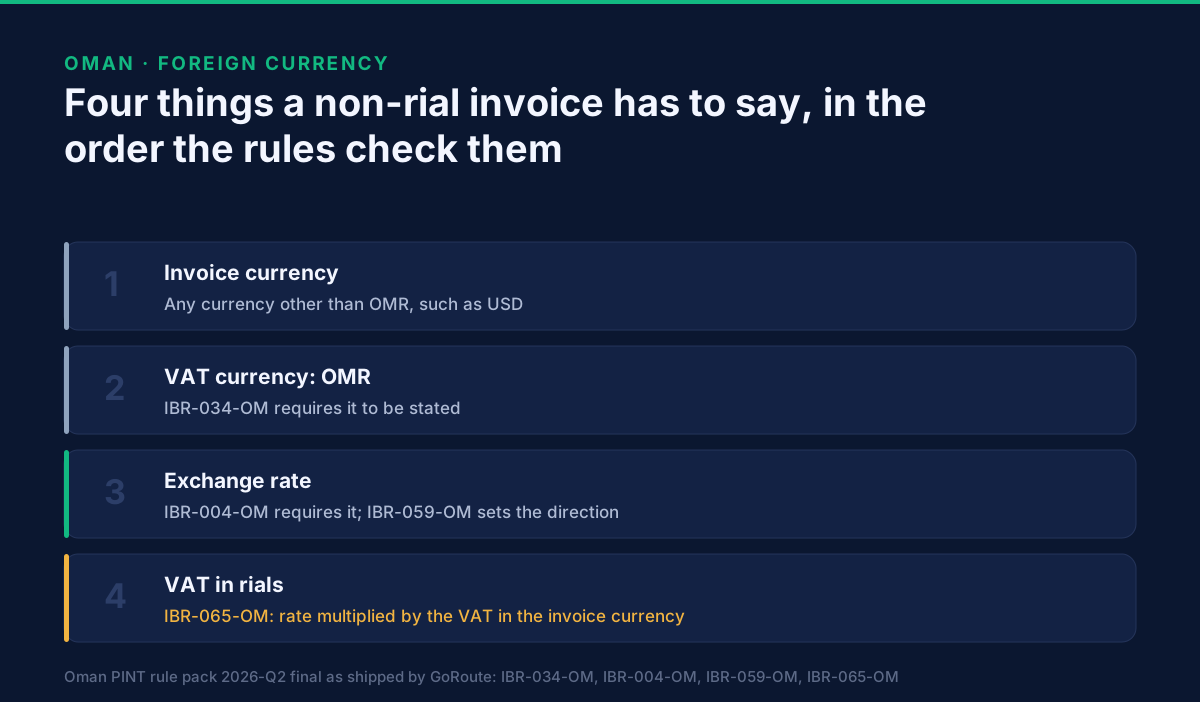
The three together describe one idea. The invoice is priced in dollars, the VAT is declared in rials, and the rate is the bridge between them.
A fourth rule keeps the bridge honest. IBR-059-OM fixes its direction: the source
currency is the invoice currency and the target is the VAT accounting currency. A rate
written the wrong way round is a different number, so the pack states which way it runs.
What does IBR-172-OM check?
That a domestic invoice does not carry a rate. The pack text is: "If Invoice currency code (IBT-005) is "OMR" then Exchange Rate (BTOM-003) MUST NOT be present."
It is the mirror of IBR-004-OM. Together they enforce the rule in both directions. A
common cause of failure is a billing system that adds a rate of 1 to every document
whether it needs one or not. In an invoice in rials the field has to be removed, not left
at one.
How is the invoice laid out?
The document currency, the tax currency and the rate are three separate elements, and the VAT total appears twice, once in each currency.
<cbc:DocumentCurrencyCode>USD</cbc:DocumentCurrencyCode>
<cbc:TaxCurrencyCode>OMR</cbc:TaxCurrencyCode>
<cac:TaxExchangeRate>
  <cbc:SourceCurrencyCode>USD</cbc:SourceCurrencyCode>
  <cbc:TargetCurrencyCode>OMR</cbc:TargetCurrencyCode>
  <cbc:CalculationRate>0.3850000</cbc:CalculationRate>
</cac:TaxExchangeRate>
<cac:TaxTotal>
  <cbc:TaxAmount currencyID="USD">50.000</cbc:TaxAmount>
  ...
</cac:TaxTotal>
<cac:TaxTotal>
  <cbc:TaxAmount currencyID="OMR">19.250</cbc:TaxAmount>
  ...
</cac:TaxTotal>
The rate in this example is an illustration of the layout, not a rate to use.
| Element | Business term | What it holds |
|---|---|---|
cbc:DocumentCurrencyCode |
BT-5 |
The currency the invoice is priced in |
cbc:TaxCurrencyCode |
BT-6 |
The VAT accounting currency, OMR |
cac:TaxExchangeRate/cbc:CalculationRate |
BT-OM-3 |
The rate |
first cac:TaxTotal/cbc:TaxAmount |
BT-110 |
VAT total in the invoice currency |
second cac:TaxTotal/cbc:TaxAmount |
BT-111 |
VAT total in rials |
The second TaxTotal is the Oman group BG-OM-9. It also carries a breakdown by VAT
category, BG-OM-10, and IBR-066-OM requires that breakdown whenever the invoice is not
in rials and at least one category is S. IBR-136-OM requires every amount in that block
to carry the VAT accounting currency as its currencyID.
A worked example
One line, 1,000.000 USD at the standard rate of 5%, and a rate of 0.3850000 OMR per USD:
| Item | Amount |
|---|---|
| Line net amount | 1,000.000 USD |
VAT at 5% (BT-110) |
50.000 USD |
| Total with VAT | 1,050.000 USD |
Rate (BT-OM-3) |
0.3850000 |
VAT in rials (BT-111) |
50.000 × 0.3850000 = 19.250 OMR |
IBR-065-OM is the check on the last row: the VAT in rials has to equal the rate
multiplied by the VAT in dollars. A system that rounds the converted figure differently
from the issuing system can produce a document that looks right and fails that equality, so
compute the rial figure once and carry it, rather than recomputing it downstream.
The numbers are for illustration. Which rate your business applies is a separate question, and the last section addresses it.
How many decimal places can the rate and the amounts carry?
The amounts may carry up to three decimal places and the rate up to seven. The pack
rule IBR-DEC-03-OM caps every amount at three decimals, including amounts in a currency
that normally has two. A dollar invoice written to two places is within the limit, and an
amount written to four is not.
The rate has its own rule, IBR-005-OM: up to seven decimal places when the VAT
accounting currency is OMR and the invoice currency differs.
The data dictionary disagrees. Its BR-OM-5 says the rate should have at most four
decimal places. The pack we run in production, from the 2026-Q2 final set, says seven.
We build to the pack because the pack is what validates the file. The data dictionary
article explains how the two relate.
The rial's three decimals are the more common source of trouble, and the general three-decimal rule and its line-level tolerance are covered in the format article.
Which exchange rate must I use?
The rules do not say. The packs require a rate, check its direction and its precision, and check that the VAT in rials equals the rate times the VAT in the invoice currency. They do not name a source, a date or a rounding convention, and neither does this page.
Which rate applies, and on which date, is a tax question. Ask your tax adviser, or the Oman Tax Authority directly. If you hold a rate in your ERP already, send that figure and make sure the same figure is used for the rial amounts.
Where is this handled in accounting software?
A cloud accounting system that invoices in several currencies already stores a rate per invoice, and the work is making sure it reaches the file. The Xero guide covers how that system carries it, including the rule that sends a USD invoice back for a missing rate: e-invoicing in Oman from Xero. To check any invoice before sending it, run it through validation: how to test an Oman e-invoice before you send it.
When the rejection comes back, why Oman e-invoices get rejected lists the rest by identifier.
What is not settled here
Which rate. See above. This page does not recommend one.
Gains and losses. Exchange differences between invoice date and payment date are an accounting matter and are not in the e-invoice rules.
Rule changes. The rule texts are from the 2026-Q2 final packs as we ship them today. The version history is tracked here.
What to do with this
If any of your Omani contracts are priced in dollars, find a recent invoice and check four things: the currency of the document, the VAT accounting currency, the rate with its direction, and the VAT in rials. If your system adds a default rate to rial invoices, that is the first thing to remove.
GoRoute takes the invoice currency and the rate as fields, builds the rial VAT block and checks the rules before sending. The Oman e-invoicing page sets out the service, the documentation has the field names, and the tutorials show a run. To go through your own invoices, book a demo.
GoRoute is accredited by the Oman Tax Authority on 29 July 2026 through Union Digital Technologies SPC, and is a certified Peppol Access Point (POP000991).
Primary sources: Oman Tax Authority — the authority that publishes the Oman e-invoicing rules; Peppol technical documentation — the PINT specification this profile extends.
Frequently asked questions
- Can an Oman e-invoice be in USD?
- Yes. The document currency can be another currency. When it is not OMR, the invoice must also name OMR as the VAT accounting currency, carry an exchange rate, and state its VAT total in rials. Rules IBR-034-OM, IBR-004-OM and IBR-065-OM enforce those three.
- What does IBR-172-OM check?
- That an invoice in OMR carries no exchange rate. The rule text is: if the invoice currency code is OMR then the exchange rate must not be present. It catches the default rate of 1 that many systems add to a domestic invoice.
- Which direction does the exchange rate run?
- The source currency is the invoice currency and the target is the VAT accounting currency (IBR-059-OM). On a USD invoice with OMR as the VAT currency the rate converts one unit of USD into OMR.
- How many decimal places can the exchange rate have?
- Up to seven in the rule pack we run (IBR-005-OM). The data dictionary version 1.0.1 says four in its rule BR-OM-5. The pack is what validates a file, so seven is the limit that applies.
- Which exchange rate source must I use?
- The rule packs do not name one. They require a rate and check how it is used, not where it came from. Which rate your business applies is a matter for your tax adviser and the Oman Tax Authority.
- Do amounts on a USD invoice need three decimal places?
- They may carry up to three, and not more. The pack's rule IBR-DEC-03-OM caps every amount at three decimals, whatever the currency. OMR amounts are naturally written with three, because the rial has 1,000 baisa.
About Dr. Syed Raza
Dr. Syed Raza is an IT Enterprise Architect at ClayDesk LLC and leads the GoRoute platform. He works across Peppol Access Point and SMP infrastructure, PINT jurisdictions (Oman, AU/NZ, EU, JP, MY, SG), and national CTC regimes, translating regulatory detail into production-grade e-invoicing systems.
Building on Peppol?
GoRoute is a certified Peppol Access Point & SMP. Book a demo or read the docs to get started.