
What to Settle With an Oman Service Provider Before You Connect
Four things are agreed with an Oman e-invoicing provider outside the Fawtara portal, and your free exit closes the moment that provider accepts your request.

Last updated .
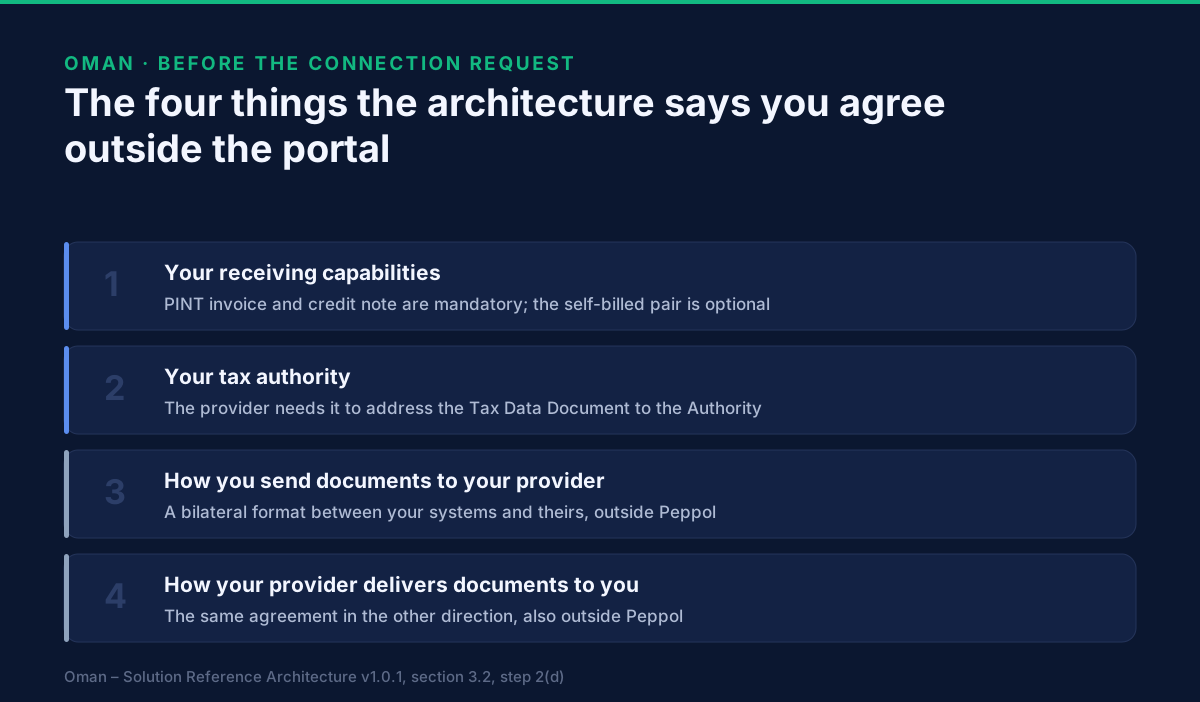
Four things get agreed with an accredited Oman e-invoicing provider outside the Fawtara portal, and the Tax Authority's own architecture lists them: your receiving capabilities, your tax authority, the data format in which you hand documents to the provider, and the data format in which they hand incoming documents back to you. The portal never asks to see any of them. It asks only whether your commercial engagement is finished, and it will not let you press Proceed until all four engagement stages are ticked — the last of which is a signed agreement.
One thing on that list stops being reversible. Until the provider accepts your request you can withdraw it with no reason and no agreement from them. Once they accept, leaving is a disconnection request with a stated reason and a working-day clock attached.
This page is for a finance or tax manager who has chosen a provider and is about to sign. If you are still choosing, the six questions are on how to choose an e-invoicing service provider in Oman; the portal mechanics that follow the signature are on how to connect your Omani business to an accredited service provider.
What does the portal actually verify?
Almost nothing about the agreement itself.
Pressing Connect on a provider's row opens a dialogue asking you to record your current stage of engagement with them across four checkboxes: Identify Service Provider · Scope and Commercial Negotiations · Scope and Commercial Finalized · Agreement/Contract Signed. The manual is explicit that "completion of all stages is required to proceed with the connection."
That is a self-declaration. The portal does not read your contract, does not know which document types you agreed, and does not check that either data format exists. What it enforces is ordering. Everything in the rest of this page is work the portal assumes you have already done.
One consequence worth naming: a provider can reject your request after you have ticked all four boxes, and the Authority's own worked rejection reason is "Taxpayer has not completed all required setup steps." Four ticks is your view of readiness. The provider has their own.
Which document types do you have to be able to receive?
Two are mandatory and two are a decision.
Your receiving capabilities are the list of document types registered against your service group on Oman's central SMP, and they are what tells the rest of the network what it may send you. The architecture divides them:
| Document type | Status for an Omani invoicing organisation |
|---|---|
| Oman PINT Invoice | Mandatory receiving capability |
| Oman PINT Credit Note | Mandatory receiving capability |
| Oman PINT Self-billed Invoice | Optional — registered only for participating organisations |
| Oman PINT Self-billed Credit Note | Optional — registered only for participating organisations |
The two mandatory ones need no negotiation; any accredited provider must support them. The self-billed pair is the conversation. If a customer of yours raises invoices on your behalf — common where a large buyer runs the billing — then self-billed documents will be sent to your participant identifier, and they will only arrive if your provider registered that capability for you. Agree it before signing. What changes on a self-billed document, and why it is not an ordinary invoice, is in correcting a self-billed invoice in Oman.
One capability is not yours to worry about: the Message Level Status, the technical receipt that reports whether a document validated. The architecture requires the provider to register MLS receiving capabilities against its own service-provider identifier, not against yours. If a provider offers to register MLS for your participant identifier, that is a sign they have the model wrong.
Why does your provider need to know your tax authority?
Because a second document goes somewhere else, and it has to be addressed.
An Omani invoice does not only travel to your buyer. Your provider also builds a Tax Data Document from it and exchanges that with the Authority's own access point, which then delivers it onward outside the Peppol network. To address it, the provider enriches the document with the invoice identifier and your tax authority's participant identifier.
The Authority is identified with the Service Provider Identifier Scheme under ICD code 0242,
written as the provider's six-digit seat identifier, the use case TaxAuthority, and the suffix
OM — the architecture's own example is 001090-TaxAuthority.OM. You do not configure this; you
confirm the provider has it. It is worth one question, because the reporting leg is the half of the
flow you cannot see from your own system.
What are the two data formats, and why are they outside Peppol?
Because Peppol governs what travels between providers, not what travels between you and yours.
The architecture calls them the C1–C2 and C3–C4 bilateral data submission formats, and marks both "outside Peppol". In plain terms: how your ERP hands an invoice to your provider, and how your provider hands you an invoice that arrived for you. Nothing in the Peppol specifications decides either. They are yours to agree, and they are where integration time is actually spent.
Two provider obligations sit on the outbound side of that boundary and are worth understanding before you agree a format. Your provider must enrich the invoice you give it — adding the unique identifiers the Oman profile requires — and where you build the Tax Data Document yourself rather than leaving it to them, the provider must confirm that what you supplied is a correct representation of the matching invoice. That check is a contractual service, not a courtesy, and it is a reasonable thing to see named in the agreement.
If your side of that boundary is the open question, the connector walkthroughs are on how to connect your software to Fawtara.
What can you still undo before they accept?
Everything, at no cost.
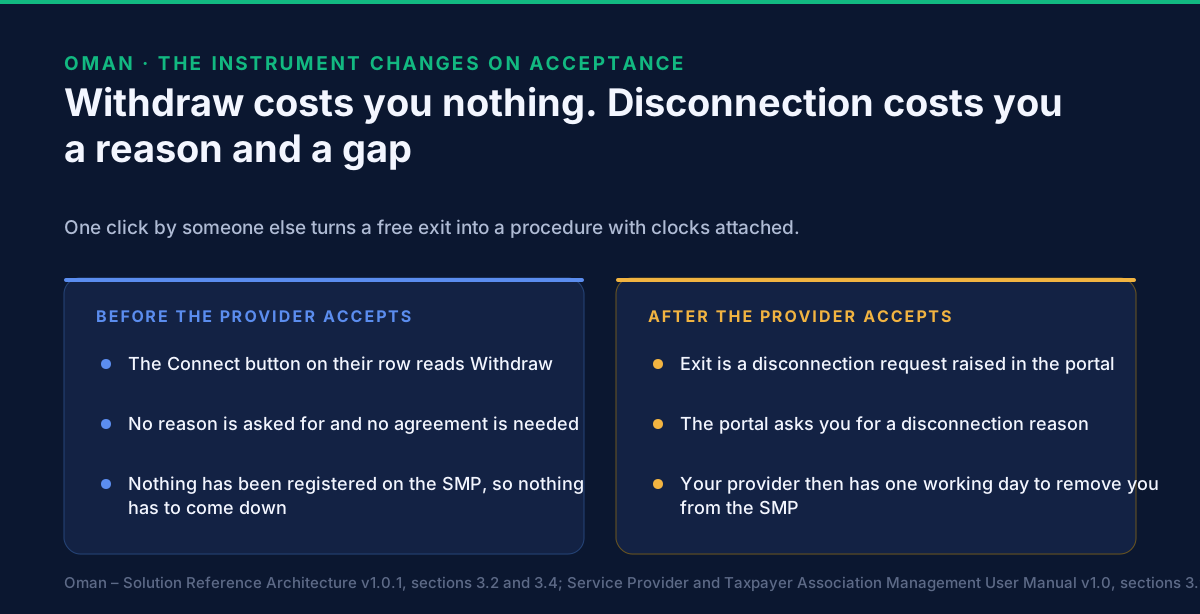
After a successful submission, the button on that provider's row changes from Connect to Withdraw. Confirming it gives you an on-screen and email notification that the request was withdrawn, and emails the provider to tell them the same. No reason is asked for.
It also happens without you asking. Send a connection request to a different provider while one is still pending, and the portal withdraws the first automatically — you are notified on-screen and by email, and the previous provider is emailed. That is a useful property during a competitive process and a dangerous one if two people in the same finance team are both driving the portal.
The architecture states the rule behind all of this in one sentence: if the provider and the taxpayer do not reach agreement before the provider accepts the request, the taxpayer can withdraw it. The window is defined by their click, not by yours.
What changes the moment they accept?
The exit becomes a procedure, and it acquires clocks.
From acceptance onward, ending the relationship means raising a disconnection request in the portal — E-Services, then Manage Service Provider, then Disconnect, then a confirmation, and then a disconnection reason, which the portal requires. On success you get an email and an on-screen confirmation, and the provider is emailed and told they have one business day to remove you from the SMP.
That one working day is the same deadline the architecture states for the general case: when a relationship on the portal ceases to exist, the accredited provider has one working day to deregister you from the central SMP. On a switch it runs against a second, longer clock — the incoming provider has three working days to add you. Those two numbers are the whole reason a provider change needs planning: the record can come down four times faster than its replacement has to go up.
The instrument to manage that is the preferred effective date on the new connection request, which the Authority requires to be a current or future date and treats as optional. Leave it blank and, in the Authority's own words, "your connection will take effect as soon as your service provider accepts the connection request" — which means the disconnection from your current provider happens whenever the new one gets round to clicking Accept.
What if the provider asks to disconnect you?
Then you have three days, and silence is not neutral.
A provider can raise a disconnection request against you — the manual's worked reason is accreditation termination. When they do, a notification appears on login and the request sits on the Manage Service Provider page with Approve and Reject. The manual states that "if no action is taken within 3 days from when the disconnection request is raised, the disconnection request will be cancelled."
Cancelled is not the same as resolved. Whatever caused the provider to raise it has not gone away, and where the request expires the provider is still emailed and told they have one business day to remove you from the SMP. Rejecting is a real option — the portal asks for a rejection reason from a dropdown — but it buys time rather than a relationship.
If a disconnection does complete, the Manage Service Provider button on your dashboard changes to Appoint a Service Provider, which the manual says exists so the taxpayer can connect to another provider and keep trading. That is the recovery path, and it starts the three-working-day registration clock again from zero — what that costs you in reachability, and how to time it, is on how to change your Oman e-invoicing service provider without a delivery gap.
What belongs in the agreement itself?
Six things, each of which traces to a rule above rather than to general contract hygiene.
- Which receiving capabilities they will register, naming the self-billed pair explicitly as in or out. The mandatory two are not worth a clause; the optional two are.
- Confirmation of the SMP registration, not of the portal acceptance, with the three-working-day obligation written down. Connected and reachable are different states, and you can verify the second one yourself rather than taking a confirmation on trust — see how to check your business is really registered on Oman's SMP.
- Both bilateral data formats, in both directions, with the enrichment and Tax Data Document confirmation duties named.
- Data location in writing. The Authority states that data residency in the provider list is supplied by the providers, that it does not verify it and accepts no liability, and that taxpayers must confirm it directly. A contract term is the confirmation.
- The exit. Who raises the disconnection, how much notice you get, and what the provider does with your documents afterwards.
- The certificate expiry date. The Manage Service Provider page displays it alongside your connected-since date, so it is a real operational date on your side, not an internal matter of theirs. Ask what happens as it approaches.
What this page does not cover
Penalties. Neither the manual nor the architecture states a penalty for failing to appoint a provider or for a lapsed connection, so no figure appears here. Ask the Tax Authority or your tax adviser.
VAT-return treatment. Nothing in either source describes how appointing, changing or losing a provider interacts with a VAT return. We are not going to infer it.
Choosing the provider. That decision, and the six questions behind it, are on how to choose an e-invoicing service provider in Oman.
Related Oman guides
- How to connect your Omani business to an accredited service provider — the portal sequence this agreement unlocks, status by status.
- How to choose an e-invoicing service provider in Oman — the decision immediately before this one.
- How to connect your software to Fawtara — the integration project that sits behind the two bilateral formats.
- Correcting a self-billed invoice in Oman — why the optional receiving capability above is a real decision.
- Peppol in Oman: Fawtara readiness — the programme and the network the connection attaches you to.
What to do next
Settle the four items before the contract goes to signature, not after. The portal will not take your request until the agreement is signed, and the provider can reject it if the technical side is unfinished — so a signature that gets ahead of the receiving capabilities and the two data formats buys you a rejection rather than a connection.
Decide your exit before you need one. Ask for the disconnection terms and the certificate expiry date while you still have negotiating position, which is before the provider presses Accept.
The commercial ground for Oman, including where GoRoute sits on the accredited list, is on our Oman Fawtara e-invoicing page. The connector walkthroughs are on tutorials, and the participant, SMP and receiving-capability detail behind this page is in the developer documentation. To take your own draft agreement and integration plan through these rules with our team, book a session.
Sources: the Oman – Solution Reference Architecture v1.0.1 of 22 May 2026 (OpenPeppol AISBL with the Oman Tax Authority), section 3.2 step 2(d) and its footnote for the four items agreed outside the portal and for withdrawal before acceptance against a disconnection request after it, section 3.4 for the one-working-day deregistration and three-working-day registration, sections 5.1 and 6.1.1 for the mandatory and optional receiving capabilities and for MLS being registered against the provider's own identifier, and section 10.3.2 for the tax authority identifier; and the Oman Tax Authority's Service Provider and Taxpayer Association Management User Manual v1.0, sections 3.3 and 3.6 for the single-provider rule and the four engagement stages, 3.7 and 3.8 for the effective date and the submission disclaimer, 3.9 and 6 for withdrawal, 4.3 to 4.8 for the three-day window to answer a provider's disconnection request and the rejection reason, and 5.3 and 5.4 for the Manage Service Provider page, the certificate expiry date and the disconnection reason. Oman's material is published by the Tax Authority.
Frequently asked questions
- What has to be agreed with an Oman service provider before the connection request?
- Four things, and none of them is a field in the portal. The Oman solution architecture says the provider contacts the taxpayer for onboarding outside the portal to agree the taxpayer's receiving capabilities, the taxpayer's tax authority, the data submission format between the taxpayer's systems and the provider, and the data submission format between the provider and the taxpayer on incoming documents. The last two sit outside the Peppol network entirely.
- Which document types must my Oman provider be able to receive for me?
- The Oman PINT invoice and the Oman PINT credit note are mandatory receiving capabilities for domestic Omani invoicing organisations, so both must be registered against your service group. The Oman PINT self-billed invoice and self-billed credit note are optional — they are registered only if you agree them, which makes self-billing a conversation you have before signing rather than a switch flicked later.
- Can I withdraw a Fawtara connection request?
- Yes, until the provider accepts it. After a successful submission the Connect button on that provider's row changes to Withdraw, and confirming it sends you an on-screen and email notification and emails the provider. It also happens automatically: send a connection request to a different provider while one is pending and the portal withdraws the first, notifying you and the previous provider.
- What happens if I want to leave a provider after they have accepted?
- You raise a disconnection request in the portal, from E-Services then Manage Service Provider. The portal asks you for a disconnection reason before it will proceed. On a successful disconnection you get an email and on-screen confirmation, and the provider is emailed and told they have one business day to remove you from the SMP.
- How long am I unreachable when I change Oman e-invoicing providers?
- The architecture sets two different clocks and they do not overlap in your favour. On a switch, the existing provider must deregister you from the central SMP within one working day, and the new provider must add you within three working days. Between the old record coming down and the new one going up, nothing on the network resolves to you.
- What if my service provider asks to disconnect me?
- You have three days. The manual states that when the provider you are connected to requests a disconnection you can accept or reject it, and that if no action is taken within three days from when the request was raised, the disconnection request is cancelled. If you reject it you must give a rejection reason from a dropdown. Either way the provider is told they have one business day to remove you from the SMP.
- Does the Tax Authority check what my provider tells me about data residency?
- No. The notice above the accredited provider list states that data residency information is provided by the service providers themselves, that the Authority does not verify it and accepts no liability for it, and that taxpayers must confirm the details directly with the provider. That makes data location a contract term to get in writing, not a row in a table to rely on.
- Does signing the contract connect me to the provider?
- No — it only unlocks the portal step. The portal asks you to record your stage of engagement across four checkboxes, and the manual states that completion of all stages is required to proceed with the connection. A signed agreement is therefore the precondition for raising the request, and the request still has to be submitted, accepted by the provider, and followed by an SMP registration before anything works.
About Dr. Syed Raza
Dr. Syed Raza is an IT Enterprise Architect at ClayDesk LLC and leads the GoRoute platform. He works across Peppol Access Point and SMP infrastructure, PINT jurisdictions (Oman, AU/NZ, EU, JP, MY, SG), and national CTC regimes, translating regulatory detail into production-grade e-invoicing systems.
Building on Peppol?
GoRoute is a certified Peppol Access Point & SMP. Book a demo or read the docs to get started.