
How to Connect Your Omani Business to an Accredited Service Provider
Appointing an accredited e-invoicing provider in Oman is a request you raise on the Fawtara portal. What it carries, what each status means, and what follows.

Last updated .
Appointing an e-invoicing service provider in Oman is not a contract you file and forget — it is a connection request you raise on the Tax Authority's Fawtara portal, which the provider then accepts or rejects, and which the portal tracks through its own states: submitted, accepted, rejected, expired, withdrawn, disconnected. A business can be connected to exactly one provider at a time, and the relationship only becomes real on the network when that provider registers you afterwards.
This page is for a finance or tax manager in a VAT-registered Omani business that has already decided which provider to use. If you are still deciding, the questions to ask are on how to choose an e-invoicing service provider in Oman. Everything below traces to the Tax Authority's own Service Provider and Taxpayer Association Management User Manual v1.0 and the Oman – Solution Reference Architecture v1.0.1.
Where is the list of accredited service providers?
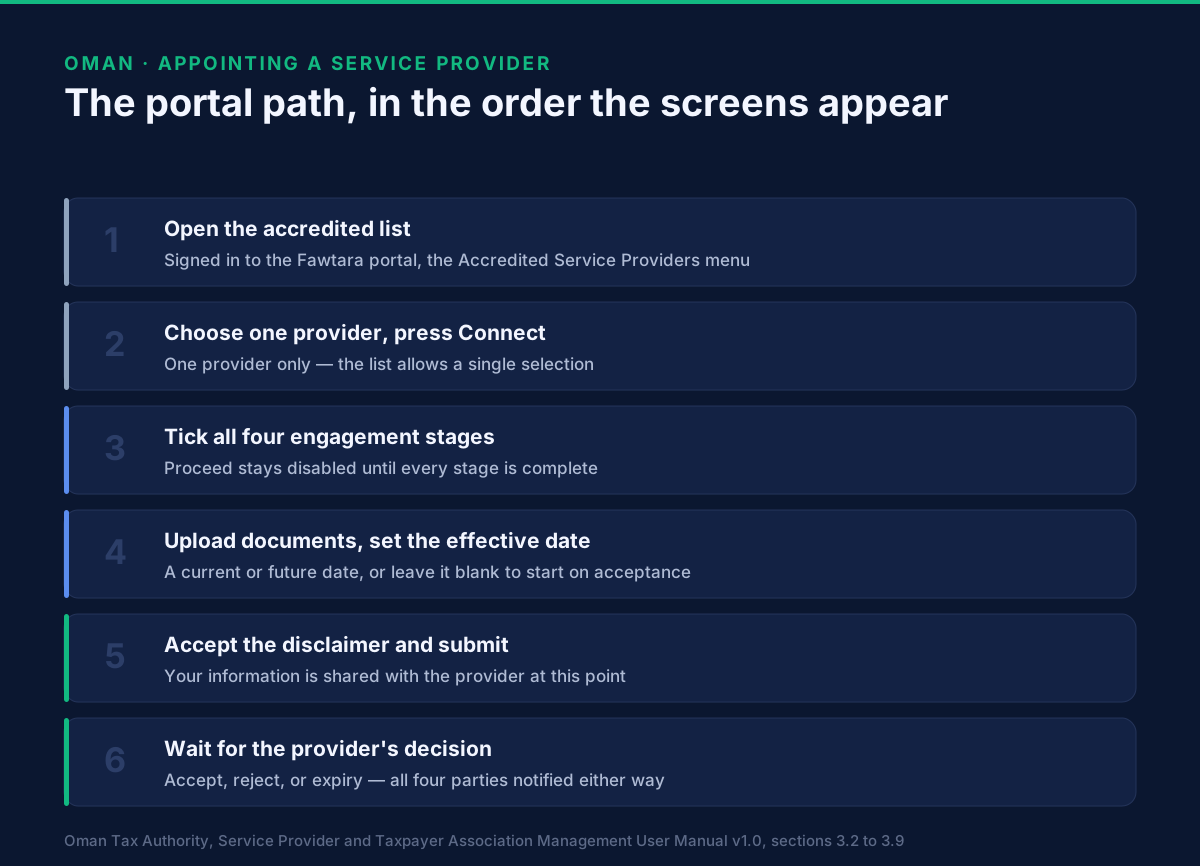
Inside the portal, under Accredited Service Providers in the top menu.
You reach it by signing in to Fawtara with your Tax Authority portal credentials — single sign-on with the credentials you already have, so there is no separate account to create. The Authority describes the list as service providers "officially accredited and recognised by the Oman Tax Authority for their compliance with technical and security standards and their capability to deliver eInvoicing services in Oman."
Each row carries the provider's name, solution name, data residency, contact person and contact email, with a Connect button at the end. The list is searchable, filterable and paginated.
One line above the table deserves reading before you rely on it. The Authority states that data residency information is provided by service providers, that it does not verify it and accepts no liability, and that taxpayers must confirm details directly with their provider. The list tells you authoritatively who is accredited; everything else on the row is the provider's own claim, so get data location in writing rather than from the table.
What must be true before the portal accepts a request?
That your commercial relationship is already finished. The portal enforces this, and it is the step that surprises people.
Pressing Connect does not open a request form. It opens a dialogue asking you to record your current stage of engagement with that provider, across four checkboxes: Identified Service Provider · Scope and Commercial Negotiation / Discussion · Scope and Commercials Finalized · Agreement / Contract Signed.
Tick as many as apply and press Save, which stores the selection and changes that provider's button from Connect to Continue, so you can return and update it. But Proceed stays disabled until all four are ticked: "Completion of all stages is required to proceed with the connection." The practical consequence: the portal step is the last step, not the first.
What that commercial conversation has to settle is in the architecture rather than the manual, and it is more technical than a procurement team expects. Before the provider accepts, you agree your receiving capabilities — which document types you can accept, such as PINT invoices and credit notes and their self-billed equivalents — your tax authority, and the data formats you will use to hand documents to each other in both directions. All of that sits outside the Peppol network and outside the portal; the portal simply asks you to confirm it is done. Each of those four items, and what each one commits you to, is worked through in what to settle with an Oman service provider before you connect.
What does the connection request carry?
Two things you provide, and one you accept.
Your taxpayer documents, uploaded in the portal.
A preferred effective date — when your onboarding should take effect. The Authority requires "a current or future date", and the field is optional: leave it empty and "your connection will take effect as soon as your service provider accepts the connection request."
That choice matters most when you are switching. The same notice warns that if you connect to a new provider while connected to an existing one, you will be disconnected from the current provider either on the effective date if provided, or immediately. A future effective date is the only control you have over the gap between one provider stopping and the next starting.
A disclaimer, which you accept. Pressing Connect raises a confirmation: "Your information will be shared with the Service Provider, and you will be onboarded after your Service Provider accepts your connection request. Do you wish to proceed?" Answer Yes and the portal returns "Submission completed".
What does the provider do with your request?
They see it in their own portal view, and they have a deadline to answer.
A provider signed in as a service provider opens E-Services → Manage Taxpayers, which has two tabs. Connected Taxpayers lists the businesses already linked to them, with each taxpayer's name, participant ID, effective date and contact information. Pending Requests lists the ones waiting, with the taxpayer's name, participant ID, request date and request expiry date. Opening one shows your name, participant ID, email and effective date, with Accept and Reject — and either way you are notified at once.
A rejection is chosen from a dropdown of reasons. The Authority's worked example — "Taxpayer has not completed all required setup steps" — describes the common case exactly: the portal believes the relationship is signed because you ticked four boxes, and the provider knows some piece of the technical onboarding is not finished.
What do submitted, accepted, rejected, expired and withdrawn mean?
Five states, and the differences are operational rather than cosmetic.
| State | What it means | Who is told, and how |
|---|---|---|
| Submitted | The request reached the provider. Nothing is connected yet | Both sides, by email, SMS, on-screen message and portal alert |
| Accepted | The connection exists on the portal, and the provider's registration clock starts | Both sides, by email and on-screen message |
| Rejected | The provider declined, with a reason chosen from the portal's list. No connection | Both sides, by email and on-screen message |
| Expired | The provider did not act before the request expiry date. Not a rejection, and not a connection | Both sides, by email and on-screen message |
| Withdrawn | You cancelled a request the provider had not yet accepted | You on-screen and by email; the provider by email |
Two details are worth carrying into an operational procedure.
Submitted is the only state that raises an SMS. Every other transition is email and on-screen. If your finance inbox is a shared mailbox nobody watches closely, an expiry is exactly the kind of event that goes unnoticed for a fortnight — and an expired request looks identical to one in progress if all you check is that you sent it.
Expired is not rejected. Nobody refused you; a window closed. Raise the request again — and since a provider who lets one expire has usually not finished something on their side, find out why first.
Can you take a request back?
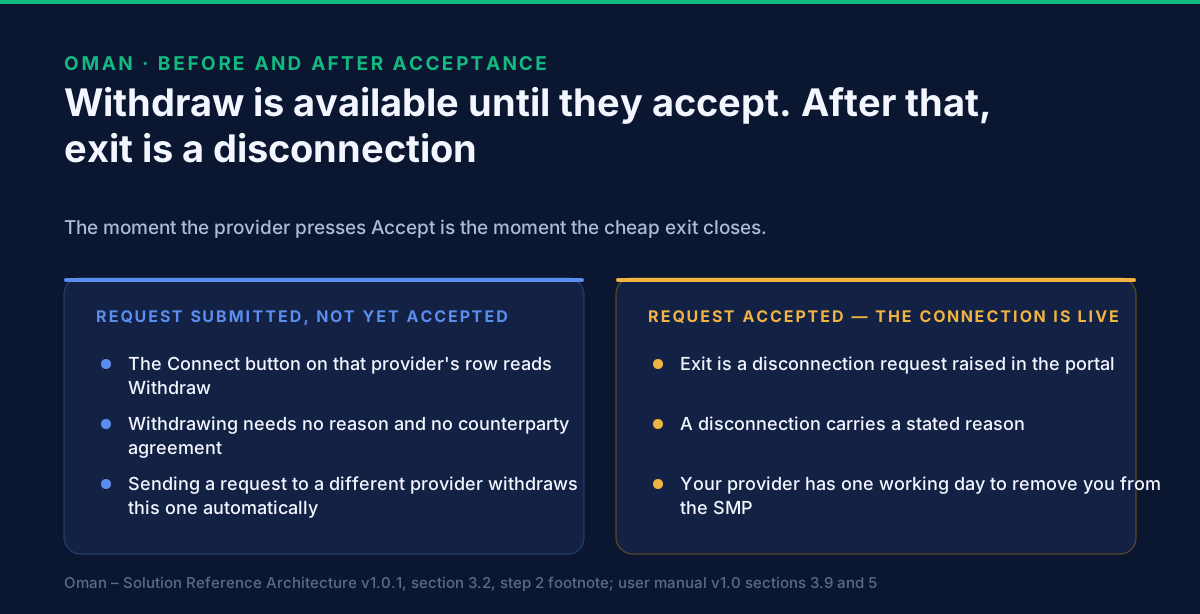
Until they accept it, yes, easily.
After a successful submission, the button on that provider's row changes from Connect to Withdraw, and the portal returns "Your connection request has been successfully withdrawn." You need no reason and no agreement from the provider. It also happens on its own: send a request to a different provider while one is pending and the portal withdraws the first automatically, notifying all three parties.
Once the provider accepts, that door closes. The architecture puts it plainly — if the two sides do not reach agreement before the provider accepts, the taxpayer can withdraw; once the provider has accepted, a disconnection request has to be initiated in the portal by the taxpayer. That is a heavier instrument: it carries a stated reason, it triggers the provider's obligation to deregister you, and it leaves you unconnected until someone else accepts you.
What exists on the network once the connection is active?
A record the invoicing network can find you by — and it does not appear the moment the provider presses Accept.
Acceptance creates the relationship on the portal, and starts a clock. The provider's own confirmation message states the obligation: "You have three business days to add [the taxpayer] to the SMP." The architecture says the same — the accredited service provider must add the taxpayer to the central SMP within three working days of the relationship being established.
What the provider registers, in order:
- Your participant ID and service group on Oman's central SMP, a step the portal validates.
Omani organisations are identified by their 12-digit VAT identification number under Peppol
participant identifier scheme
0248— written, for example, as0248:OM1100003554. - Your receiving capabilities against that service group: the document types you can accept.
- The SMP then tells Peppol's SML to create the lookup record, a DNS entry pointing your participant ID at the SMP holding your metadata. The SML verifies the identifier is unique.
The SMP will not take the provider's word for it. When a provider calls the SMP to add, amend or remove a participant, the SMP queries the Fawtara portal to verify that a valid connection exists. Where it does, the change is approved; where it does not, the call is rejected and nothing changes. The portal relationship authorises the network record, which is why the order cannot be reversed.
This is the window where a business believes it is live and is not. You are connected on the portal from acceptance; you are addressable on the network only once that registration lands, so ask your provider to confirm the registration rather than the acceptance. Better still, do not ask at all — the record is public, and how to check your business is really registered on Oman's SMP walks through the lookup, what each answer means and what to do on day four. What the record looks like from the network's side is on the Fawtara five-corner model explained, and the whole programme is in Peppol in Oman: Fawtara readiness.
What if you are already connected to somebody?
Then you are switching, and two deadlines run at once.
You can see the current relationship under E-Services → Manage Service Provider: the provider's name, contact email, connected since date and certificate expiry date, with buttons to Connect to another Service Provider or Disconnect. Where nobody is connected, that page offers Appoint a Service Provider instead.
On a switch, the architecture sets two clocks: the outgoing provider must deregister you from the central SMP within one working day, and the incoming provider must add you within three working days. Those numbers do not overlap in your favour — between the old record coming down and the new one going up, no lookup resolves to anyone and your counterparties' access points cannot find you.
This is what the effective date is for. Used deliberately, it moves the handover to a date you chose and told both providers about. Left blank, the disconnection happens immediately and the gap starts whenever the new provider gets round to pressing Accept. The sequence of a switch, the route to take and the three checks that prove it finished are on how to change your Oman e-invoicing service provider without a delivery gap.
A disconnection can also come from the provider's side — the manual's worked reason is "Accreditation Termination". Where it does, you have three business days to accept or reject it, and if nobody acts the request is cancelled. That is not a notification to let sit in a shared inbox: the underlying event does not go away because the request expired.
What this page deliberately does not cover
Which provider to choose. The six questions to put to each one are on how to choose an e-invoicing service provider in Oman.
Connecting your software. Appointing a provider and integrating your ERP or till estate are separate projects with separate timelines: how to connect your software to Fawtara.
VAT-return treatment and penalties. Neither source describes how appointing or changing a provider interacts with a VAT return, and neither states a penalty for a lapsed connection. We are not going to invent either. Ask your tax adviser or the Tax Authority.
Becoming an accredited provider. This page is written for taxpayers. Accreditation is a different process, with its own application on the portal's homepage and its own manual.
Related Oman guides
- How to choose an e-invoicing service provider in Oman — the decision immediately before this page.
- GoRoute is a pre-approved Oman service provider — what accreditation means, and where we sit on the list.
- Peppol in Oman: Fawtara readiness — the programme and the network this connection attaches you to.
- The Fawtara five-corner model explained — what your provider does once the connection is live.
- Which wave of the Oman e-invoicing mandate are you in? — the date this has to be finished by.
What to do next
Two calendar entries, not decisions.
Work backwards from your wave date to the signature date, not to the portal date, because the portal will not take a request until the contract is signed and the provider will not accept it until your receiving capabilities and data formats are agreed.
Put a check three working days after acceptance, and ask your provider to show you the SMP registration rather than the portal confirmation. That is the difference between connected and reachable, and it is the one nobody diarises.
The commercial and integration ground for Oman is on our Oman Fawtara e-invoicing page, the connector walkthroughs are on tutorials, and the participant, SMP and transmission details behind this page are in the developer documentation. To walk your own connection, switch or go-live timetable against these rules with our team, book a session.
Sources: the Oman Tax Authority's Service Provider and Taxpayer Association Management User
Manual v1.0, for the accredited list and its data-residency notice, the four engagement stages,
the effective-date rule, the submission disclaimer and confirmation, the withdrawal behaviour, the
Manage Taxpayers and Manage Service Provider screens, the rejection and disconnection reason
lists, the notification channel for each status, the three-business-day SMP addition and the
three-business-day window to answer a provider's disconnection request; and the Oman – Solution
Reference Architecture v1.0.1 of 22 May 2026 (OpenPeppol AISBL with the Oman Tax Authority), for
single sign-on, the pre-acceptance agreement on receiving capabilities and data formats, the
participant ID and service group registration on the central SMP, the SML lookup record,
participant identifier scheme 0248 with the 12-digit Oman VAT identification number, and the
one-working-day deregistration against three-working-day registration on a switch. Oman's material
is published by the Tax Authority.
Frequently asked questions
- Where is the list of accredited e-invoicing service providers in Oman?
- On the Fawtara portal itself, under the Accredited Service Providers item in the top menu. The Tax Authority describes the list as service providers officially accredited and recognised for their compliance with technical and security standards and their capability to deliver e-invoicing services in Oman. Each row shows the provider's name, solution name, data residency and contact details, with a Connect button.
- How many service providers can an Omani business appoint?
- One. The Authority's manual is explicit that taxpayers can choose only one service provider from the list. If you send a connection request to a second provider while connected to a first, the portal treats that as a switch: the earlier relationship ends either on the effective date you gave or immediately.
- What does a Fawtara connection request have to carry?
- Three things. All four engagement stages ticked — identified provider, scope and commercial negotiation, scope and commercials finalised, and agreement or contract signed — because the Proceed button stays disabled until they are. Your taxpayer documents, uploaded. And a preferred effective date, which must be today's date or a future one; leave it blank and the connection takes effect as soon as the provider accepts.
- Can you cancel a connection request after sending it?
- Yes, while it is still pending. After a successful submission the Connect button on that provider's row changes to Withdraw, and withdrawing needs no reason. Once the provider has accepted, withdrawal is no longer the instrument — ending the relationship then means raising a disconnection request in the portal, with a stated reason.
- What happens when a service provider accepts your connection request?
- The portal confirms the connection to both sides by email and on-screen message, and starts a clock on the provider. The Authority's manual tells the provider they have three business days to add you to the SMP; the solution architecture states the same obligation as three working days from the relationship being established on the portal. Until that registration exists, you are connected on the portal but not yet addressable on the network.
- What does it mean if a connection request expires?
- It means the provider did not act on it inside the window. The provider's Pending Requests list shows a request date and a request expiry date against each taxpayer, and where that date passes without a decision, both the provider and the taxpayer are notified by email and on-screen message that the request has expired. An expired request is not a rejection and does not create a connection.
- Why would an accredited provider reject a connection request?
- Because the commercial or technical groundwork is not finished. The provider rejects from a dropdown of reasons in the portal — the Authority's own worked example is 'Taxpayer has not completed all required setup steps' — and both sides are then notified by email and on-screen message. The architecture expects the provider to contact you outside the portal first, to agree your receiving capabilities and the data formats between your systems.
- How do you check which provider you are currently connected to?
- In the Fawtara portal under E-Services, on the Manage Service Provider page. It shows the provider's name, contact email, the date you have been connected since and the certificate expiry date, alongside buttons to connect to another service provider or to disconnect. If you are not connected to anyone, that button reads Appoint a Service Provider instead.
- Does the Tax Authority verify what the provider list says about data residency?
- No, and it says so on the page. The notice above the accredited list states that data residency information is provided by service providers, that the Authority does not verify it and accepts no liability, and that taxpayers must confirm details directly with their provider. Treat the list as a list of who is accredited, not as a verified fact sheet about each one.
About Dr. Syed Raza
Dr. Syed Raza is an IT Enterprise Architect at ClayDesk LLC and leads the GoRoute platform. He works across Peppol Access Point and SMP infrastructure, PINT jurisdictions (Oman, AU/NZ, EU, JP, MY, SG), and national CTC regimes, translating regulatory detail into production-grade e-invoicing systems.
Building on Peppol?
GoRoute is a certified Peppol Access Point & SMP. Book a demo or read the docs to get started.